Register below to get your template for free
If you’re running campaigns across Google Ads, LinkedIn, email, and organic content without proper UTM tracking, your analytics are probably lying to you. Inconsistent tags (think “Google” vs “google” vs “google-ads”) split your traffic into duplicate sources in GA4, making it impossible to tell which channels are driving results. This free UTM tracking template gives your team a single, reliable system for tagging links, so every campaign URL is built correctly and every report tells the same story.
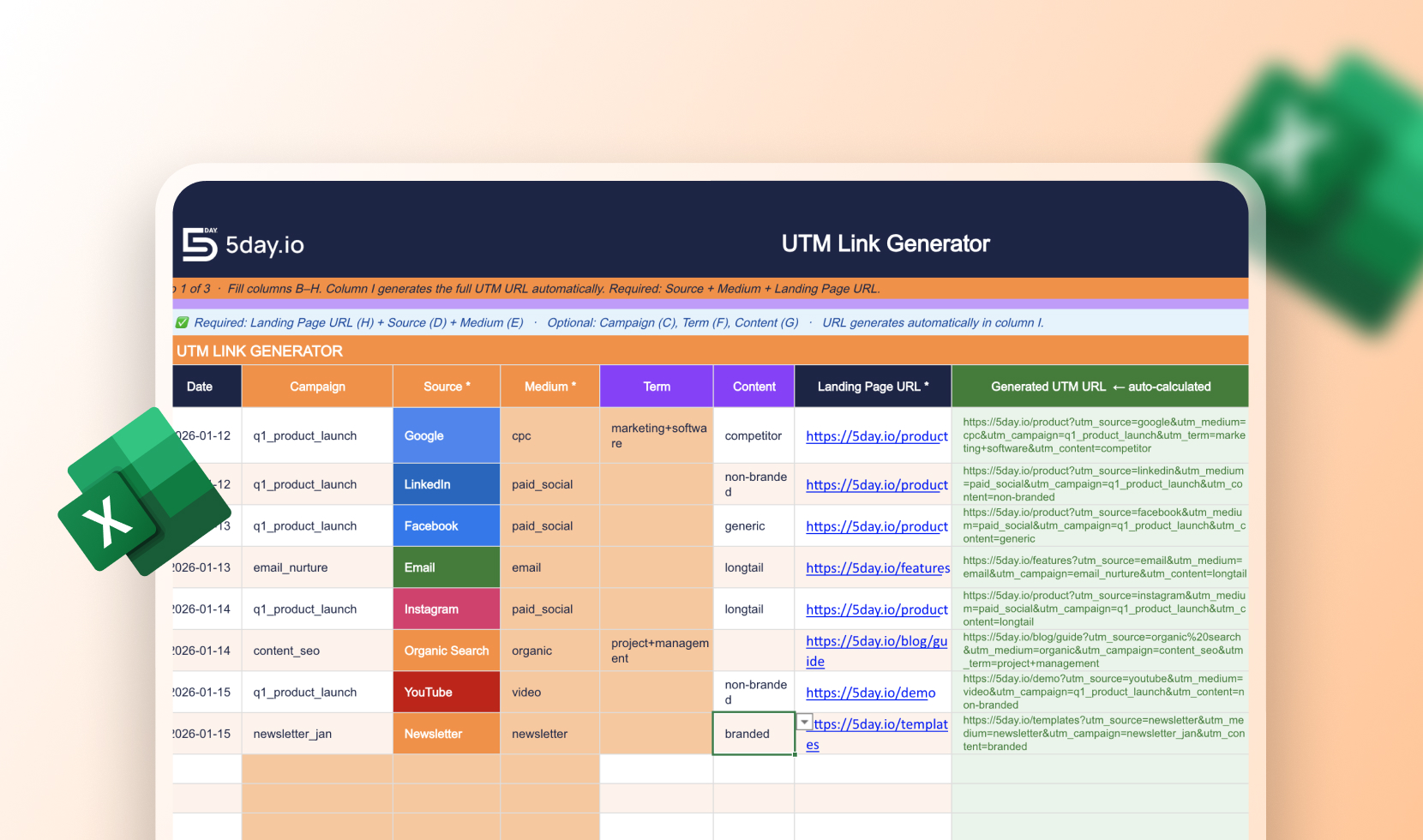
This isn’t just another blank UTM tracking spreadsheet, it’s a complete UTM tracker template built for marketing teams. The UTM builder template auto-generates a full campaign URL the moment you fill in source, medium, and landing page (campaign, term, and content are optional but recommended). Use it as your go-to UTM builder tool for tracking every paid, email, and organic link, or as a quick reference for campaign url options when setting up new initiatives. A built-in naming conventions tab keeps your team’s tagging consistent, while the reference guide explains exactly what each parameter does and where it shows up in GA4. Download this UTM template for tracking template free, and start tagging links correctly from your very next campaign.

A UTM tracking or builder template is a pre-built spreadsheet that helps you create, organize, and standardize the UTM parameters (source, medium, campaign, term, content) added to your URLs. Instead of manually typing out tagged links and risking typos or inconsistent naming, you fill in a few fields and the full tracking URL is generated for you.
Add UTM parameters to the end of your URL: utm_source (where the traffic comes from, e.g. google), utm_medium (the channel type, e.g. cpc or email), and optionally utm_campaign, utm_term, and utm_content. In this template, you just fill in the columns and the full tagged URL is built automatically in the generator tab.
UTM source identifies the specific platform sending traffic (linkedin, google, newsletter), while UTM medium describes the type of traffic or channel (paid_social, cpc, email). Source answers “where,” medium answers “what kind.”
Without agreed naming rules, the same channel can get tagged differently by different team members (Google vs google vs Google Ads), which splits your data into separate rows in GA4 and makes campaign comparisons inaccurate. A shared naming convention keeps your reporting clean and comparable over time.
Yes. Every UTM parameter in this template maps directly to a GA4 report, source/medium under Traffic Acquisition, campaign under Campaigns, and content/term under session details. The reference tab shows exactly where each one appears.
Yes, the UTM builder and tracking template is completely free to download and use, no signup required for the file itself.
Let's get your team onboarded
Try all the premium 5day.io features free for 30 days. No credit card needed.

Product
Features
Industries
Teams
Compare
Resources
Company