

Claude Cowork for marketing has become a necessity because AI is already part of day-to-day marketing work.
Knowledge workers spend a large part of their day on “work about work.” This means chasing updates and finding files to deal with changing priorities.
Claude Cowork fits this gap because it helps marketers move beyond simple prompts and drafts. It can work across desktop files and everyday apps, so teams can turn a clear outcome into completed steps with less manual switching and follow-up.
According to marketing stats, 80% of marketers use AI for content creation and 75% use it for media production.
This is the main difference marketers should understand. Claude chat helps with thinking and drafting. On the other hand, Claude Cowork is built to help move real work across files, documents, tools, etc.
What is Claude Cowork?
Claude Cowork is a desktop product built for non-technical knowledge work that involves several steps. It is useful for people who work with files, documents, and data every day.
It helps users spend less time putting work together and more time using judgments. This matters for marketers because many daily tasks go beyond writing.
It is built for high-effort repeatable work such as:
- Research synthesis
- Document preparation
- Data extraction
- File organisation
- Multi-step task handling
In simple terms, Claude chat helps with ideas, drafts, and answers. Claude Cowork is designed to support the work around those ideas. It can help marketers handle files, prepare outputs, and complete repeatable workflows with less manual effort.
What Makes It Different for Marketers?
For marketers this means Cowork is not mainly about asking for ten content ideas. It is more useful when there is already real work material that needs to be turned into a clear output.
For example, a marketer may have:
- Folder notes
- Campaign files
- Client inputs
- Research documents
- A spreadsheet
- Draft copy
- Performance data
Scattered files slow teams down because nobody knows which version is final. A centralized asset library for marketing helps keep campaign inputs clean and easy to reuse.
Cowork can help bring those inputs together and shape them into something usable. This makes it a better fit for tasks like weekly reports and client decks. It can also help with competitor research content packaging and asset organization.
A standard chat window is useful for ideas, drafts, and quick explanations. Cowork is more useful when the task needs file handling and step by step work. It can help organize local files. It can also prepare documents using source files and pull useful information out of unstructured material.
For marketing teams, it is important because a lot of work does not start with a blank page. It starts with scattered inputs. There may be notes in one folder, data in a spreadsheet, and client comments in another document. Cowork helps connect those pieces so the team can move faster toward a finished output.
Claude Cowork vs Claude.ai and Claude Code
This is the biggest clarity point in the topic.
Claude AI
Claude.ai is the web and app chat experience.
It works well when users need direct help through prompts. It can support drafting and analysis. It can also help with Q&A and structured thinking.
Claude AI is a conversational assistant that responds to user prompts. In short, it is useful when marketers need ideas, draft explanations, or clearer thinking in a chat-based format.
Claude Cowork
Using Claude Cowork for marketing, your team can create smoother workflows.
Most AI tools start with a prompt. Cowork starts with the result the user wants to complete. It runs on a desktop and can work with local files. It is also designed for non-technical task automation.
This makes it useful for work that needs more than one answer. For example, it can help organise files and prepare documents. Also, it can support tasks that move across different tools.
Claude Code
Claude Code is a coding product for developers.
It is designed to help technical teams work with codebases. It can read code files and edit them. Also, it can run commands and support coding tasks that help engineers ship to work faster.
This makes Claude Code useful for developers. It is not the default starting point for most marketers because marketing work usually focuses on brief content files, research reports, campaign execution, etc.
The Practical Difference
- Use Claude.ai when you want to think and draft.
- By using Claude Cowork, you can create a desktop workflow to keep working across files and tools.
- Use Claude Code when the work is actually software development.
To understand it better, keep reading to know the differences in depth.
The Four Parts of the Claude Cowork Stack Marketers Should Know
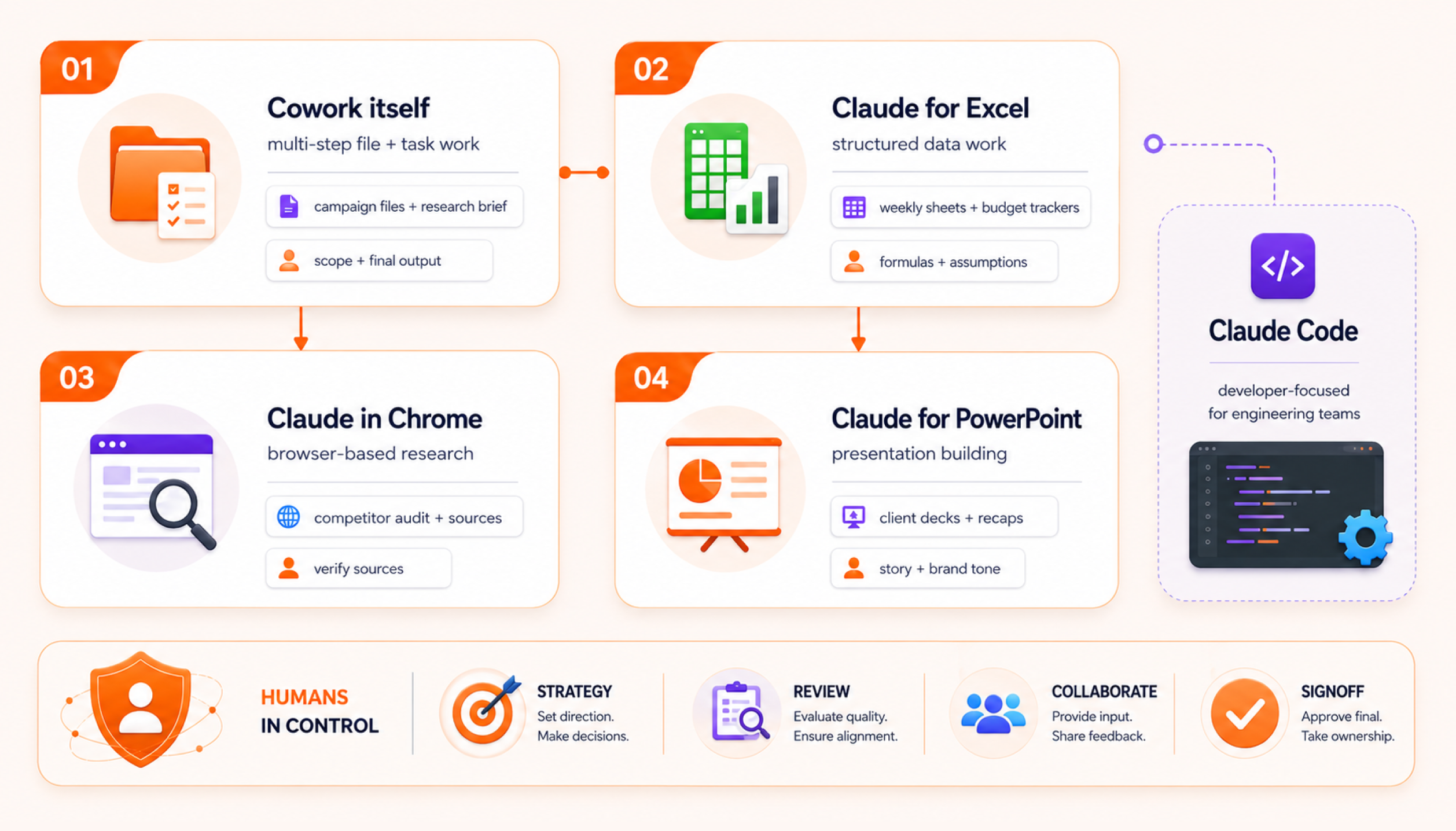
Claude Code is built for developers. It is an agentic coding tool that can read codebases, edit files, run commands, and support faster software development. So, it is useful for engineering teams. It is not the usual starting point for most marketers.
Part of the stack | Best marketing use | Practical example | Human checkpoint |
Cowork itself | Multi-step file and task work | Organising campaign files and preparing a research brief | Check task scope and final output |
Claude for Excel | Structured data work | Weekly performance sheets and budget trackers | Check formulas and data assumptions |
Claude in Chrome | Browser-based research | Competitor page audits and source collection | Verify sources and avoid sensitive sites |
Claude for PowerPoint | Presentation building | Monthly client decks and campaign recaps | Edit story, claims, and brand tone |
ClaudeCowork
Cowork works like an operational hub. It helps Claude work through tasks on desktop instead of only answering prompts. Users can open Cowork inside Claude Desktop. They can describe the task and review the suggested approach before the work starts. Cowork can then continue running while the desktop app stays open.
Claude Cowork workflows are useful for marketers because much of their work is not only writing. It often involves bringing different pieces together. A marketer may need to clean a folder and collect notes in one place. They may need to compare research inputs or prepare a brief. They may also need to turn scattered source files into a clear document.
Cowork fits this kind of multi-step work better than a normal chat window.
A practical marketing use case could look like this:
- Put campaign notes, a client brief, performance exports, and old reports in one folder
- Ask Cowork to organise the files and identify what is useful
- Have it prepared a first campaign summary or briefing document
- Review the draft and add human judgment before sharing it
Cowork can use connectors first. Then, it can use the browser and screen interaction when needed.
Examples include competitive analysis using local files and connected tools. They also include spreadsheet work using several sources and tasks inside desktop apps that do not have direct connectors.
For marketers, the best rule is simple: use Cowork for repetitive file-heavy work, not for final strategy. It can help prepare the work, but the marketer still needs to decide what matters.
Claude For Excel
Claude for Excel is the spreadsheet layer. Product help materials list “Use Claude for Excel” as a dedicated capability. Claude can create Excel spreadsheets along with PowerPoint files, Word documents and PDFs. Weekly sheets become easier to act on when reporting is tied to decisions and next actions. Building marketing reports with 5day.io fits that outcome-led reporting habit.
This is useful for marketers because many teams still manage important work through spreadsheets. Budget trackers and campaign reports need a clear structure. Lead lists and keyword sheets also need the same clarity.
Content calendars and performance exports can quickly become hard to manage. Claude can help turn messy data into cleaner tables and formulas. It can also create summaries and useful views that make the data easier to work with.
For example, a marketing team could use Claude for Excel to:
- Clean a weekly ad performance export
- Add variance formulas to a marketing budget tracker
- Structure lead data by campaign source
- Summarize channel performance by CPL or CPA
- Prepare a reporting sheet for client review
The main benefit is speed. Marketers do not have to clean rows, write formulas, and build basic summaries manually every week. Claude can help create the first structured version so the team can review and improve it faster. This makes it useful for weekly marketing reports, budget tracking campaign summaries, and client-facing spreadsheets.
Human checks are still important. Marketers should review formulas, date ranges, attribution rules, source data, etc. before using the sheet in a client report or budget decision.
Claude In Chrome
Claude in Chrome is the browser research layer. It works as a Chrome browser extension that lets Claude read, click and navigate websites while the user browses. It runs in the side panel so users can keep the webpage open and get help in context. It can also connect with Claude Desktop for browser-based tasks.
For marketers, this is most useful for work that normally requires a lot of switching between tabs. Competitor research, landing page audits, pricing checks, product page reviews, search result analysis, source collection, and so on. all involve browser-heavy work.
A practical workflow could look like this:
- Open a shortlist of competitor pages
- Ask Claude in Chrome to review messaging patterns
- Capture page claims, CTA styles, offer structure, and positioning notes
- Move the findings into Cowork for a competitor brief
- Review all claims manually before adding them to a strategy document
This can reduce copying and pasting across tabs. It should still be used with care. The product guidance notes that Claude in Chrome is a beta feature. Browser-based AI can also carry risks such as prompt injection. You can use it on trusted sites and check what Claude can access on a page before giving it more control.
For marketing teams, the safest use is research support. Do not use it to take sensitive actions, manage private client systems, or make changes without review.
Claude For PowerPoint
Claude for PowerPoint is the presentation layer. Marketers even use Claude for PowerPoint as a dedicated capability. Claude can create PowerPoint presentations directly.
This is useful because marketers often need to convert work into decks. A spreadsheet becomes a performance review. A research brief becomes a strategy of presentation. A campaign recap becomes a client-ready summary. Claude can help create the first structure faster.
For example, marketers can use it for:
- Monthly client performance decks
- Internal campaign recap presentations
- Competitor research summaries
- Quarterly planning slides
- Sales enablement decks
- Post-campaign learning decks
The stronger workflow is not “ask Claude to make a final deck.” A better approach is to use Claude for the first draft of the slide structure, then let the account lead or strategist refine the story. This keeps the deck accurate and brand-safe for the audience.
It also works fabulously in cross-format. Claude can help turn data or source material into ready-to-use files such as spreadsheets and presentations.
For marketers, this is where the stack becomes more useful. Excel helps structure the numbers. Cowork helps prepare the work. Chrome helps collect browser-based inputs. PowerPoint helps turn the final story into a format that is easy to share.
How the Stack Works Together in a Real Marketing Workflow?
The value becomes clear when these parts work together instead of staying separate.
- A marketer can use Chrome to research competitor pages and collect browser-based inputs.
- Excel can then help structure the findings into a cleaner view.
- Cowork can use those files to prepare a summary or shape the work into a clearer draft.
- PowerPoint can then turn the final story into a client-ready presentation.
This kind of flow is useful because marketing work often moves through many small steps. The team may need to research pages. Then it may need to clean notes. After that, it may need to compare findings and prepare a report. Later, the same work may need to become a deck for client review.
In simple terms, the tools help organise the inputs and prepare the first structured output. The marketer still decides what matters and what should be presented.
Five Real Marketing Workflows You Can Run with Claude Cowork
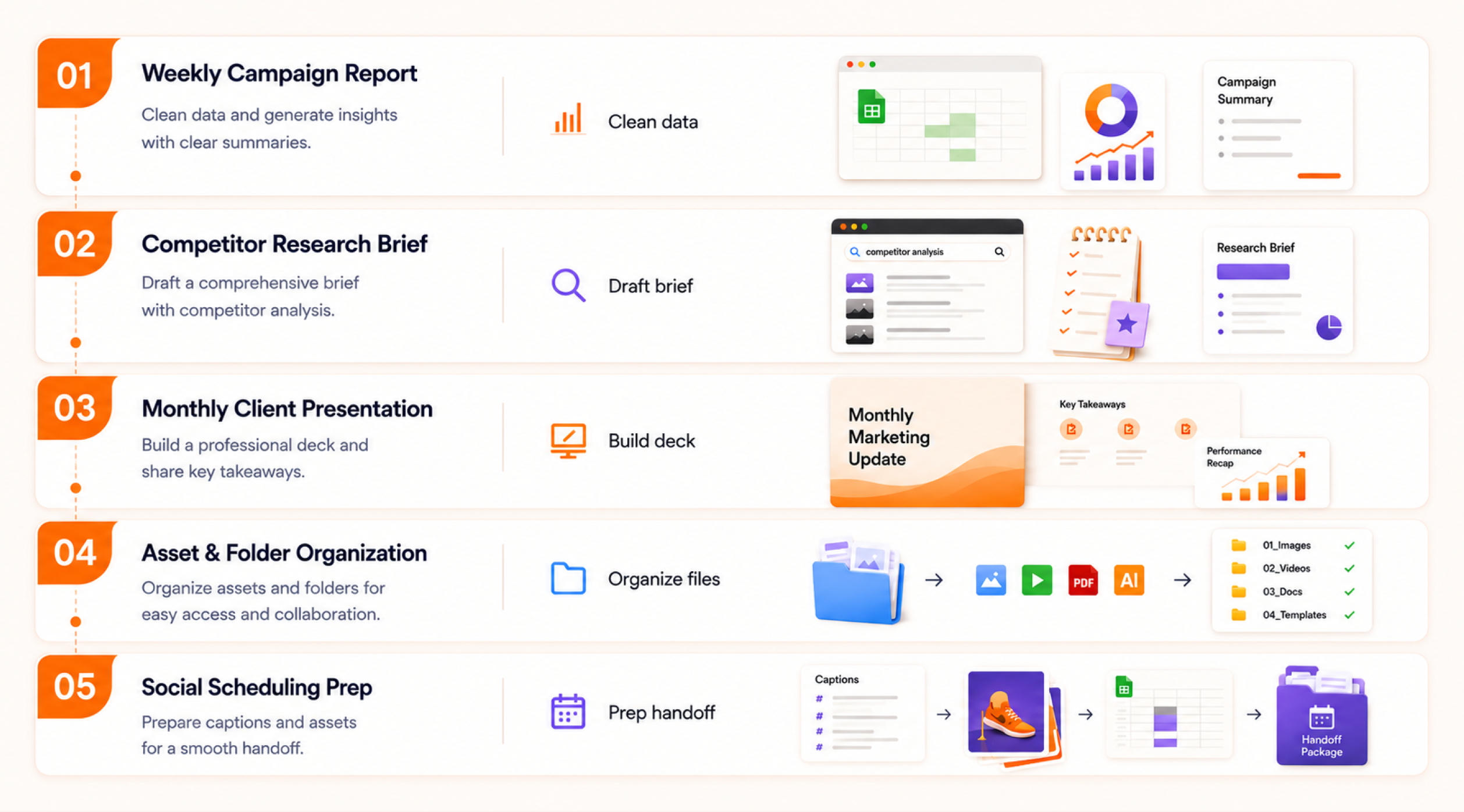
These are not one-click workflows. They are realistic use cases grounded in Cowork’s confirmed strengths around files, research, spreadsheets, decks, document assembly, etc.
Weekly Campaign Performance Report
Start with the performance export in Excel. Use Cowork to clean the sheet and organize the numbers into a clearer structure. It can help surface key changes and prepare the first report draft.
The marketer should still review the data and add real interpretation. This workflow works well because campaign reports often need both structure and judgment. Cowork can handle the first assembly step while the team explains what the numbers actually mean.
Client updates move faster when the numbers and the action list are prepared in one flow. Improving marketing agencies client reporting with 5day connects well with this reporting use case.
Competitor Research Brief
Use Claude in Chrome to review competitor pages for messaging and product updates. Then use Cowork to turn those findings into a draft brief. This works well for marketing teams because competitor research often involves many scattered inputs.
The human reviewer should still check accuracy and add judgment. Cowork can help organise the research while the marketer decides what is useful and what should be ignored.
Monthly Client Presentation
Use Excel inputs from previous notes and the approved story angle to create the first PowerPoint draft. Cowork can help assemble the material faster and turn scattered inputs into a more usable structure.
The account lead should then review the narrative. They should also check the brand fit and final message before sharing it with the client.
Asset And Folder Organization
Cowork can help with local folder work such as renaming, sorting, removing duplicates, and finding relevant files.
For marketing teams, this can be useful during campaign cleanup. It can also help with naming conventions, content libraries, and handoff folders. These areas often get messy when several people work on the same campaign.
Social Scheduling Prep
Cowork is not a social scheduling platform. It can still support the work that happens before scheduling.
It can help with:
- Structuring caption files
- Checking basic spreadsheet formatting
- Organising assets for review
- Preparing handoff files for the scheduling tool
This should be treated as prep work. The final scheduling and publishing should still happen inside the social media scheduler.
How Marketing Agencies Can Use Claude Cowork Across Clients?
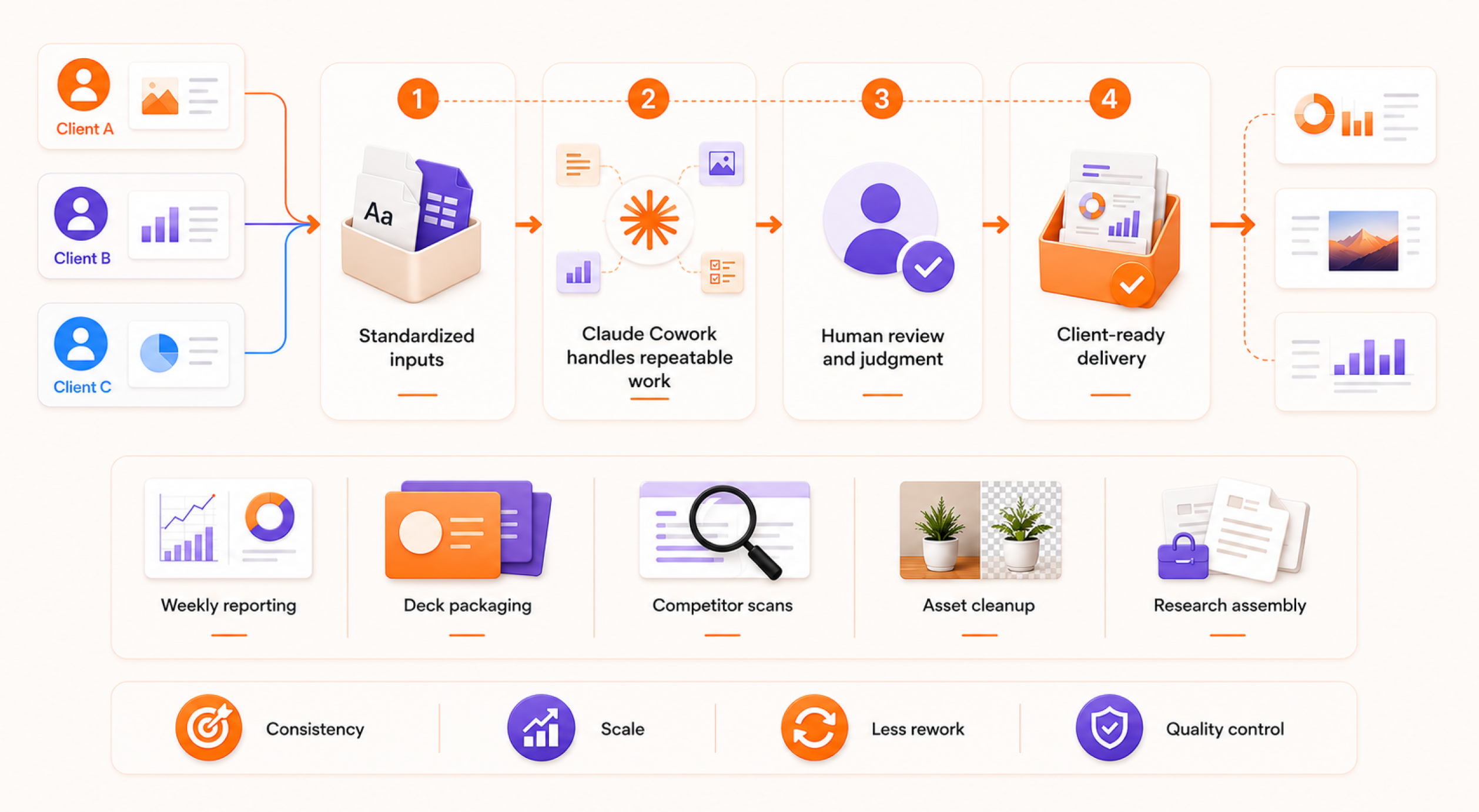
Agencies usually gain the most when they stop treating AI as a one-off drafting tool and start using it for repeatable production steps. Cowork is especially relevant when the same pattern repeats across clients: weekly reporting, deck packaging, competitor scans, asset cleanup, structured research assembly, etc.
Agency workflows break when each client has a different system, and nothing stays consistent. Managing multiple marketing client projects supports the multi-client structure you describe here.
Cowork is built for high-effort and repeatable work, which is exactly where agency operations tend to benefit most.
A practical agency use case
One agency pattern could look like this:
- one standardized reporting spreadsheet structure
- one standard deck outline
- one recurring review flow per client
- human review at the end before anything goes out
The point is not to remove the strategist. The point is to remove the repetitive assembly to work around the strategist.
Getting Started with Claude Cowork for Marketing
The best starting point is not your most complex workflow. Start with the task your team repeats every week and already finds annoying. That could be reporting prep, competitor notes, campaign file cleanup, slide draft creation, turning messy research into a client-ready brief, and so on.
Claude Cowork works best when the task has clear inputs and a clear final output. It is designed to work on a desktop with local files and applications.
It can help turn those inputs into a finished deliverable. That makes it more useful for file-heavy marketing work than open-ended brainstorming. It fits tasks where marketers need to organize material, prepare documents, and complete repeatable workflows.
Step 1. Install the Desktop App and Confirm Access
Start by confirming that your Claude account has Cowork access and that the desktop app is properly set up. Keep the first task simple. Do not always begin with a client deck and performance report.
A good first test is a low-risk internal task, such as organizing a folder of campaign files or turning meeting notes into a first-draft summary. This helps the team understand how Cowork behaves before using it for client-facing work.
Step 2. Pick One Narrow Workflow
Choose one workflow with repeatable steps and predictable inputs. The narrower the workflow, the easier it is to test.
Good first candidates include:
- Weekly report assembly
- Competitor brief prep
- Campaign file organisation
- Slide draft prep
- Content research summary
- Lead list cleanup
- Asset naming and folder cleanup
For example, instead of asking Cowork to “help with client reporting,” give it a clearer task: “Use this spreadsheet and these notes to prepare a first-draft weekly campaign summary with wins, issues, next actions, etc.”
Step 3. Give It Clean Inputs
Claude works better when the source material is organised and the task is clear. Add the files first. Then explain the goal and the format you need. Also mention any limits such as length, tone or file type.
A strong instruction should include:
- The goal of the task
- The files or folders to use
- The output format needed
- The audience for the final output
- Any brand or tone rules
- What Claude should not change
- What should be flagged for human review
For example:
“Review these campaign performance exports and meeting notes. Create a one-page internal summary with key changes, possible reasons, and action items. Do not make final recommendations without marking them as suggestions.”
This keeps the output useful and easier to review.
Step 4. Review Before Trusting
Cowork can help prepare for work faster. It should not become the final reviewer. Cowork may access files of browser content connected to services and apps.
Users should stay careful about what it can see and what it can do. The safest approach is simple: use Cowork to prepare drafts and organize files. Then, support repeatable tasks and keep final review approval and sensitive decisions with the team.
For marketing teams, review is especially important when the output includes:
- Client-facing claims
- Budget or performance numbers
- Competitor comparisons
- Legal or compliance language
- Brand messaging
- Strategy recommendations
- Revenue or attribution comments
Step 5. Document the Workflow Once It Works
If a workflow saves time, turn it into a repeatable process. Write down the prompt, input folder structure, review steps, and final output format.
A simple documented workflow can include:
- Workflow name
- Task trigger
- Required inputs
- Cowork prompt
- Output format
- Human review checklist
- Final storage location
- Owner
This is how a personal shortcut becomes a team process. Once the workflow is documented, the same process can be used across clients or campaigns with small changes.
What Claude Cowork Cannot Do?
This section is also important as AI workflow articles often overpromise. Claude Cowork can help marketers move faster, but it should not be treated as a replacement strategy, QA, core marketing systems, etc.
It Does Not Replace Strategy
Cowork can organize files and prepare documents. It can also structure research and support multi-step desktop work. However, it does not replace strategic judgment or brand positioning. Also, it does not replace client understanding or audience insight.
For example, Cowork may help summarize competitor messaging. However, the marketer still needs to decide what that means for positioning. It may help prepare a campaign recap. The account lead still needs to explain the real business context.
Use it for preparation and assembly. Keep strategy with the team.
It Should Not Be Your Final QA Layer
Cowork can help spot gaps, structure information, and prepare drafts faster. It should not be the final quality check before client delivery.
Computer and file access can create risks. Users should stay careful and review both the activity and the final output. For marketing teams, the safest approach is clear.
Use Cowork to support research drafts of file work and repeatable tasks. Keep a final review of client context and approval with the team.
For marketing work, final QA should still check:
- Numbers and formulas
- Source accuracy
- Brand tone
- Claims and proof points
- Links and screenshots
- Client names and dates
- Recommendations
- Sensitive information
It Does Not Replace Your Marketing Systems
Cowork works best for desktop-based work that depends on files and documents. It can support the work around campaigns, but it is not a CRM. It is also not an ad platform email platform analytics tool social scheduler or project management system.
Cowork output becomes far more useful when it drops into the same system that runs tasks of reviews and delivery. Martech stack integration with project management software supports that connected setup.
This difference matters. Zapier is built for app-to-app automation across more than 9000 apps. Cowork is better understood as a desktop workflow assistant for knowledge work.
A useful split looks like this:
- Use Cowork to prepare, organize, summarize, and assemble work
- Use your CRM to manage contacts and pipeline
- Use your ad platforms to run campaigns
- Use your email platform to send campaigns
- Use analytics tools to measure results
- Use project management software to assign, approve, and deliver work
It Does Not Remove the Need for Clean Processes
Cowork works better when the workflow is already clear. If files are scattered and names are messy, then the output may still feel confusing. The same can happen when briefs are incomplete, or approval rules are unclear.
Before using Cowork at team level, clean up the basics:
- Use standard folder names
- Keep source files in one place
- Write clear task instructions
- Define review owners
- Use repeatable output formats
- Track final delivery in your project management software
That is where Claude Cowork and a tool like 5day.io can work well together. Cowork can help prepare the work faster, while project management software like 5day.io can help teams track owners, deadlines, approvals, automations, delivery status, and a lot more inside a proper marketing workflow.
How 5day.io Helps Streamline This Workflow While Making It Easier?
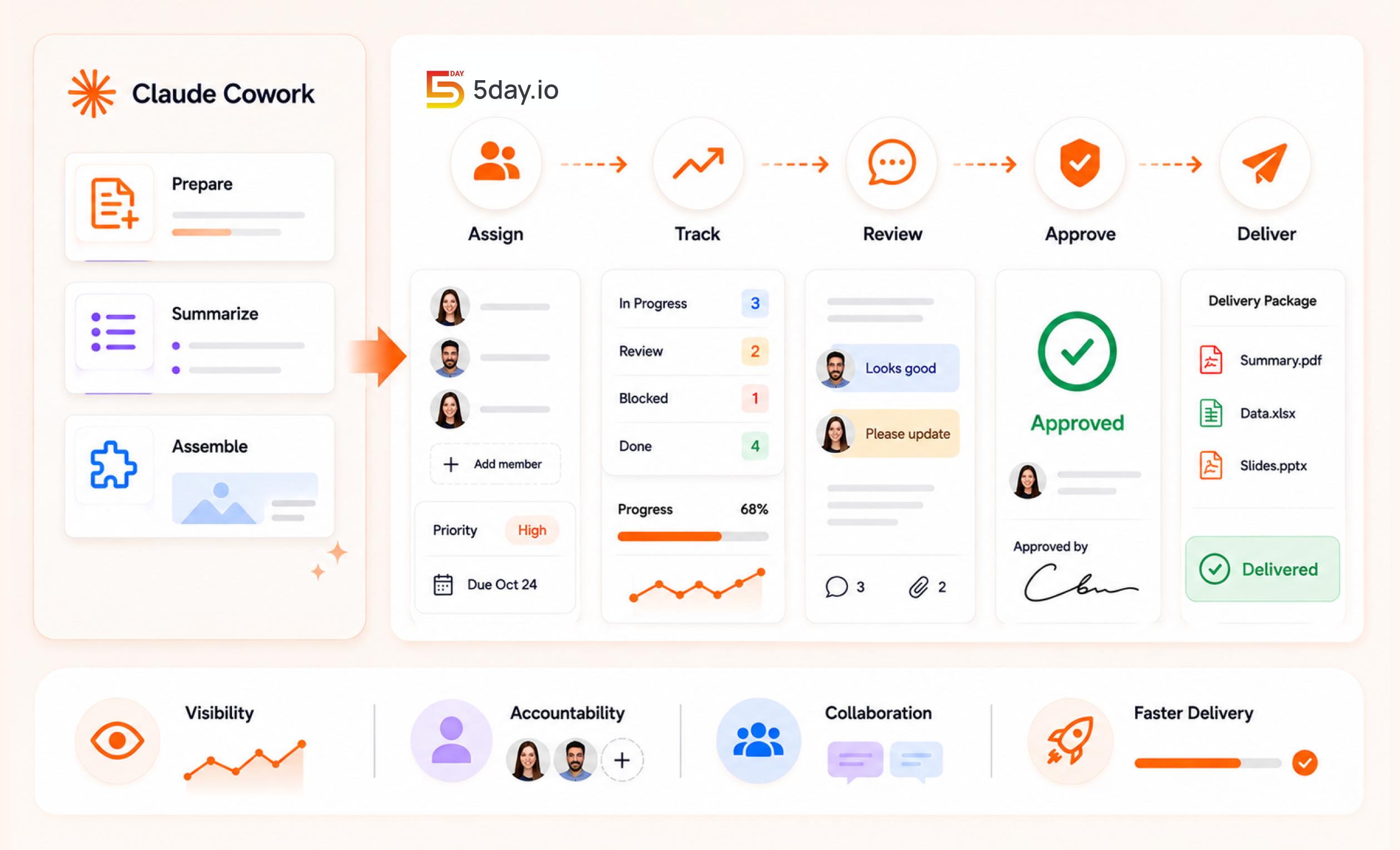
Claude Cowork can help marketers move faster with preparation and assembly work. It does not replace the system that keeps tasks visible and accountable.
This is where 5day.io is a great solution. It is a leading project management software that works as a marketing operations and project management platform for campaigns, clients’ deliverables, tracking templates, implementing automations, ensuring workflow visibility, and there are many other useful features. Also, it supports reusable marketing workflow templates and team collaboration.
Claude Cowork for marketing teams help prepare, summarize, and assemble the work. Then, use 5day.io to assign track reviews and approve. Thus, deliver the work in a streamlined workflow.
That is a strong combination for agencies and in-house teams because AI output becomes more useful when it stays inside a real project management software for marketing agencies setup instead of floating across folders and chats.
Conclusion
Claude Cowork is not just Claude with a different name. It is a desktop focused workflow product built for non-technical knowledge work that has several steps.
For marketers, the biggest value is not generic drafting. The bigger value is faster assembly of repeated work around reports, research decks and file tasks. Product and help materials support this clearly. Cowork is meant to help users work across files, documents and desktop workflows instead of only giving answers in a chat window.
If your team already uses AI for content and research, Claude Cowork becomes interesting when you want AI to help complete the task, not just answer the prompt. And if you want that work to stay organized after it is created, a marketing teams project management tool like 5day.io is the layer that helps turn AI output into structured execution.