
Marketing teams often handle multiple projects at once. When they understand workflow basics, they can save time and spot bottlenecks before they slow down the campaign.
Your team may already follow a workflow in some form. But building it in a way that supports your actual coordination and execution goals is very important.
A clear marketing workflow will give every task and goal in your project a structured step-by-step process. It’ll keep your team members aligned and make responsibilities easier to understand.
Also, it will help decrease confusion when your campaigns grow, and there will be complexity. Your team’s execution speed will ensure better outputs with the right marketing workflow in place.
Plus, technical knowledge or software premiums aren’t required in creating a marketing workflow; just ensure how a better routine will support your work.
What Is a Marketing Workflow?
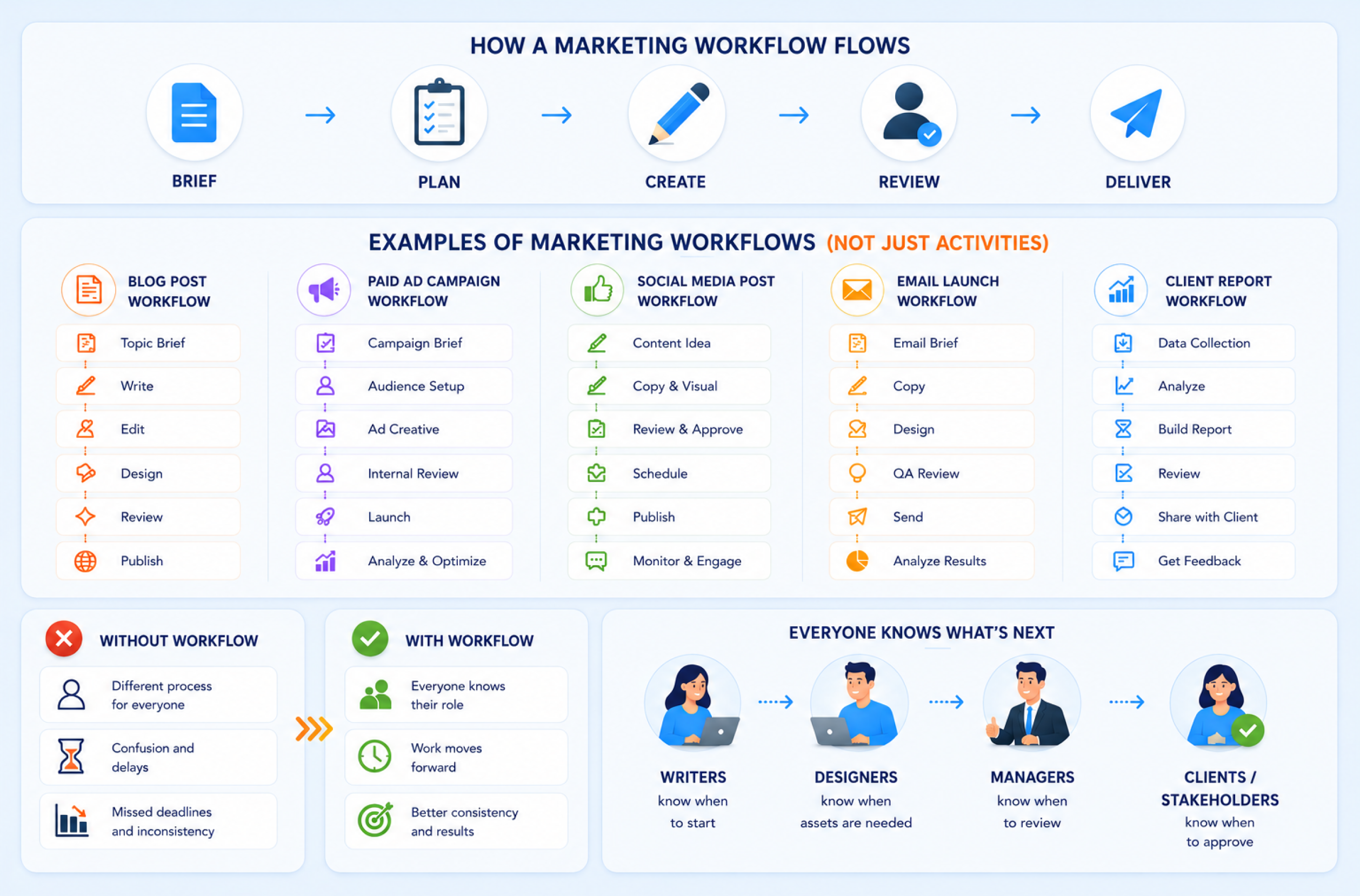
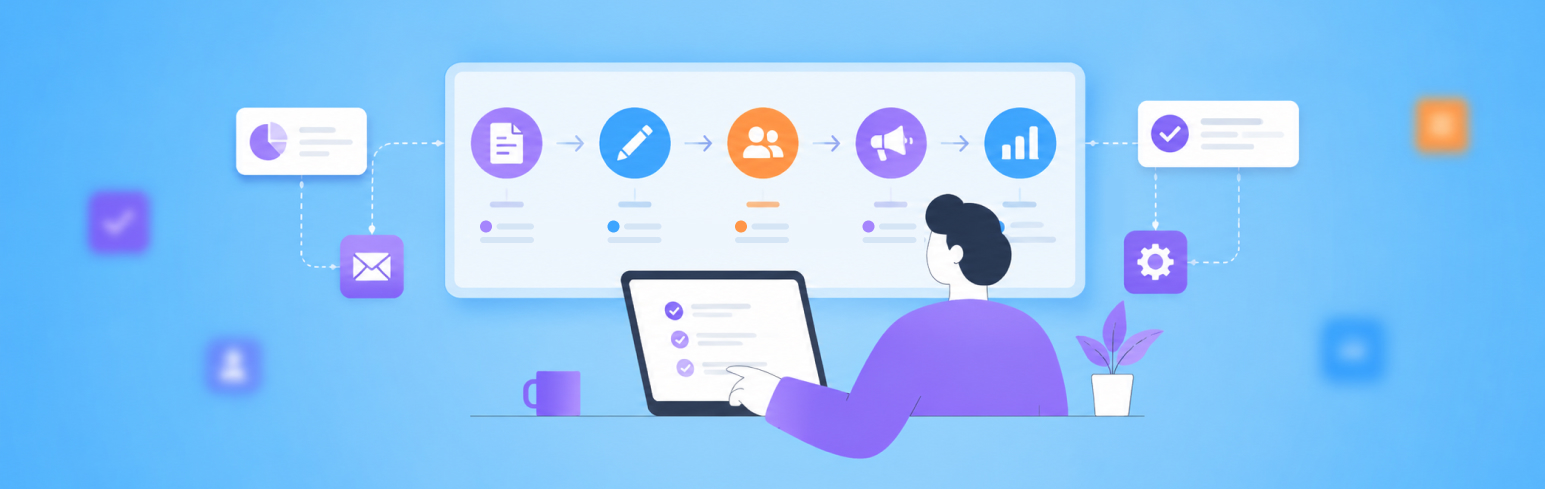
A marketing workflow is the step-by-step path that helps a marketing task move from the first brief to final delivery.
It shows three simple things:
- What needs to be done
- Who is responsible for each step
- What should happen next
For example, a workflow can help with:
- A blog post
- A paid ad campaign
- A social media calendar
- An email launch
- A client report
- A full marketing project
Without a workflow, every person in the team may follow a different process. This creates confusion and delays. Many marketing workflows fail for the same reason projects fail: no shared process that people follow end to end. The project management process helps frame workflows as a delivery system, not just steps on paper.
With a clear workflow, the team knows where the work stands. Writers know when to start. Designers know when assets are needed. Managers know when to review, and clients or stakeholders know when to approve.
That is why marketing workflow management is useful. It keeps work organized and helps the team complete repeatable tasks in a more consistent way.
Why Do Teams Need Marketing Workflow?
Without a workflow, teams still do the work, but they do it differently every time. Ownership gets clearer when teams use simple role definitions instead of vague responsibility. Project management roles fit the owner, reviewer, and approver idea you explain later.
That creates various problems like:
- Extra questions
- Repeated mistakes
- Slower approvals
- Confusion with multiple tasks
The workflows create consistency and structure, and workflow automation helps teams do more with fewer resources by defining how work moves from planning to execution.
Workflow Versus Automation
A workflow is the path your marketing work follows. Automation is the helper that handles repeated steps inside that path.
For example, a blog workflow may include:
- Brief creation
- Writing
- Editing
- Approval
- Publishing
Automation can support that workflow by creating tasks and sending reminders. Also, it updates the status or notifies the next owner.
So, the workflow tells the team what should happen, while automation helps some of those steps happen faster.
Part | What It Means | Simple Example |
Workflow | The full process the team follows | A blog moves through brief, draft, review and publish |
Automation | A rule that handles repeated work | The editor gets a reminder when the draft is ready |
AI Support | Help with writing, summaries or task creation | AI turns a campaign brief into a task list |
Human Review | Final check before the work moves ahead | A manager approves the final email before sending |
Automation works best when the workflow is already clear. If the process is messy, automation can make the mess move faster. For example, sending automatic reminders will not help much if nobody knows who owns the approval.
A simple rule is this:
Build the workflow first. Add automation second.
Start by mapping the steps. Then decide which repeated actions can be automated. However, the team still needs to control the strategy and final decision, while automation removes small manual tasks that slow the work down.
7 Types of Marketing Workflows with Real Examples

Different teams need different workflows, but most marketing work follows a few repeatable patterns. A small business may not need a heavy process for every task, but it still needs clear steps for the work that happens repeatedly.
Agencies need this even more because the same type of work may repeat across several clients, channels, and campaigns.
The goal is not to make every workflow complex. The goal is to make the work visible enough that people know what needs to happen and what should happen next.
Workflow type | What it covers | Real example | Why is it important? |
Content marketing workflow | Brief, draft, edit, design, review, publish | A weekly SEO blog production flow | Keeps writers, editors, designers, and publishers aligned |
Email marketing workflow | Segment, write, design, test, send, review | A webinar invitation sequence | Reduces errors in timing, links, audience logic, and messaging |
Social media workflow | Ideation, copy, design, approval, scheduling, engagement | A 7-day social campaign | Helps teams manage multiple platforms without last-minute posting |
Campaign workflow | Planning, asset creation, approvals, launch, monitoring | A lead generation launch across paid and organic | Connects goals, assets, deadlines, budget, and reporting |
Creative approval workflow | Request, brief, design, review rounds, sign-off | A landing page banner review cycle | Prevents feedback loops and unclear final approvals |
Paid advertising workflow | Brief, copy, creative, tracking, launch, optimise | A Meta ads campaign launch | Makes budget, targeting, tracking, and creative checks more controlled |
Reporting workflow | Data pull, analysis, summary, presentation, action items | A monthly client performance report | Turns raw numbers into decisions and next steps |
Content Marketing Workflow
A content marketing workflow is one of the easiest places to start because the steps are usually predictable.
Most content work starts with a brief and research. This applies to blog posts as well as guides. It also applies to case studies and landing pages. After researching, the team writes and edits the draft. The draft then moves into design. Once it is approved, the team publishes it and shares it across the right channels.
For example, a weekly SEO blog workflow can begin with a clear brief. The content manager adds the keyword and title along with the search intent. The brief also includes the outline and internal links. The writer then drafts the blog. The editor checks the structure and accuracy. They also review SEO use and brand tone. The designer may create the featured image while the publisher uploads the piece and checks the final formatting before it goes live.
This workflow helps small teams because nobody has to ask, “Who has the draft?” or “Has this been reviewed?” every time. It also helps agencies because the same flow can be reused across clients with small changes.
A simple content workflow should include:
- Brief owner
- Draft deadline
- Editing deadline
- Design or image status
- SEO review
- Final approval
- Publish date
- Distribution task
Email Marketing Workflow
An email marketing workflow usually covers the full path of an email campaign. It starts with audience selection and moves through copywriting, design testing, scheduling, sending, and performance review. This workflow becomes more important when the email supports a webinar, product launch, nurture sequence or customer update.
For example, a webinar invitation workflow may include the first invite, followed by reminder emails and a last-call email. It may also include a confirmation email and post-webinar follow-up. Each email needs the right audience segment, along with the correct subject line, CTA link, event date, and tracking setup.
This is where mistakes can happen quickly. The wrong segment can send emails to people who should not receive it. A broken link can reduce registration. A missed test send can make small formatting errors visible to the full list.
A practical email workflow should include a test-send step before scheduling. It should also include a final link check and an audience, and tracking check. Also, check owner approval before the email goes live.
Social Media Workflow
It is an important part of the marketing agency workflow. A social media workflow covers the full path of a post or campaign. It starts with ideas and ends with engagement or reporting.
The common steps are:
- Ideation
- Caption writing
- Creative briefing
- Design
- Approval
- Scheduling
- Publishing
- Post-publish follow-up
For example, a 7-day social campaign may include various social media content like LinkedIn posts or Instagram carousels. Also, it includes X posts and short videos.
Each channel needs a slightly different format, even when the core message is the same.
The workflow matters because social media work looks simple until several posts and approvals are active at the same time. A content calendar or social post scheduler helps only when it is tied to clear ownership and status.
A useful social workflow should show:
- Post idea
- Platform
- Caption
- Visual format
- Asset status
- Approval status
- Publish date
- Engagement follow-up
Campaign Workflow
A campaign workflow is wider than a single content workflow or social workflow. It connects several moving parts across the full campaign.
These mostly include goals and audiences. They can also include budget and creative assets. Paid media and email often sit inside the same workflow. Landing pages and tracking also need to stay connected. Sales enablement and launch-day checks should be part of the same plan. Reporting should also be built into the workflow.
For example, a lead generation campaign may include paid ads and a landing page. It may also include email follow-ups and organic social posts. A sales handoff may come after the leads start coming in.
Each part depends on another. Ads need the landing page to be ready. The landing page needs tracking. The sales team needs a lead context. Reporting needs campaign tags. Most delays come from dependencies that are not visible until it is too late, like creative waiting on copy or ads waiting on landing pages. Project dependencies fit the “what blocks what” problem inside campaign work.
A marketing campaign workflow should not only list tasks. It should also show dependencies. If the landing page gets delayed, then the ad launch gets delayed too. If tracking is not ready, then performance reporting becomes weak.
For small and mid-sized businesses, the most important campaign workflow fields are:
- Goal
- KPI
- Budget
- Channel list
- Asset owners
- Launch date
- Approval status
- Tracking status
- Reporting owner
Creative Approval Workflow
Creative approval is often the hidden bottleneck in marketing work. A design may be ready, but it can still get stuck in comments or too many review rounds.
A creative approval workflow starts with a request and a brief. Then it moves to design and internal review. Then, it will move to revision and final client review. Then, simply sign off.
For example, a landing page banner review cycle may involve various people in the chain. Without a clear workflow, one person may comment on a copy while another asks for layout changes after final approval. That slows everything down.
A stronger creative approval workflow should define:
- Who requests the asset
- What the brief must include
- Who reviews the first draft
- How many review rounds are allowed
- Who gives final approval
- Where final files are stored
This keeps feedback practical and reduces repeated revision loops.
Paid Advertising Workflow
A paid advertising workflow needs tighter control because mistakes can waste budget quickly. A paid campaign usually moves through the brief and audience planning first. It then covers budget setup and copy. Creative review and landing page checks come next. Tracking and platform setup should be ready before launch. After that, the workflow should cover monitoring and optimization.
For example, a Meta ads launch may include the campaign objective and audience. It may also include creative sizes and primary text. The headline and landing page should be checked. Pixel setup and UTM links should also be ready. Budget and approval should be confirmed before the campaign goes live.
If any of these steps are missed, then the campaign may spend money without clean data or strong results.
A well-paid advertising workflow should include pre-launch QA. QA is part of workflow quality, not a last-minute check before publishing or launching. Project quality management tools strategies support the idea of building quality into the process early.
The team should check the budget and target. Creative assets and links should also be reviewed. Tracking and the conversion event must be ready. Campaign dates should be checked before launch.
After launch, the workflow should be monitored. The team should review spending and CTR. CPL and CPA should also be checked. Lead quality needs regular review, so budget decisions can happen early instead of waiting until month-end.
Reporting Workflow
A reporting workflow helps turn campaign data into clear decisions. Many teams collect numbers for a report, but do not always explain what the numbers mean or what should happen next.
A monthly client report workflow may include data collection and source checks. It can also include metric review and analysis. Summary writing and slide preparation usually come next. Internal review and client delivery should follow. The final step should cover action items.
This workflow matters because reporting is not just about past performance. It should guide the next round of work. If paid social has a high CPL, then the next step may be creative testing. If SEO traffic is growing but leads are weak, then the next step may be improving conversions on key pages.
A useful reporting workflow should include:
- Data source
- Reporting period
- KPI summary
- Key wins
- Key issues
- Next actions
- Owner for each action
- Follow-up date
This makes reporting more useful for agencies and clients because the report does not end with numbers. It ends with decisions.
How to Build a Marketing Workflow from Scratch
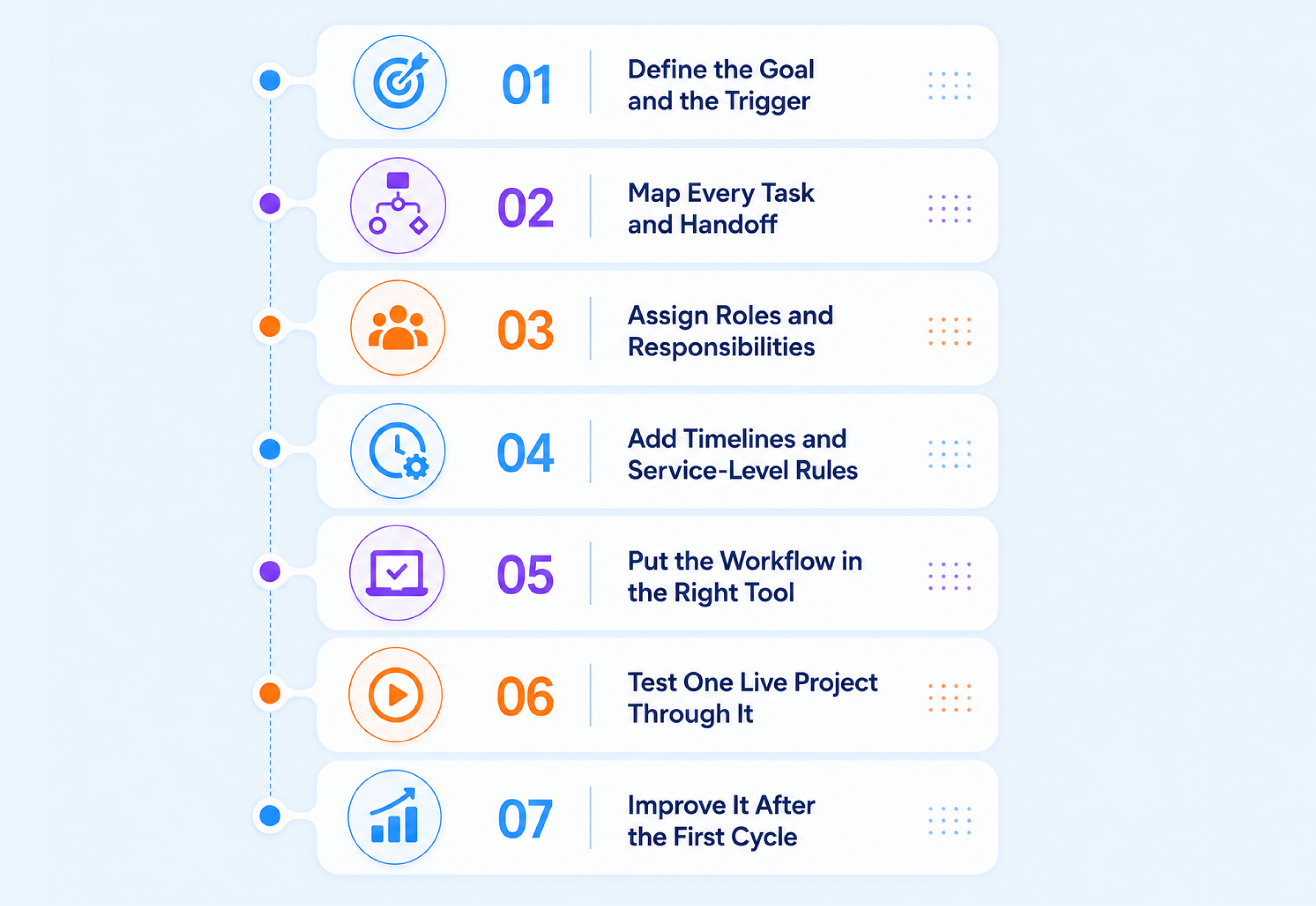
A usable marketing workflow should feel clear enough for the team to follow and flexible enough to improve over time. It should not be a heavy process document that nobody opens. It should act like a practical path that shows how work moves and who owns each step. Also, it should be clear what needs to happen before the work is complete.
The easiest way to build one is to start with one repeatable activity. Do not try to fix the full marketing department in one attempt. Start with a workflow that already creates confusion, such as blog production, campaign launch, creative approval, social scheduling, or monthly reporting.
Define the Goal and the Trigger
Start with one clear question: what should this workflow help the team complete?
A workflow for a campaign launch should not look like a workflow for a monthly report. A content workflow may focus on various parts, like:
- Brief
- Draft
- Edit
- Publish
- Distribute
On the other hand, a reporting workflow focuses on:
- Data pull
- Analysis
- Summary
- Review
- Action items
Then define the trigger. The trigger is the moment the workflow begins. This keeps the team clear on when the process should start.
For example:
Workflow | Goal | Trigger |
Blog workflow | Publish one approved article | The keyword brief is approved |
Campaign workflow | Launch a campaign on time | The campaign brief is signed off on |
Creative workflow | Deliver approved creative assets | Design request is submitted |
Email workflow | Send a clean campaign | Audience segment and message are final |
Reporting workflow | Share useful performance insights | Reporting period ends |
Map Every Task and Handoff
Once the goal is clear, write down every step in order. Include the work before production and the production steps. Also, don’t forget to add review steps and final delivery.
This is where weak workflows break. They include visible work like writing and design. However, they skip handoffs like feedback and final sign-off.
For example, a content marketing workflow should not only say “write a blog.” A better version would include:
- Create brief
- Assign writer
- Draft article
- Edit article
- Add internal links
- Review SEO
- Create image
- Upload to CMS
- Final formatting check
- Publish
- Share on social or email
- Review performance later
This level of detail helps the team see where delays happen. If drafts move fast, but approvals take too long, the workflow can show that clearly.
Assign Roles and Responsibilities
Every workflow step needs one clearer owner. This does not mean one person does all the work. It means one person is responsible for moving that step forward.
For example, a designer may create the visual, but the campaign manager may own final creative approval. A writer may prepare the draft, but the editor owns the final content review. A media buyer may launch the ad, but the analyst may own tracking checks.
A simple role setup can include:
Role Type | Meaning |
Owner | Person responsible for completing the step |
Reviewer | The person who checks the work |
Approver | The person who gives the final sign-off |
Viewer | A person who only needs visibility |
This avoids the common problem where too many people are involved, but nobody is truly responsible. For small and mid-sized teams, this clarity is especially useful because people often handle more than one role.
Add Timelines and Service-Level Rules
A workflow gets stronger when each step has an expected turnaround time. Open-ended tasks create delays because people do not know when a response is needed.
You do not need a strict deadline for every small action. Start with the steps that slow down work often. For example, briefs, approvals, client feedback, QA, final launch checks, etc.
For example:
- A brief review should happen within 1 working day
- The first draft should be ready within 3 working days
- Design feedback should come within 24 hours
- Client approval should be requested 2 days before launch
- Final QA should happen before anything goes live
These rules help the workflow move without constant reminders. They also make delays easier to spot because the team knows what “late” actually means.
Put the Workflow in the Right Tool
A workflow should live where the team actually works. If the process is written in a document, but tasks happen in chat, emails, spreadsheets, and separate folders, the workflow will not stay useful for long.
Spreadsheets can work for simple workflows. But once you have multiple owners, deadlines, approval stages, files, client comments, and campaign dependencies, a dedicated tool is usually better.
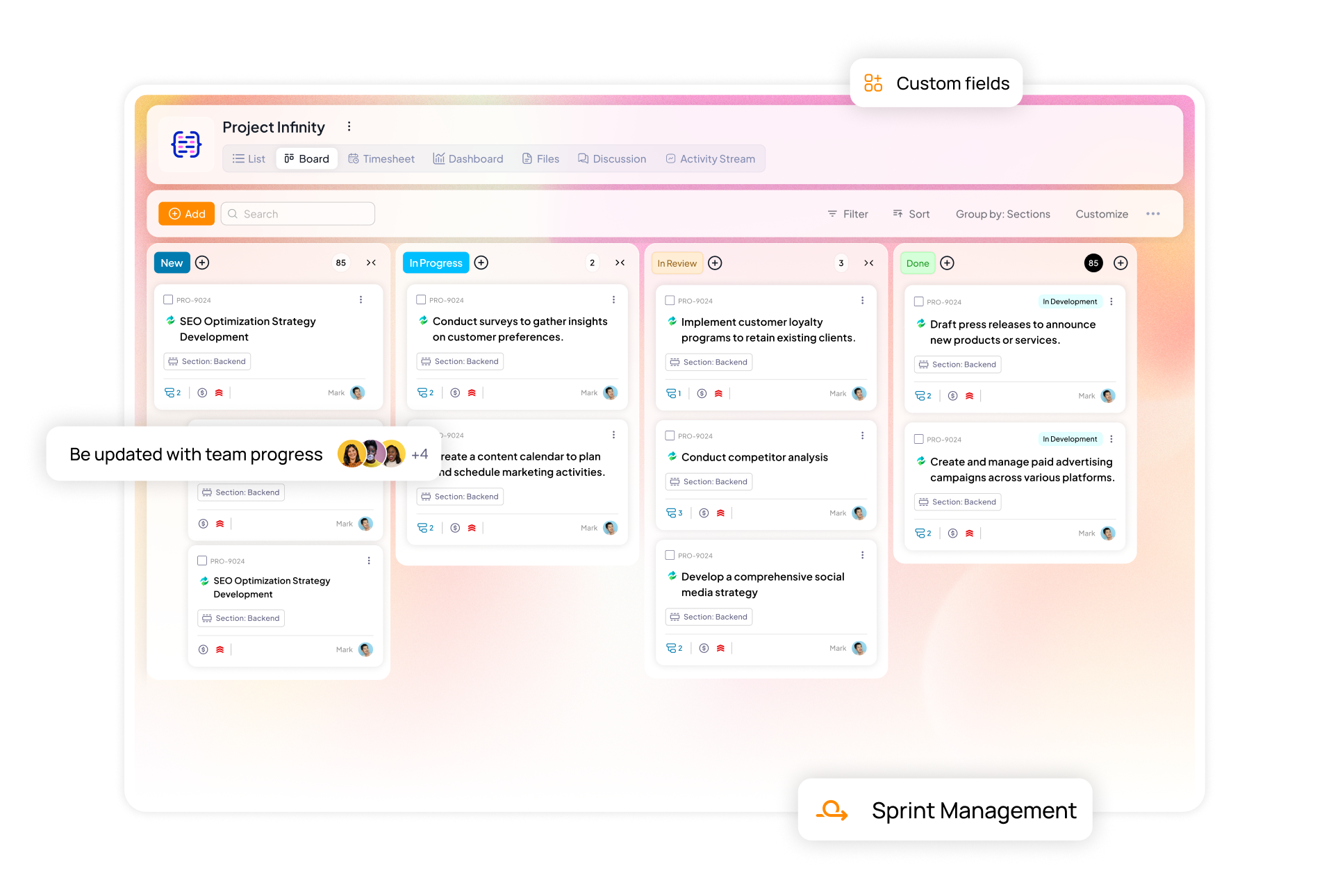
This is where project management software for marketing small teams or agencies becomes useful. A tool like 5day.io can help teams turn workflows into reusable templates, assign owners, track status, manage approvals, and keep campaign work visible in one place.
The tool should answer a few simple questions quickly:
- What stage is the work in?
- Who owns the next step?
- What is blocked?
- What is due this week?
- What needs approval?
- What has already been completed?
If the tool cannot make those answers easier, the workflow may still feel scattered.
Test One Live Project Through It
Do not mark the workflow as final too soon. Test it with one real project first. This could be one blog or one campaign. It could also be one email sequence or one monthly report.
During the test, see how the team actually uses the workflow. Check where people get confused and which steps they skip. Also, notice which handoffs still happen through chats.
Ask the team practical questions after the test:
- Which step was unclear?
- Which task needed a better owner?
- Which approval took too long?
- Which step felt unnecessary?
- Which detail was missing?
- Did the workflow reduce back-and-forth?
This test helps you build a workflow that fits real work rather than an ideal version of work.
Improve It After the First Cycle
A strong marketing workflow should improve after every cycle. The first version does not need to be perfect. It only needs to be clear enough for the team to use it. Use each completed project to check a few things:
- If a step is always skipped, then remove it or rewrite it
- If approvals keep slowing work down, then set clearer deadlines
- If too many people are reviewing the same task, then reduce the number of reviewers
- If the team still needs side chats to understand the status, then improve the workflow fields
- If ownership feels unclear, then add better notes or owner rules
A good workflow should become easier to use over time. It should reduce repeated questions. It should also speed up handoffs and make the same type of work easier to repeat.
Final Advice
For small and mid-sized businesses, the best approach is simple: build one workflow, test it, improve it, then turn it into a reusable template. Once that first workflow works well, repeat the same method for your next high-value marketing process.
Marketing Workflow Templates You Can Actually Use
Templates matter because most marketing work repeats in some shape or form. Reusable structure helps teams handle repeat work without starting from scratch each time. This applies to content production and email launches. It also applies to client onboarding, social scheduling and campaign execution.
5day.io supports this approach with free marketing workflow templates for common tasks. Teams can use them for content production, email campaigns, social scheduling and onboarding.
Its main product and marketing team pages also position templates as a way to launch campaigns faster and avoid rebuilding the same structure each time.
A practical template library for a small team could include:
- content brief to publish workflow
- social media weekly workflow
- campaign launch workflow
- reporting workflow
- client onboarding workflow
How to Automate Your Marketing Workflows with AI and AI Agents
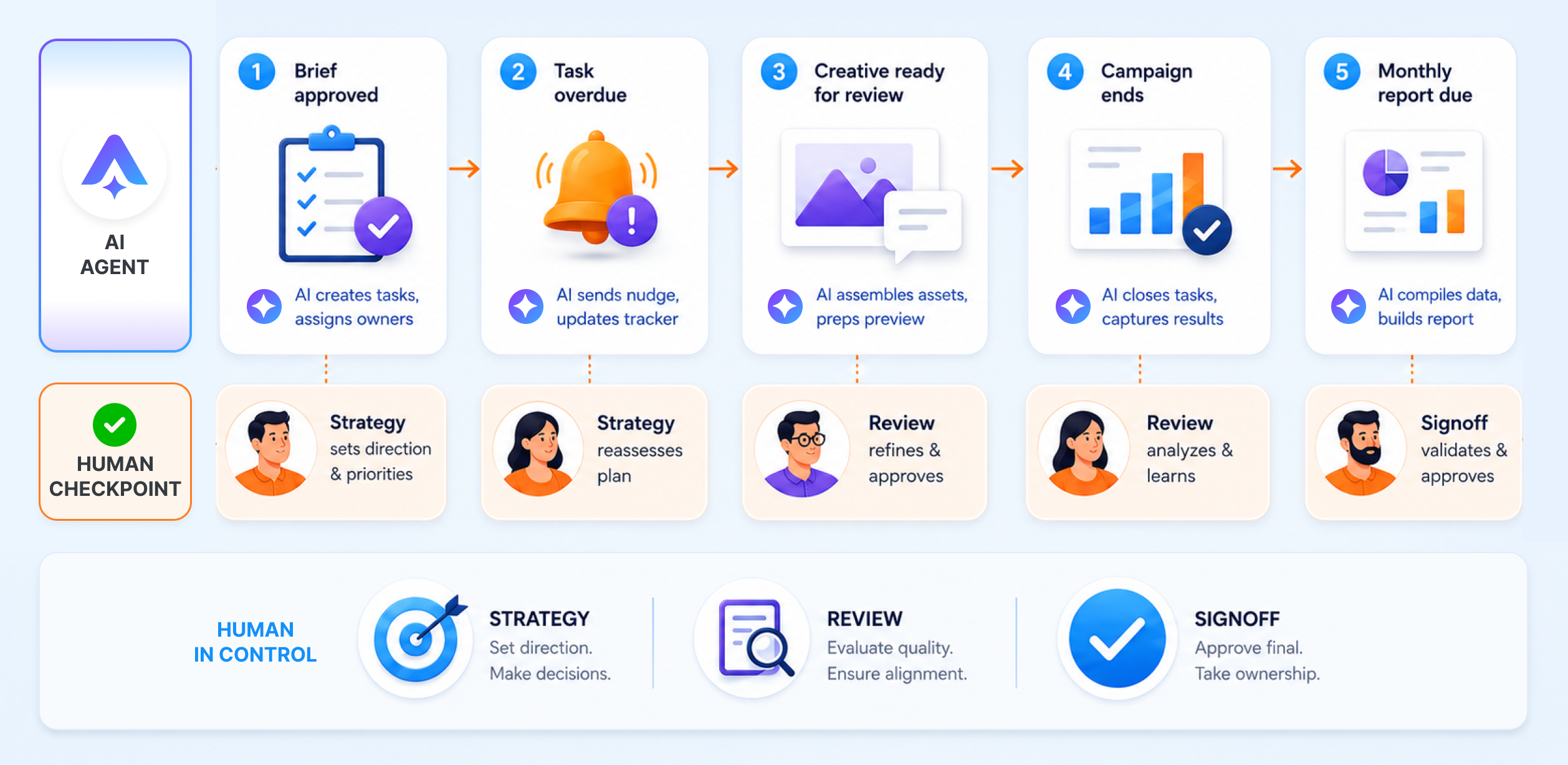
Automation works best when it removes repeated admin work. It should not replace strategy or judgment. Also, it should not replace final approval.
A good marketing workflow still needs people to decide on the message. The team must review quality and check context before any work is approved. Automation only helps routine steps move faster.
For small and mid-sized teams, the best starting point is not a complex AI system. Start with tasks that happen often and follow a clear rule.
Workflow Moment | What Automation Can Do | What People Should Still Control |
Campaign brief is approved | Create tasks for copy design, landing page setup, tracking, QA and reporting | Check the scope and confirm owners |
The task is overdue | Send an automatic reminder to the owner | Decide if the delay needs escalation |
Creative is ready for review | Notify the reviewer and update the task status | Review quality and approve the asset |
Campaign ends | Draft a recap using notes, performance data, and task history | Add judgment and final recommendations |
The monthly report is due | Create a recurring reporting task | Explain what the numbers mean |
This keeps automation practical. The system handles repeated follow-up work while the team stays in control of strategy quality and final decisions.
Good Places to Automate
The safest automation opportunities are tasks that do not need much judgment. These usually include:
- Status change notifications
- Task creation using saved templates
- Reminders for overdue approvals
- Recurring report setup
- Meeting summaries
- Campaign recap drafts
- Follow-up tasks after client feedback
- Internal alerts when a launch item is blocked
For example, if a designer marks a creative task as “ready for review,” the workflow can automatically notify the campaign manager. If the manager approves it, the next task can move to the media buyer or publisher. This removes small manual updates that usually happen in chat.
Where AI Helps Most
AI is useful when the team needs a first draft or a clear summary. It also helps when scattered information needs to be turned into a structured version.
It can turn a campaign brief into a task list. It can convert meeting notes into action items. It can also create first-draft captions and summarise client feedback. A team can use it to repurpose one blog into social post ideas.
This saves time because the team does not have to start with a blank page. The output still needs to be reviewed, though. AI can miss context and reduce important details. It can also make the copy sound too generic.
The best process is simple. Let AI create the first draft. Then let the team edit and approve it.
Where AI Agents Can Support the Workflow
AI agents go one step beyond basic prompting. They can follow a defined process across tools or tasks. For example, an AI agent can read a campaign brief and suggest a task structure.
It can help with:
- Creating task lists
- Suggesting draft owners
- Preparing a launch checklist
- Watching overdue approvals
- Flagging items that may need escalation
The important part is control. AI agents should work inside a clear workflow. They should not publish content and should not approve of work. They should not change campaign settings without human review.
Use AI agents to move forward faster. Keep the final decisions with the team.
How to Measure Marketing Workflow Effectiveness
A marketing workflow is only useful if it helps the team move work faster with fewer mistakes. That is why measurement matters. It shows if the workflow is actually improving execution or only adding more steps.
The goal is not to track every small action. Start with a few simple workflow metrics that show speed, clarity, quality, and accountability.
A good workflow should answer questions like:
- Is work moving on time?
- Where does the team get stuck?
- Are approvals taking too long?
- Are tasks being reopened too often?
- Is the same workflow easier to repeat next time?
These answers help teams improve the workflow instead of guessing what is wrong.
The first metric to check is cycle time.
This means how long a task takes from start to finish. For example, a blog workflow may begin when the brief is approved and end when the article is published. If a blog takes 5 days and the other takes 2 weeks, the team should check what caused the delay.
The second metric is approval turnaround time.
Many marketing projects slow down during review. If creative assets, email copy, or campaign pages stay in approval for too long, the workflow needs better deadlines or fewer reviewers.
Consider rework rate
Rework happens when a task comes back because the brief was unclear; the first draft missed key details, or feedback came too late. Some revisions are normal. But repeated rework shows that the workflow needs better input quality.
Track blocked tasks
A task may be blocked because the owner is waiting for copy, design, access, data, client feedback, or final approval. If the same type of blockage happens often, the workflow should make that dependency more visible.
Here is a simple way to measure workflow health:
Metric | What it shows | What to improve |
Cycle time | How long work takes from start to finish | Slow steps and long handoffs |
Approval time | How long reviews take | Reviewer rules and deadlines |
Rework rate | How often work comes back for changes | Brief quality and feedback clarity |
Blocked tasks | Where work gets stuck | Dependencies and ownership |
On-time completion | How often tasks finish as planned | Timelines and workload planning |
Template reuse | How often teams repeat a proven workflow | Process consistency |
For marketing teams, performance data should also connect back to the workflow. A campaign may miss its results because of weak targeting or budget. But sometimes the issue is process related. The landing page may have launched late. Tracking may have been added after launch. Creative testing may not have started on time.
That is why teams should review both marketing results and workflow behavior.
- For example, after a campaign ends, check:
- Did the campaign launch on time?
- Were all assets ready before launch?
- Was tracking checked before spend started?
- Did every task have a clear owner?
- Were approvals completed within the expected time?
- Were the next actions added after the report?
This turns workflow measurement into a habit. It also makes reporting more useful because the team can see what needs to change before the next project begins.
A software like 5day.io can make this easier by keeping task status, owners, deadlines, approvals, templates, etc. in one place. Instead of searching through chats or spreadsheets, teams can see where work stands and what is slowing it down.
The best way to measure a workflow is to review it after every project cycle. Keep what worked. Remove steps that add no value. Add clarity where people getting confused. Over time, the workflow becomes easier to follow and easier to scale.
Common Marketing Workflow Mistakes (and How to Fix Them)
Even a good marketing workflow can fail if the process is unclear or sits outside of daily work. Most issues happen because teams try to move faster without first fixing ownership and approval paths. The aim is not to create more steps. It is to remove confusion, so work moves with less chasing.
Mistake 1: Trying to Automate Chaos
Automation will not fix a broken process if the team does not know who owns each step and what needs approval. Also, they must know what happens next and which are the automation-only paths to avoid confusion faster.
Fix it:
Map the workflow manually first. Write down the trigger and task stages. Add owners and approval points. Then define the final delivery step. Once the process is clear, automate only the repeated admin work. This can include reminders and task creation. It can also include status updates and recurring reports.
Mistake 2: Keeping Workflow Steps Too Vague
A step like “create campaign” is too broad. It does not tell the team what needs to happen or who is responsible. Broad steps lead to missed details because every person interprets them differently.
Fix it:
Break large tasks into clear actions. For example:
- Draft campaign brief
- Review goal and KPI
- Create copy and creative
- Set up tracking
- Run QA
- Launch campaign
- Monitor early performance
This makes the workflow easier to follow and easier to improve.
Mistake 3: Missing Owners and Approval Rules
Many workflows list tasks but do not show who owns them. This creates delays because everyone can see the work, but nobody is clearly responsible for moving it ahead.
Fix it:
Add an owner to every task and an approver to every review step. If more than one person is involved, then define who will do the work. Also, make it clear who will review it and who will give the final sign-off.
Mistake 4: Storing the Workflow Outside the Work
A workflow hidden in a document will not help if the team still manages tasks in one tool, approvals in another, and updates in chat. The workflow needs to live inside the real delivery system.
Fix it:
Move the workflow into the same project management software that your marketing team already uses for tasks and timelines. Keep files and comments there as well. Add approvals to the same place, so the process stays active instead of becoming a static reference file.
Quick workflow health check
Before improving a workflow, ask:
- Does every task have one clear owner?
- Can the team see the current status without asking in chat?
- Are approval steps clearly marked?
- Are deadlines attached to key stages?
- Does the workflow reduce repeated questions?
- Can the same workflow be reused next time?
If the answer is no, the workflow needs cleanup before automation. A strong marketing workflow should make work easier to repeat, easier to track, and easier to hand off.
Conclusion
A marketing workflow is not just a process map. It is a system that helps teams move work from request to delivery with less confusion. Good workflows make ownership clearer and reduce repeated mistakes. Also, it will make automation more useful.
For small and mid-sized teams, the best approach is simple: start with one workflow and map the steps clearly. Then, assign owners and use templates to improve them after each cycle.
If the work is already too complex for spreadsheets and scattered updates, a project management software for marketing agencies platform like 5day.io can make that transition much easier.