
What is Notion?
Notion is a personal productivity tool with a cleaner, more flexible alternative to scattered notes and disconnected documents. It grew into a team workspace built around a simple idea that everything is a block, and you can arrange blocks into almost anything.
Pages, databases, wikis, tables, kanban boards, all built from the same foundation.
For marketing agencies, that flexibility makes Notion genuinely useful for a specific category of work. Brand guidelines, onboarding wikis, content strategy documentation, meeting notes, and SOPs. Notion handles all of it elegantly. If your team needs a shared knowledge base that’s easy to navigate and easier to maintain, it’s hard to argue against.
Notion is great for strategy, weak for execution
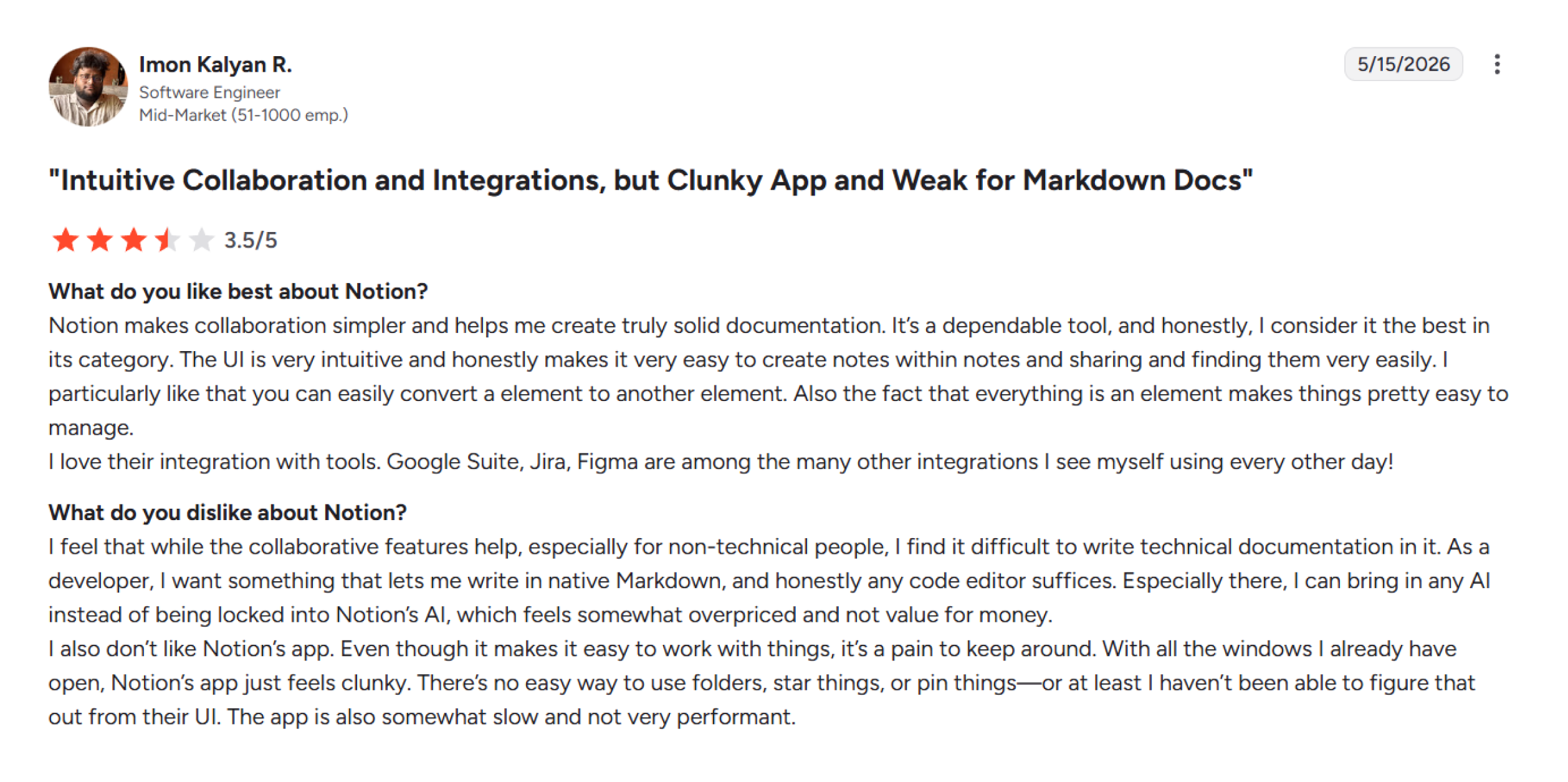
In most Notion comparison discussions, flexibility is usually the headline advantage. For knowledge management and strategy work, it earns that reputation. It gives the teams freedom to create their system from scratch and make the most use of it.
Where does Notion fall short for marketing agencies?
Notion’s limitations surface when agencies try to run operational work through it. Its task management is minimal by design. There are no recurring tasks, no native time tracking, and no deadline enforcement beyond a date field in a database.
Client approval workflows don’t exist out of the box. At a larger database scale, load times become noticeable across workspaces running multiple active databases at the same time.
The agencies that get the most from Notion are using it alongside a dedicated project management tool, not instead of one. Used that way, it’s excellent. Used as the primary system for campaign execution and client delivery, the gaps show up quickly.
While Notion’s freedom is powerful, it can overwhelm even experienced PMs. Using Notion well requires time and discipline. You have full control, but also full responsibility for setup, maintenance, and data integrity. It means time tracking or complex approvals must be built via integrations or manual steps.
What is ClickUp?
ClickUp started as a simpler alternative to the project management tools that had grown too bloated for everyday teams. At the start, it was introduced as the one app to replace them all. Flexible enough to run engineering sprints, sales pipelines, and marketing campaigns from the same workspace. It allows teams to collaborate, share tasks, and get status updates. It offers high-level customizations for work and project management.
Why do marketing teams pick ClickUp?
In almost every major ClickUp comparison, its flexibility is the biggest strength. ClickUp handles multi-client task management, deadline tracking, workload visibility, and time tracking better than most tools in its category.
For agencies managing structured delivery across several client accounts, it gives operations leads genuine control over how teams assign, track, report, and deliver tasks. It also has strong collaboration tools that allow you to comment on any task, share files, do proofing (e.g., annotate images or documents), and even chat in-app.
What are the real limitations of ClickUp?
The complexity is the tradeoff. ClickUp’s workspace has become so complex. It includes multiple view types, automation layers, custom fields, permission settings, and nested folder hierarchies.
For teams that invest in configuring it properly, that depth pays off. For teams that don’t, or for new hires who inherit someone else’s setup, the learning curve is real.
Marketing-specific workflows, like content calendars, campaign briefs, and client approval rounds, don’t come pre-built. Teams need to construct it on top of the platform’s general-purpose architecture, which most teams start once and then quietly never finish.
Its detailed dashboards and goal tracking can help large teams monitor KPIs. But with power-users in mind, it may overshoot the needs of marketing teams. Most marketing teams use only a fraction of ClickUp’s features, and they spend more time administering the tool than creating campaigns.
What is 5day.io?
5day.io is a content, campaign planning, and work management platform built specifically for marketing agencies. For agencies evaluating a ClickUp alternative or a Notion alternative purpose-built for marketing, it’s the most direct comparison in this category.
From the ground up, it scopes everything that a marketing ops team needs to run client campaigns without spending half their week configuring the tool.
This marketing agency management platform offers pre-built content calendars, campaign and creative workflows, client approval processes, and AI-assisted content creation. An agency can onboard and start operations on the same day.
Where is 5day.io genuinely strong?
- Content calendar and campaign management
This is the core of the platform, and not something you need to configure. Campaigns have phases, content has statuses, and the calendar reflects what’s shipping and when.
Minimal design and pre-built marketing content calendar workflow make 5day.io a great campaign management tool. For agencies overwhelmed by operational complexity, 5day.io is emerging as a strong ClickUp alternative.
- Client approval workflow
Content moves from draft to client review to approved inside the platform. It means no forwarded Google Docs, no approval threads buried in email. Clients interact through a dedicated review portal that doesn’t require them to navigate a full project management software.
- Marketing-native 5day.io AI
Content brief generation, caption drafting, repurposing suggestions, and meta tag generation are built into the content workflow. It’s not just added as a general writing assistant layer.
- Low onboarding overhead
Because the workflows are pre-built for marketing, onboarding new team members is easy. You can map the existing process onto the platform rather than learning someone else’s custom configuration. It saves your team’s time and reduces extensive training overhead.
Where does 5day.io have real limitations?
These are worth knowing before evaluating the platform.
- Not a general project management tool
5day.io focuses more on marketing content and campaign workflows. Agencies running engineering projects, product development, or operational work outside of marketing will find it insufficient for those use cases. It doesn’t replace ClickUp for non-marketing delivery management.
- More selected integrations than ClickUp
ClickUp connects to 250+ tools. 5day.io’s integrations focus exclusively on the marketing tech stack, like social, SEO, CRM, and email tools.
For teams running cross-functional operations, 5day.io connects with n8n, giving you the ability to build custom automation workflows with virtually any tool in your stack, including CRMs, finance tools, dev platforms, etc. But it may take some setup time to build those automations.
- Smaller ecosystem
ClickUp and Notion have large communities, extensive template libraries, YouTube tutorials, and third-party consultants who specialize in their setup. 5day.io’s ecosystem is smaller, which matters for teams that rely on community resources during onboarding.
Notion vs ClickUp vs 5day.io: Where each tool wins, and where it falls short
When comparing Notion vs ClickUp vs 5day.io, the difference comes down to how each tool handles project planning and execution.
Task and project management
ClickUp
ClickUp handles multi-client task management, deadline tracking, workload views, and dependencies well. For agencies running complex cross-functional delivery alongside marketing, ClickUp gives you the structure to manage all of it in one place.
Where it asks more of marketing teams is setup: campaign workflows, content delivery stages, and approval tracking all need to be configured before they work the way a marketing team needs them to.
Notion
Notion’s task management covers the basics, giving you a database with a due date and a status column. For lightweight campaign tracking with a small team, it works. Recurring deliverables, workload visibility across client accounts, and deadline enforcement require workarounds that most agencies start building and quietly stop maintaining.
5day.io
For marketing agencies, 5day.io gets the highest score here. Task management is built around how marketing teams work. It helps with campaign phases, content deliverables, publishing deadlines, and client approval stages, which are all native to the structure rather than configured on top of it. A new campaign is operational in minutes and doesn’t require a setup session.
Project hierarchy
ClickUp
It has a multi-layer hierarchy (such as Workspace → Spaces → Folders → Lists). It is powerful but can be confusing.
Notion
Notion, on the other hand, has no enforced structure (everything is pages and databases).
5day.io
5day.io uses a three-level hierarchy (Projects → Sections → Tasks). It’s more straightforward than ClickUp’s multi-layer setup, which means less time orienting new team members and less risk of deliverables getting buried inside nested folders.
For marketing agencies, that simplicity maps well to how they organize marketing work in a natural flow.
1. Content calendar
ClickUp and Notion
Neither ClickUp nor Notion ships with a native content calendar. Both can be configured to display one. ClickUp offers a content calendar option through calendar views and custom fields, and Notion through a database filtered by date. Overall, the configuration is something your team builds and maintains.
5day.io
5day.io’s content calendar is the core of the platform. Its content calendar offers campaign timelines, publishing dates, and content status.
For agencies where the content calendar is the operational backbone, this is the most significant practical difference between the three. All in all, it’s better than Notion and ClickUp when it comes to marketing and content teams.
2. Client collaboration and approvals
ClickUp
It allows guest access, and clients can view and comment on tasks. A proper client approval workflow, where content moves through review stages and gets signed off, is not available; rather needs to be built. The custom configuration is time-consuming and exhausting to maintain. As a result, most agencies start and don’t finish.
Notion
This tool handles client-facing documentation well. Sharing a strategy doc or brand guidelines page with a client via guest access is straightforward. Task-level approvals don’t exist natively.
5day.io
It includes a built-in client review portal and approval workflow. Content moves from draft to client review to approved within the platform, without routing through email threads or shared Google Docs.
For agencies where client approval is a recurring bottleneck, this is where 5day.io earns the most ground as an alternative to Clickup and Notion. If you’re setting up a new client account in 5day.io, this agency client onboarding workflow checklist covers the full setup process step by step.
3. AI features
ClickUp
ClickUp AI (Brain) assists with task summaries, meeting note extraction, action items, and formula generation. These are productivity-focused features that reduce admin work across any kind of team.
Notion
Notion AI works at the document level, such as drafting pages, summarizing content, answering questions across your workspace, and translating text. It’s useful for knowledge management tasks rather than content production.
5day.io
5day.io’s AI (ACE) covers all the features with a marketing output scope. Content brief generation, caption drafting, repurposing suggestions, meta tag generation, and campaign ideation are native to the workflow rather than added as a separate layer.
The output is directly generated using the brief given or the project’s context. This makes the output highly contextual and doesn’t require significant editing to fit a marketing context.
4. Onboarding and ease of use
ClickUp
ClickUp has a steeper initial curve. The feature depth that makes it powerful for established teams makes it harder for new hires to navigate without proper documentation and training.
Agencies with high staff turnover feel this cost repeatedly.
Notion
It has the lowest barrier to entry. The interface is intuitive, and a small team can get oriented quickly. The difficulty comes later, when teams try to scale their Notion setup into something that handles real operational complexity.
5day.io
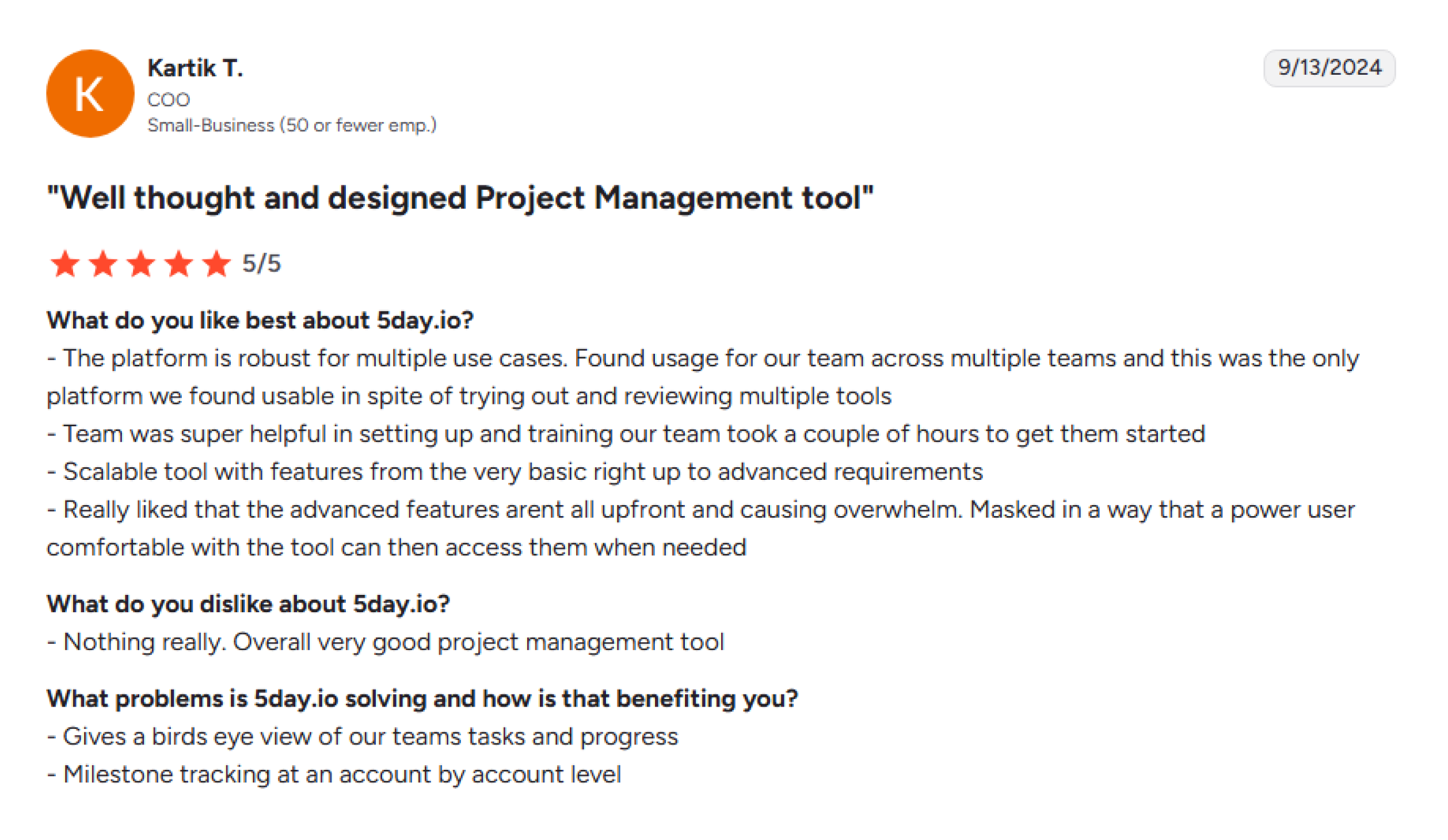
Its onboarding is faster for marketing teams specifically because the structure already maps to how they work. The tradeoff is less flexibility, as teams wanting to adapt to the platform for non-marketing workflows will find fewer options.
ClickUp vs Notion vs 5day.io pricing comparison: What marketing teams end up paying?
The listed price tells only part of the story. For agencies managing multiple clients and fast-moving campaigns, the real cost often shows up in integrations and the hidden operational costs. Let’s evaluate ClickUp vs Notion vs 5day.io pricing.
Free plan comparison of ClickUp, Notion, and 5day.io
Both ClickUp and Notion offer free plans, but with meaningful constraints for agency use.
ClickUp’s free plan includes unlimited tasks and unlimited members. It’s genuinely useful for small teams to get started. The limitations hit when agencies need automation, advanced reporting, guest access beyond basic view permissions, and timeline views.
Usually, most agencies outgrow the free tier within the first month of real client work.
Similarly, Notion’s free plan is better for individual use. Team collaboration, guest access, and advanced permission controls require a paid plan. For any agency with more than one person working in the same workspace, the free plan is a starting point rather than a viable operating tier.
5day.io has a free plan for teams of up to 5 users and 5 projects. Also, it offers a 30-day free trial with full access to all paid plan features; no credit card required upfront.
For agencies evaluating the platform, that’s a more useful window than a permanently restricted free tier. A full campaign cycle fits inside 30 days; a limited free plan rarely tells you what you need to know in a real work scenario.
Per-seat cost at 5, 10, and 20 users
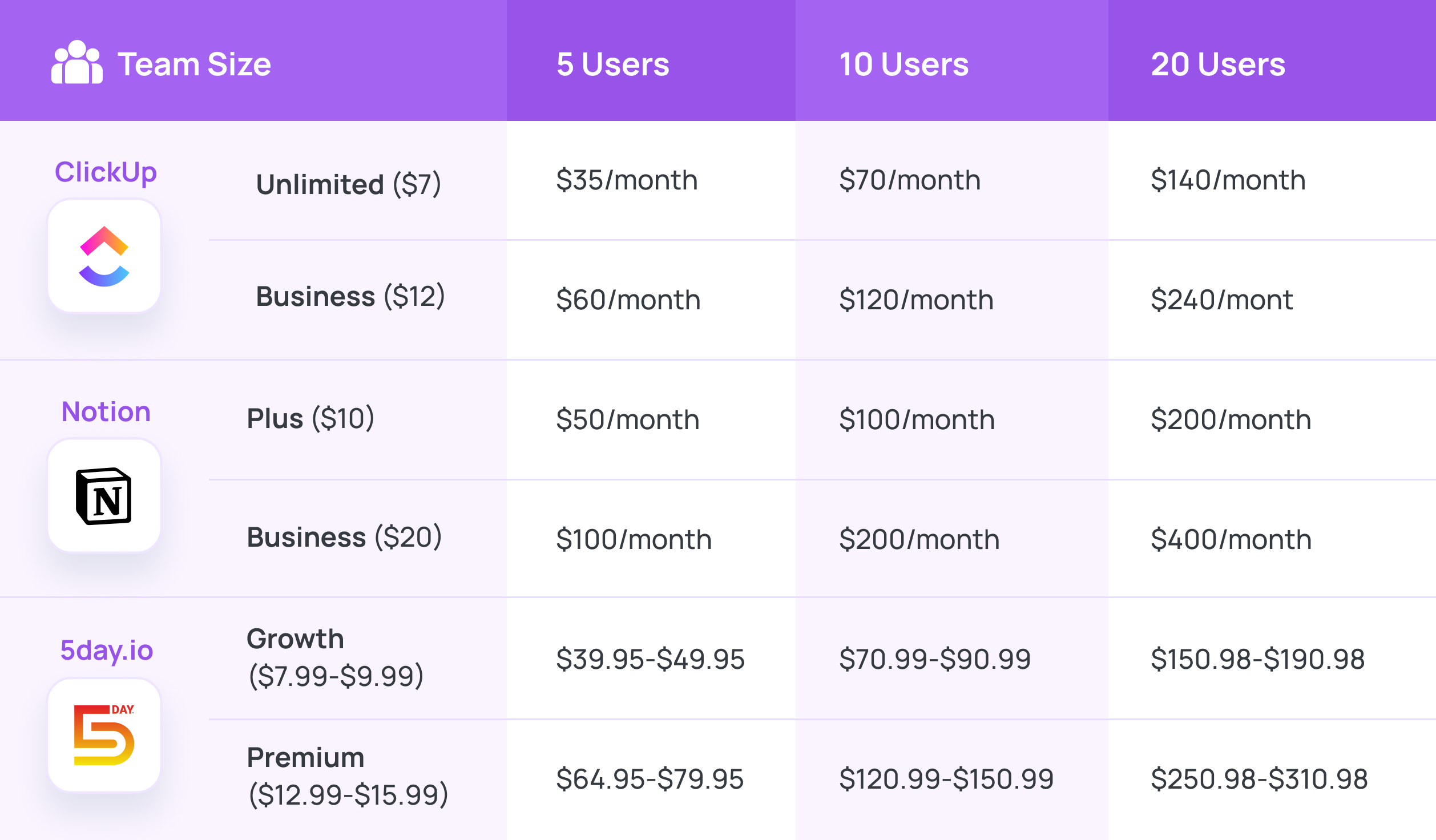
At 10 users, the difference between ClickUp Unlimited and Notion Plus is $30/month. 5day.io’s pricing sits in a comparable range for marketing teams, with the added advantage that campaign management, client approvals, and timesheet tracking are included in the base tier rather than gated behind higher plans. At the decision level, use case fit matters far more than the price differential.
Verify current pricing directly with each tool before making a purchasing decision, as SaaS pricing changes frequently.
Hidden costs
Most tools don’t cost what they list their per-seat price. Hidden costs add up quickly once they start using them.
ClickUp
Automation action limits apply at every tier except Enterprise. Agencies running heavy automation, like task triggers, status updates, and notification flows, hit these limits and either upgrade or reduce automation.
The Unlimited plan allows 1,000 automation actions per month per workspace; Business raises this significantly but at a higher per-seat cost.
Notion
Guest access pricing has historically been a friction point for agencies. Clients accessing shared pages count toward guest limits depending on the plan, and adding external collaborators at scale adds to the real monthly cost.
If you’re making a project management software comparison, pricing matters, but workflow fit matters far more once your agency starts scaling.
Plus, you may not find the complete costs on any pricing page, as it is mainly the configuration time. Agencies spending 20–40 hours building marketing workflows inside a general-purpose tool are paying in ops manager time, instead of the software cost. That investment doesn’t show up in the monthly bill, but it’s real.
ClickUp vs Notion vs 5day.io for marketing agencies: The right fit
Agency Type | Primary Need | Recommended Tool | Why | Secondary Tool |
5-person social media agency, 8 clients | Content calendar, client approval, social post management | 5day.io | Purpose-built for this workflow — content calendar, client review, and AI content in one platform | ClickUp, if structured project delivery is also needed |
15-person full-service agency | Structured project delivery + team knowledge base | ClickUp + Notion | ClickUp for delivery management, Notion for SOPs and strategy docs | 5day.io is adding a dedicated content calendar workflow |
Solo content strategist scaling to a small agency | Lightweight task management + content planning | Notion early stage → 5day.io at scale | Notion is low-cost and flexible for solo work; 5day.io is used when client volume justifies a dedicated content platform | ClickUp, when adding team members with complex delivery needs |
In-house marketing team, mid-market B2B | Campaign planning, content calendar, cross-team collaboration | ClickUp or 5day.io | ClickUp if cross-functional coordination is primary; 5day.io if content production and campaign calendar are primary | Notion for strategy and brand documentation |
SEO and content agency | Content brief management, publishing calendar, and repurposing workflow | 5day.io | AI content brief generation, content calendar, and repurposing workflow are core 5day.io features | Notion for client SEO strategy documentation |
Creative and design agency | Project management, client feedback, and deadline tracking | ClickUp | Strongest for design workflow task management and deadline tracking | Notion for creative brief library and brand guidelines |
There’s no single answer here. The right tool depends on what your agency needs to run well day to day. These three tools serve different operational profiles, and the honest answer is that some agencies genuinely belong on ClickUp or Notion.
Here is a use-case-wise analysis of ClickUp vs Notion vs 5day.io for marketing agencies.
Choose ClickUp if:
Marketing isnot the primary revenue driving function in your organization. If your team spends significant time working cross-functionally with product, engineering, finance, or operations and needs a single platform to manage work together, ClickUp offers the right features for that kind of coordination.
It suits organizations where marketing supports a broader delivery operation rather than leading it. .
If your team has the bandwidth to configure and maintain the platform, and your workflows go beyond marketing into broader project delivery, ClickUp can work for you.If you’re actively evaluating a dedicated ClickUp alternative for marketing teams, that comparison covers the switch in detail.
Choose Notion if:
Your agency’s primary need is a shared knowledge base, such as SOPs, brand guidelines, content strategy documentation, and onboarding wikis. And if you’re already using a separate tool for task management, Notion is helpful to use.
Notion works well as the second system in a two-tool setup, not as the primary operational platform.
Smaller agencies or freelance teams doing lighter project tracking alongside documentation work may find Notion sufficient on its own. At that scale, the task management gaps are manageable.
Choose 5day.io if:
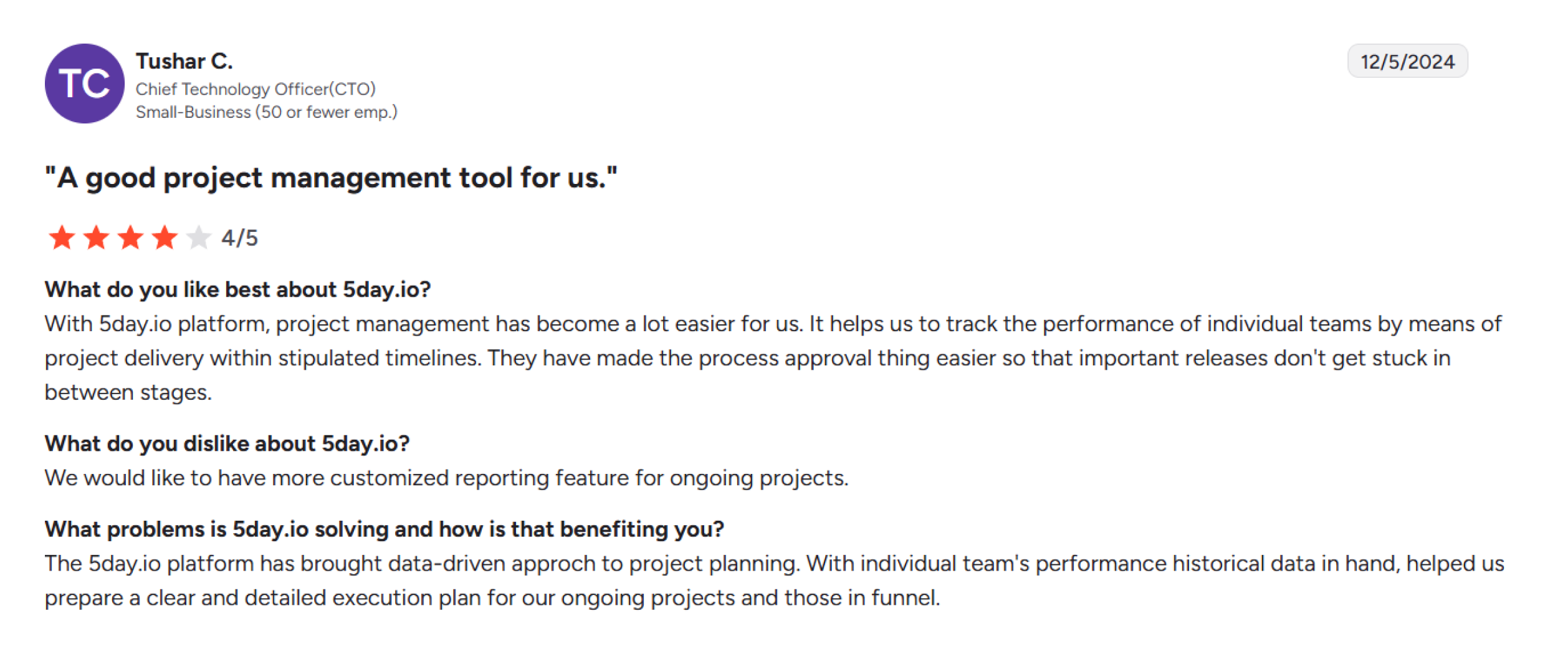
Your agency needs one platform to run the entire marketing function, such as managing campaigns, monitoring team utilization, tracking billable hours, handling client approvals, and keeping resource planning visible without switching tools.
If any of these questions resonate, 5day.io is the best possible choice for your operations:
- Do your need campaign planning, timesheet tracking, and clients approvals in the same platform?
- Is visibility into team utilization and billable hours a recurring challenge?
- Are you managing deliverables across multiple client retainers with a clear picture of who has the capacity?
- Do you want client collaboration to be a part of your workflow rather than handling it through emails or shared docs?
- Are you spending more ops time configuring your current tool than running campaigns?It’s also worth considering if your agency is growing and onboarding new hires regularly. A platform that maps directly to how marketing teams operate and reduces the time between someone joining and someone contributing.
Teams looking for a purpose-built alternative to ClickUp or Notion for their entire marketing function will find 5day.io the closest fit.
If you’re currently running ClickUp and Notion together:
That setup works, and many agencies run it successfully. The question worth asking is how much time your team spends maintaining two systems and explaining the setup to new people. If the answer is more than you’d like, a single marketing-native platform is worth evaluating.
How to make the right call when choosing ClickUp, Notion, or 5day.io?
ClickUp, Notion, and 5day.io are all capable platforms. The difference is what each one was designed to do. A tool built for general project delivery and a tool built for marketing campaign ops will feel different the moment real client work starts moving through them.
Figuring out which is the best project management software for marketing agencies comes down to the tool closest to your team’s needs. The right one will fit your agency like a glove, and it isn’t about which work management software has the most features or the lowest per-seat price.
If your team lives inside campaign calendars and approval workflows, 5day.io is the best marketing project management software for your workflow.
Ready to see what marketing ops software looks like? Try 5day.io today. Or if you want to talk through your current setup and whether a switch makes sense, schedule a 15-minute call with the 5day.io team.