

A strong go to market strategy can still fail when execution is scattered. Teams may know the audience, positioning, channels, pricing, launch goals, etc., but the launch can still break if ownership is unclear or key tasks are spread across disconnected spreadsheets and conversations.
That is where a GTM operations checklist becomes useful. It turns strategy into a working launch system. The best part about it is having multiple options to define owners, timelines, approvals, campaign assets, sales enablement, tracking, feedback loops, post-launch reviews, and so on.
It helps every team see what needs to happen before launch, during launch, and after the first results start coming in.
In 2026, this GTM work will no longer be handled by one team. Product, marketing, sales, customer success, RevOps, and agency partners often need to move together across multiple channels and launch types.
So, a basic checklist can help once, but an operations-ready checklist helps teams repeat the process with more control.
This guide explains how to build a go-to-market operations checklist for 2026. It covers the key stages, role ownership, templates, launch tracking, and agency workflows that help teams move beyond planning and execute with clarity.
What is a GTM Operations Checklist and Why Most GTM Launches Fail Without One
A GTM Operations Checklist is a phase-based and role-assigned system that helps every team complete the operational work behind a go to market launch. It turns launch readiness into clear steps and covers the key areas that need attention before, during, and after launch.
These areas usually include:
- Market readiness
- Messaging
- Sales enablement
- Campaign activation
- Technical setup
- Tracking
- Customer success handoff
- Post-launch monitoring
A strong go-to-market plan checklist does not replace strategy. In fact, it protects the strategy by making sure the plan can be executed across every team involved in the launch. This includes marketing, sales, product, revenue operations, customer success, finance, legal, etc.
A GTM checklist works best when it stays inside repeatable marketing workflows that teams actually follow week after week. That is what keeps ownership and approvals clear across functions.
GTM Strategy vs GTM Operations
GTM strategy can be described as a framework built around understanding the market, prioritizing buyer pain, identifying competitive advantage, and bringing the product to market in a way that feels “ready to buy.”
GTM operations are the execution layer. It answers practical questions such as:
- Who owns each launch task?
- What needs to be completed by each phase?
- Which assets are approved?
- Is the sales team trained?
- Is tracking working in production?
- Are nurture flows live?
- What happens if launch issues appear?
- How will the team review early performance?
Why “Ready to Launch” and “Operationally Ready to Launch” Are Different
A team can be ready to announce a launch and still not be ready to operate it because launch readiness depends on execution clarity across every function.
The product page may be live, but tracking may still be untested. The campaign may be approved while sales have not been enabled. The launch email may be scheduled, and yet customer success may still have no handoff note.
These are not strategy problems because the strategy may be sound, but the real gaps appear when ownership is unclear, and readiness checks or follow-up steps are missing.
GTM work breaks when hidden handoffs delay everything else, like landing pages waiting on tracking or sales enablement waiting on messaging. Project dependencies help teams make those blockers visible early.
The Four Categories Every GTM Operations Checklist Must Cover

Knowing what should be on a go-to-market checklist is important. A useful go to market strategy checklist should cover four operational areas because a launch needs clear messaging, a strong team, readiness, working systems, post-launch follow-through, etc.
Market And Message Readiness
This stage confirms that the market foundation is clear before the launch moves forward. It should cover:
- ICP
- Positioning
- Proof points
- Pricing
- Customer-facing language
If this section is weak, then the launch may go live with unclear messaging or inconsistent claims across teams.
Revenue Team Readiness
This stage makes sure the sales and customer-facing teams are prepared before the market announcement. It should cover:
- Sales training
- Objection handling
- CRM updates
- Demo environments
- Sales scripts
- Enablement content
- Customer success handoff
Revenue readiness matters because sales and marketing need shared goals, shared customer definitions, and a connected handoff process. Without that alignment, the customer experience may feel inconsistent.
Campaign And Technical Readiness
This stage checks that the campaign assets and technical setup are ready before launch day. It should cover:
- Landing pages
- Nurture flows
- Paid campaigns
- Social assets
- Analytics
- UTM setup
- Conversion events
- Legal review
- Launch approvals
Tracking should not be treated as a launch-day afterthought. Tag management, analytics setup, and conversion checks should stay inside the operations checklist. So, the team can confirm that performance data will be reliable once the campaign goes live.
Tracking is one of the highest-risk launch areas because bad data can make the team optimize in the wrong direction. Project risk management fits this idea of catching risk before spend scales.
Post-Launch Readiness
This stage prepares the team for what happens after the launch is live. It should cover:
- Weekly KPI reviews
- Pipeline tracking
- Campaign optimization
- Early customer feedback
- Customer success handoff
- Retrospective documentation
Launch day is the beginning and not the end. This matters even more in 2026 because buyers now research across AI tools, review sites, communities, social channels, etc., before they speak to sales. That makes post-launch monitoring and follow-through just as important as the launch itself.
GTM Operations Checklist: The 4 Most Important Phases to Check
A strong GTM checklist works best when it follows the natural launch cycle. Each phase has a different job. The early phase checks strategy and readiness. The final phase checks performance and learning after launch. Breaking the checklist into these four phases helps teams avoid last-minute confusion and gives every owner a clear place in the launch process.
Phase 1: Pre-Launch Operations Checklist (6-12 Weeks Before Launch)
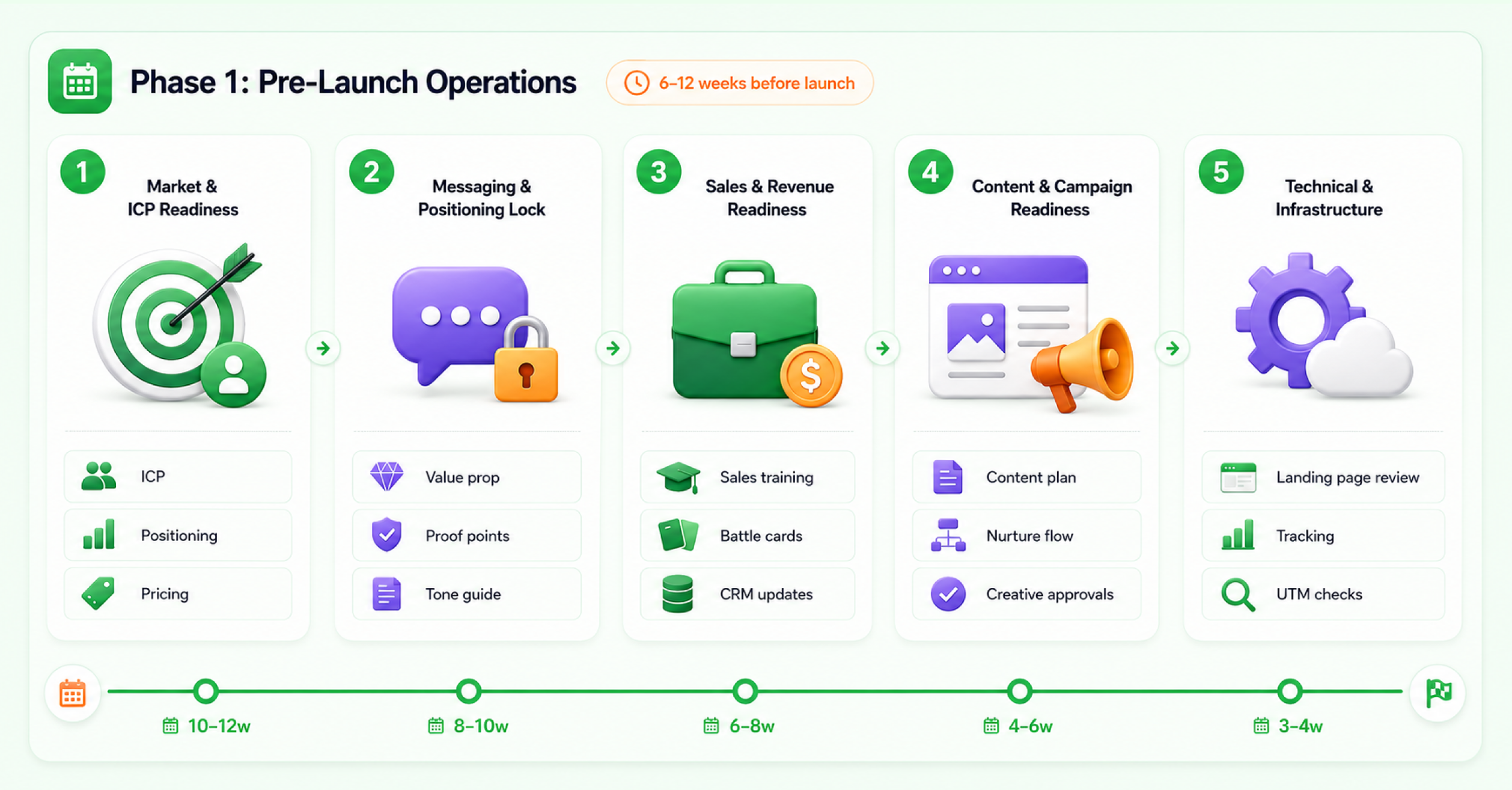
The pre-launch phase is where most launch quality is created because it sets the foundation before launch pressure begins and gives the team enough time to fix gaps early. This phase is not only about polishing final assets, but it also makes sure the strategy, systems ownership, and checks are strong enough to hold up as the launch moves closer.
Market and ICP Readiness Items
Start with a clear customer profile because the team needs the same view of who the launch is meant for. This profile should be understood across the teams responsible for marketing, sales, leadership decisions, etc.
Checklist items:
Checklist Item | Owner Role | Timing | Priority | Most Common Skip Reason |
Ideal Customer Profile documented and agreed cross-functionally | Product Marketing / Strategy | 10-12 weeks before | Critical | The ICP is defined in a strategy document, but never formally shared with sales and customer success. |
Competitive positioning completed and documented | Product Marketing | 10-12 weeks before | Critical | Competitive analysis is treated as a one-time exercise and not updated before launch. |
Pricing confirmed and signed off by leadership | Product + Finance | 8-10 weeks before | Critical | Pricing is still “in discussion” at launch, so sales quotes different numbers to prospects. |
Why This Matters
When the ICP is not clear, the campaign starts targeting too many people. If positioning is old, the sales team struggles to answer competitor questions with confidence. On top of that, if pricing is still not approved, the launch creates confusion right when the team needs speed.
That is why these decisions should be closed before execution begins. The team should align on the customer profile, positioning, pricing, channel, buying journey, etc., before the launch moves into production.
Messaging and Positioning Lock Items
Messaging should be settled before asset production picks up speed because teams need a shared direction before they create campaign assets. This does not mean every line needs to be final, but the value proposition, key messages, objections, proof points, and tone rules should be clear enough for every team to build consistent work.
Checklist items:
Checklist Item | Owner Role | Timing | Priority | Most Common Skip Reason |
Core messaging framework documented | Product Marketing | 8-10 weeks before | Critical | Messaging exists in one person’s head or one deck and never becomes the source of truth. |
Messaging tested with the target ICP | Product Marketing / Research | 8-10 weeks before | High | Messaging is written without customer validation, so resonance is assumed instead of confirmed. |
Tone and language guidelines applied across all launch assets | Marketing | 6-8 weeks before | High | The messaging document exists, but asset creators use different words across channels. |
Practical Tip
Create one messaging page that every team uses:
- One-line value proposition
- Primary buyer pain
- Three key messages
- Proof points
- Objection responses
- Words to use
- Words to avoid
Sales and Revenue Team Readiness Items
Many launches fail after demand is created because the sales team is not ready to manage that demand, and this is why sales readiness should begin weeks before launch instead of during launch week.
Checklist items:
Checklist Item | Owner Role | Timing | Priority | Most Common Skip Reason |
Sales team trained on product, ICP, objections, and competitive positioning | Sales Enablement | 6-8 weeks before | Critical | Sales training is scheduled in launch week, so the team receives new information days before customer calls. |
Battle cards and competitive objection responses created and distributed | Sales Enablement | 6-8 weeks before | Critical | Battle cards still reflect the old competitive set. |
CRM updated with new product, pricing, and ICP criteria | Revenue Ops | 6-8 weeks before | Critical | CRM is not updated until after launch, so reps log deals against the wrong product codes or pricing. |
Demo environment or sales collateral updated and approved | Sales / Product | 4-6 weeks before | High | Demo assets show old product UI or pre-launch features. |
Content and Campaign Readiness Items
A product launch GTM checklist needs more than a campaign calendar because the team also needs an asset plan with clear owners, assigned channels, approval stages, and launch timing.
Checklist items:
Checklist Item | Owner Role | Timing | Priority | Most Common Skip Reason |
Launch content plan created across blog, email, paid, social, and PR | Marketing | 8-10 weeks before | Critical | Content is planned, but not sequenced, so key assets are missing at launch. |
Lead capture and nurture flows built and tested | Marketing Ops | 4-6 weeks before | Critical | Lead forms are live, but nurture sequences are not built. |
Campaign creative assets produced and approved | Creative / Account | 3-4 weeks before | Critical | Creative approval is left to the final week, and revisions delay launch by 48-72 hours. |
Content Sequencing Tip
Do not list assets as a flat inventory. Sequence them around the launch timeline so each asset supports the right stage of the GTM plan.
- Awareness content before the announcement
- Launch day content at go-live
- Proof content after early traction
- Nurture content after lead capture
- Sales support content before the first call volume starts rising
This is where work management software for marketing teams can help because launch content does not live in one file. It moves through task ownership, approval stages, channel dates, and status changes.
Technical and Infrastructure Readiness Items
Technical readiness is often the difference between a measurable launch and an expensive guess.
Checklist items:
Checklist Item | Owner Role | Timing | Priority | Most Common Skip Reason |
Product or landing page live in staging and reviewed | Engineering / Marketing | 4-6 weeks before | Critical | The page is reviewed by marketing only, then legal or product finds issues at launch. |
Conversion tracking and UTM parameters set up and verified | Marketing Ops | 3-4 weeks before | Critical | Tracking is configured but not tested, so launch-day spend is unattributable. |
Technical Readiness Tip
Test tracking in the same environment where the campaign will run, because staging checks are useful, but production verification is the real test.
Phase 2: Launch-Ready Checklist (2 Weeks Before Go-Live)

This phase proves that the launch is ready before it goes live. An all-team GTM briefing works best when it runs like a tight kickoff, not a long meeting with no action owners. You can also read how to master a project kickoff meeting to understand this alignment.
Internal Alignment and Briefing Items
Internal alignment and briefing should confirm:
- What is launching
- Why the launch matters
- What is the core message
- Which team owns each part
- What risks could appear
- What the team should do if something goes wrong
Checklist items:
Checklist Item | Owner Role | Timing | Priority | Most Common Skip Reason |
All-team GTM briefing completed across sales, marketing, CS, and leadership | GTM Lead | 5-7 days before | Critical | The briefing is treated as optional, so misalignment appears on launch day. |
One-page GTM launch summary distributed | GTM Lead / Marketing | 5-7 days before | High | A long strategy deck is shared, but nobody has a short operating summary. |
What the One-Page Summary Should Include
The one-page launch summary should include:
- Launch date and timezone
- Launch owner
- Target ICP
- Positioning statement
- Offer details
- Channel plan
- Sales motion
- Support contact
- First-week KPIs
- Rollback owner
Campaign and Asset Final Approval Items
Approval should be clearly written and stored in a place where the team can access it easily.
Checklist items:
Checklist Item | Owner Role | Timing | Priority | Most Common Skip Reason |
Final campaign creative approved in writing | Account Manager | 72 hours before | Critical | Approval is assumed from prior review and a new stakeholder object on launch morning. |
Legal and compliance sign-off completed | Legal / Compliance | 72 hours before | Critical | Legal review is skipped under time pressure, and a public issue appears after launch. |
Approval Tip
Use a final approval checklist that says exactly what is approved:
- Copy
- Creative
- Landing page
- Claims
- Pricing language
- Offer terms
- Disclaimers
- Data collection language
Sales Enablement Final Check Items
Sales readiness should be rechecked shortly before going live, as launch details often change at the last minute.
Checklist item:
Checklist Item | Owner Role | Timing | Priority | Most Common Skip Reason |
Sales team final Q&A completed | Sales Leader | 48 hours before | High | Final Q&A is skipped, and unanswered questions appear in early customer calls. |
Tracking, Attribution, and Analytics Items
Tracking attribution and analytics are among the highest risk areas in any digital GTM checklist because a launch can look successful or broken based on the quality of the data behind it.
Checklist items:
Checklist Item | Owner Role | Timing | Priority | Most Common Skip Reason |
Attribution and tracking verified in production | Marketing Ops | 48 hours before | Critical | Tracking is verified only in staging, while production has a different setup. |
Goal completions and conversion events verified in GA4 real-time view | Marketing Ops | 48 hours before | Critical | Tracking configuration looks correct, but events are not firing. |
Google Analytics 4 documentation states that the Realtime report lets teams monitor activity as it happens, including events and conversions, which makes it useful for verifying launch activity before spend scales.
Contingency and Rollback Planning Items
Contingency and rollback planning give the team clear decision rules before problems appear. If an issue goes live without a response plan, then the team may spend valuable time debating the next step while the problem continues to affect the launch.
Checklist item:
Checklist Item | Owner Role | Timing | Priority | Most Common Skip Reason |
Rollback plan documented | GTM Lead | 24 hours before | High | No rollback plan exists, so first-day technical issues cause extended delay while teams debate response. |
Rollback Plan Basics
Key Details To Confirm:
- Who can pause campaigns
- Who can pull a page
- Which issue triggers rollback
- Who communicates with the internal team
- Who communicates with external stakeholders
- What should be restored first
Phase 3: Launch Week Operations Checklist

Launch week is where plans meet pressure because the team has to monitor fast and respond early while keeping every function aligned. The goal is not to create a perfect launch day but to catch issues quickly and keep the launch moving with control.
Day 0: Go-Live Confirmation Items
The first hour matters because a scheduled event does not always mean live. Every key item should be checked once the launch starts. So, the team knows what is active, what is working, and what needs immediate attention.
Checklist items:
Checklist Item | Owner Role | Timing | Priority | Most Common Skip Reason |
Campaigns, pages, and product features confirmed live at the scheduled time | GTM Lead / Marketing | Day 0, Hour 0 | Critical | A timezone issue makes launch assets go live early or late. |
Team members notified of go-live with monitoring responsibilities | GTM Lead | Day 0, Hour 1 | High | No internal go-live message is sent, and early issues are missed. |
Go-Live Tip
Create a launch-room message that includes:
- Live link
- Tracking link
- Ad account status
- Landing page status
- Monitoring owner
- Escalation contact
- Next check-in time
Day 1-3: Early Signal Monitoring Items
Early performance is not the final result, but it can still show where the launch needs attention. The team should watch for tracking gaps, lead quality issues, message mismatch technical errors, and sales feedback. This way, problems can be fixed before they affect the full launch.
Checklist items:
Checklist Item | Owner Role | Timing | Priority | Most Common Skip Reason |
Conversion tracking confirmed firing correctly in production | Marketing Ops | Day 0, Hours 1-3 | Critical | The tracking issue is not caught until day 3, and the spending data is lost. |
Sales team’s initial call volume and lead quality reviewed | Sales Leader | Day 1-3 | Critical | Sales does not monitor early signals, so objection patterns are missed. |
What to Monitor
Monitor:
- Form submissions
- Demo requests
- Source attribution
- Landing page behavior
- Ad disapprovals
- Early lead quality
- Sales objection patterns
- Customer support questions
Week 1: Sales and Marketing Sync Items
Sales and marketing should speak daily during launch week because early field signals can show what needs attention.
The meeting needs to capture:
- What buyers are asking
- What objections are coming up
- What message or asset may need a quick adjustment?
Checklist item:
Checklist Item | Owner Role | Timing | Priority | Most Common Skip Reason |
Sales-marketing daily sync established | GTM Lead | Day 1 | High | Daily sync is skipped after day 1, and sales insights never reach marketing. |
Daily Sync Agenda
Use a 15-minute agenda:
- Lead volume
- Lead quality
- Top buyer questions
- Objections heard
- Content gaps
- Campaign changes
- Blockers
Week 1: Customer-Facing Communication Items
The external announcement should feel coordinated across channels.
Checklist item:
Checklist Item | Owner Role | Timing | Priority | Most Common Skip Reason |
External announcement confirmed across all channels | Marketing | Day 0-1 | High | Organic social is scheduled, but PR outreach is late, and launch momentum fragments. |
Channel Tip
Use a launch channel checklist that includes:
- Website
- Product page
- Organic social
- Paid social
- Search campaigns
- PR
- Partner posts
- Sales outreach
- Customer success notes
Phase 4: Post-Launch Operations Checklist (Weeks 2-8)

Launch day is the beginning, not the end. Post-launch work helps teams protect the launch and fix weak points early, and it also helps turn initial interest into pipeline adoption or revenue.
Performance vs Launch KPIs: Weekly Review Items
Do not wait for the monthly report to understand launch health. Review performance every week so the team can spot issues early and make changes while the launch still has momentum.
Weekly KPI checks work better when they end with a decision and a next action, not a metric dump. Building marketing reports with 5day.io supports this decision-led reporting style.
Checklist item:
Checklist Item | Owner Role | Timing | Priority | Most Common Skip Reason |
Weekly KPI vs launch target review completed | GTM Lead / Analytics | Weekly, weeks 2-8 | Critical | KPI review moves to monthly, so early underperformance is missed. |
What to Review Weekly
The teams must track:
- Traffic
- Leads
- Signups
- Demo requests
- Trial activation
- Conversion rate
- Sales accepted leads
- Pipeline created
- CAC or CPL, where relevant
- Customer support themes
Sales Pipeline and Conversion Monitoring Items
Launch performance should not stop at marketing metrics.
Checklist item:
Checklist Item | Owner Role | Timing | Priority | Most Common Skip Reason |
Sales pipeline velocity and conversion reviewed against the baseline | Revenue Ops | Weekly, weeks 2-4 | Critical | The pipeline is reviewed without a baseline, so the team cannot tell if GTM moved the number. |
Pipeline Tip
Compare post-launch pipeline to:
- Pre-launch average
- Prior product launch
- Same period last quarter
- Target conversion rate
- Target deal size
Content and Campaign Optimization Items
Adjust weak variables when early performance shows a clear problem instead of keeping them unchanged only because they were part of the original plan.
Checklist item:
Checklist Item | Owner Role | Timing | Priority | Most Common Skip Reason |
Underperforming campaign elements identified and adjusted | Marketing | Week 2 | High | All campaign variables are held constant for four weeks, and preventable waste accumulates. |
What to Optimize
Review:
- Ad creative
- Audience segments
- Landing page CTA
- Offer wording
- Email subject lines
- Social angles
- Sales follow-up language
- Retargeting rules
Customer Success and Retention Handoff Items
A converted lead does not mean the launch work is finished because customer success still needs enough context to onboard early customers and support them well.
Checklist item:
Checklist Item | Owner Role | Timing | Priority | Most Common Skip Reason |
Customer success team briefed and handoff protocol confirmed active | CS Lead | Week 2 | Critical | Customer success handoff is skipped, and early customers feel unsupported. |
Learning Documentation and GTM Checklist Improvement Items
Every launch should improve the next one. A retrospective is where the next launch improves, not where the current launch gets archived. You can read about marketing project post mortem to know the “capture what worked and what failed” step closely.
Checklist item:
Checklist Item | Owner Role | Timing | Priority | Most Common Skip Reason |
Post-launch retrospective completed with structured debrief questions | GTM Lead | Week 6-8 | Critical | The retrospective never happens, and the same gaps repeat next launch. |
Retrospective Questions
Questions To Review After Launch:
- What worked better than expected?
- What failed or underperformed?
- Which checklist item prevented a mistake?
- Which checklist item was missing?
- Which team had the most unclear ownership?
- Which approval stage slowed the launch?
- What should be changed before the next launch?
The GTM Operations Checklist for Marketing Agencies in 2026: Running Client Launches
A marketing agency GTM checklist needs a clear responsibility split because the agency and the client do not own the same parts of the launch.
Area | Agency Responsibility | Client Responsibility |
Strategy support | Helps shape the GTM plan and campaign direction | Confirms business goals and launch priorities |
Campaign planning | Builds the campaign structure and execution plan | Approves the final launch direction |
Content and creative | Creates campaign assets and messaging drafts | Reviews assets and gives final approval |
Paid media | Sets up campaigns and manages optimization | Confirms budget and audience priorities |
Reporting | Tracks performance and shares updates | Reviews results and gives business context |
Product readiness | Supports communication around the product | Ensures the product is ready for launch |
Pricing | Can help frame pricing in campaign messaging | Owns final pricing and commercial decisions |
Sales training | Can support enablement content | Trains internal sales teams and confirms readiness |
Legal approval | Shares content for review | Gives legal and compliance approval |
Stakeholder alignment | Coordinates agency-side execution | Manages internal teams and decision makers |
If this split is not documented, then the agency can be held responsible for launch problems that sit outside its control.
How Agencies Adapt the GTM Checklist for Client Launches
For agency-led launches, the checklist should clearly show who owns each part of the work. Add three columns to make that split visible:
- Agency owner
- Client owner
- Approval dependency
This turns the checklist into a shared launch agreement because both sides can see responsibilities, approvals, and handoffs in one place.
Who Owns What: Agency vs Client Responsibility
Area | Usually Agency-Owned | Usually Client-Owned | Shared |
Campaign plan | Yes | Input only | Yes |
ICP validation | Support | Yes | Yes |
Pricing approval | No | Yes | No |
Sales training | Support materials | Yes | Yes |
Landing page copy | Yes | Approval | Yes |
Tracking setup | Yes or shared | Access | Yes |
Legal approval | No | Yes | No |
Launch reporting | Yes | Review | Yes |
Post-launch optimization | Yes | Decision support | Yes |
Running GTM Operations for Multiple Clients Simultaneously
Agencies often run several launches at once, which creates four common risks. These include:
- The same strategist is overloaded
- Approval dates overlap
- Client access arrives late
- Reporting gets inconsistent
A marketing agency project management platform can help when the client GTM work needs one clear view of deadlines, owners, blocked tasks, recurring launch templates, client approvals, etc.
5day.io positions itself as a marketing agency project management tool with controlled client access and campaign organization.
How to Use 5day.io to Manage Client GTM Launch Workflows?
5day.io can support agency GTM operations in five practical ways:
- Create one launch template for client GTM work
- Duplicate the template for each client launch
- Avoid rebuilding the same process every time
- Assign agency and client owners to each launch item
- Track approvals inside the launch workflow
- Use dashboards to monitor overdue tasks, blocked work files, and launch timing
5day.io offers templates for content production, email campaigns, social scheduling, and client onboarding. For agencies, this creates a more structured way to manage client GTM launches because recurring work stays visible and easier to track while the process becomes simpler to repeat.
The 2026 GTM Operations Variables: What Has Changed and What It Means for Your Checklist
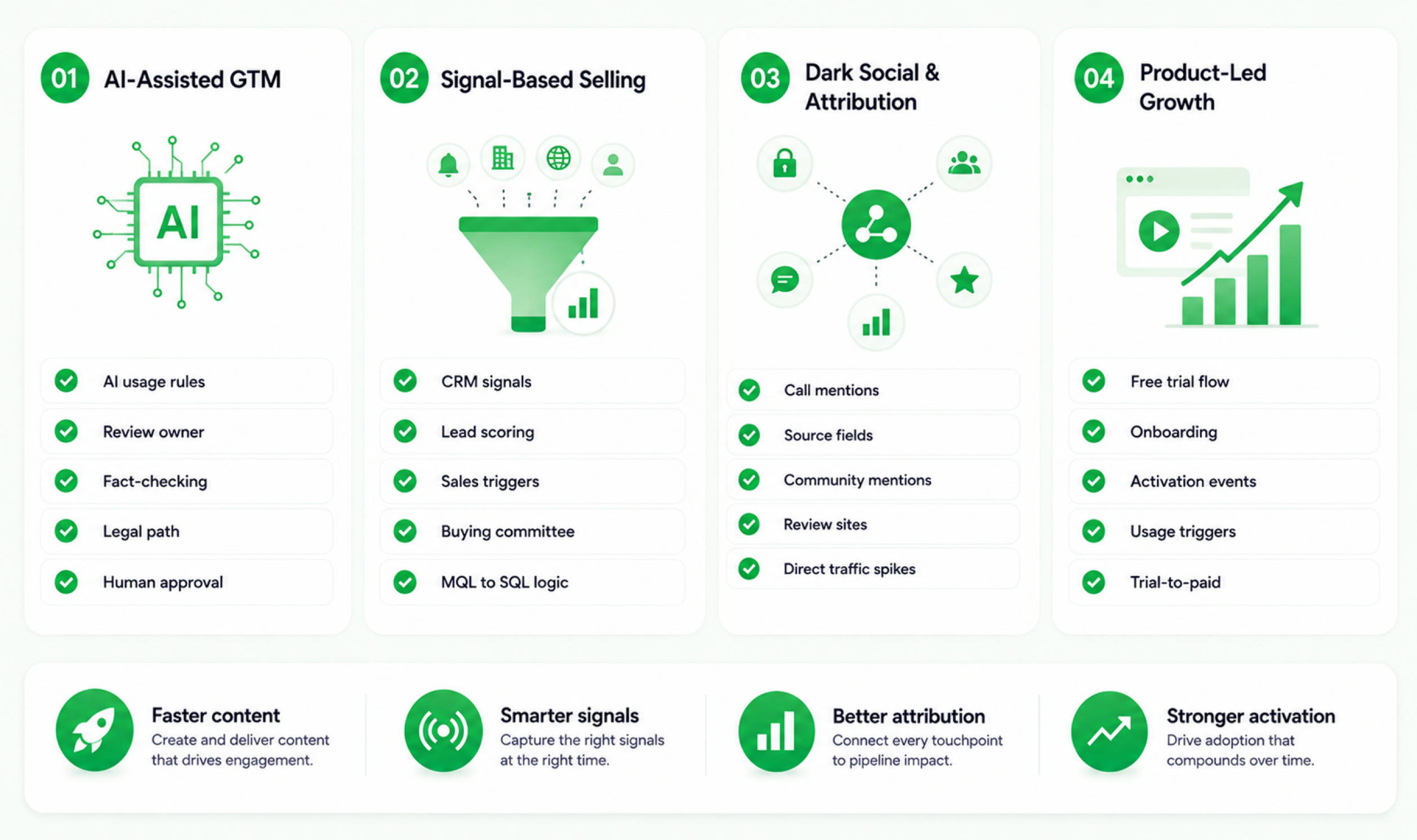 The GTM checklist that worked in 2022 may no longer cover what teams need in 2026 because buyer behavior, AI workflows, attribution, and sales engagement have drastically changed.
AI-Assisted GTM
AI can help speed up routine work by supporting research, first drafts, analysis, notes, reports, and ongoing improvements. Moreover, Human review is still important because judgment approvals, quality checks, and compliance cannot be left to automation.
Recent marketing data shows that 80% of marketers use AI for content creation and 75% use it for media production. This shifts the way GTM operations work because content can move faster, while reviews, compliance checks, and quality control may become the main slowdown.
Checklist impact
Add items for:
- AI usage rules
- Content review owner
- Fact-checking owner
- Legal review path
- Final human approval
- AI-generated claim verification
Signal-Based Selling
Signal-based selling means using buyer behavior, account activity, engagement patterns, intent data, etc., to decide which outreach should happen first.
In a modern GTM process, these signals help sales and marketing work with the same view of the buyer. They can reduce guesswork in lead scoring, support cleaner lead handoff, and help teams share the right content based on real-time buyer activity.
Checklist impact
Add items for:
- CRM signal fields
- Lead scoring rules
- Sales trigger definitions
- Buying committee mapping
- MQL to SQL handoff logic
- Sales content recommendations
Dark Social and Attribution Gaps
Dark social refers to private or hard-to-track sharing that happens outside normal attribution paths. It can happen in community group chats, DMs, Slack channels, WhatsApp, Reddit, LinkedIn comments, etc.
This matters because buyers often research and discuss options before they contact a company. As a result, launch performance may not always appear clearly through last-click attribution alone.
Checklist impact
Add qualitative monitoring for:
- Sales-call mentions
- “How did you hear about us?” fields
- Community mentions
- LinkedIn comments
- Reddit discussions
- Review-site movement
- Partner feedback
- Direct traffic spikes
Product-Led Growth Motions
Product-led growth changes the launch model because the product is not just what the campaign promotes. It becomes the channel that attracts users, helps them understand value, and moves them toward activation, conversion, expansion, or retention.
That implies a PLG launch cannot be managed like a sales-led launch because the first meaningful customer interaction may happen inside the product instead of through a sales conversation.
Checklist impact
Add items for:
- Free trial flow
- In-product onboarding
- Activation events
- Usage-based triggers
- Upgrade email sequence
- Product analytics
- Customer success alerts
- Trial-to-paid conversion tracking
The Complete GTM Operations Checklist Template: Free Download Structure
A strong GTM launch plan template should work as an operating document with clear role ownership instead of a blank spreadsheet that only lists tasks.
What to Include in the Template
Your GTM checklist for marketing should include these columns:
Column | Purpose |
Phase | Shows where the item belongs |
Category | Groups similar items |
Checklist item | Defines the work |
Owner role | Names who own it |
Timing | Sets when it should be done |
Priority | Separates critical from useful |
Skip risk | Explains what breaks if skipped |
Status | Tracks progress |
Notes | Captures context |
Approval required | Shows if a sign-off is needed |
Template Variants by Launch Type
SaaS Product Launch Variant
Add:
- Feature flag checks
- Pricing page update
- Product analytics
- Free trial flow
- Activation events
- Sales demo environment
- Help documentation
Agency Service Launch Variant
Add:
- Service scope
- Pricing sheet
- Sales deck
- Case studies
- Lead capture form
- Proposal template
- Delivery team capacity
- Client onboarding workflow
Physical Product or Campaign Launch Variant
Add:
- Inventory readiness
- Channel partner readiness
- Distribution plan
- Retail or marketplace pages
- Customer support scripts
- Launch offers
- Logistics fallback plan
How to Make the Checklist Repeatable
A checklist becomes repeatable when it is:
- Stored in one shared system
- Assigned by role
- Copied into each new launch
- Updated after retrospectives
- Connected to approvals
- Visible to all involved teams
A static checklist can help with one launch, but a workflow-based checklist improves every launch after that. This is where project management software becomes useful because the checklist moves from a task list into live execution.
5day.io can support GTM launch execution by helping teams manage:
- Campaigns
- Clients
- Deliverables
- Tracking
- Reusable templates
- Dashboards
- Marketing operations
This makes it useful for turning a GTM checklist into a working launch system where task owners’ approvals and progress stay visible.
A Practical GTM Checklist Example

Here is how a short product go to market checklist might look for a B2B SaaS feature launch.
Phase | Item | Owner | Status |
Pre-Launch | ICP update approved | Product Marketing | Done |
Pre-Launch | Messaging tested with 5 target customers | Product Marketing | In progress |
Pre-Launch | Sales battle card updated | Sales Enablement | Not started |
Pre-Launch | Landing page staged | Marketing / Product | Done |
Launch-Ready | Tracking verified in production | Marketing Ops | Not started |
Launch Week | Sales feedback reviewed daily | Sales Leader | Scheduled |
Post-Launch | Week 2 KPI review completed | GTM Lead | Scheduled |
Post-Launch | CS handoff completed | Customer Success | Not started |
This example is smaller than a full checklist to give you an idea about how to run GTM operations for multiple clients simultaneously, but it shows:
- The logic
- The item visibility
- The owner is clear
- The launch phase is obvious
- The status tells the team what needs attention.
Key Takeaways: A GTM Checklist That Executes, Not Just Plans
A go to market checklist is not the strategy itself. It is the operating layer that turns strategy into clear actions with owners, timelines, checks, and launch execution.
The strongest GTM checklists are:
- Phase-based
- Role-assigned
- Timed
- Tied to approvals
- Built for post-launch learning
- Adjusted by launch type
- Visible inside the team’s work system
Strategy tells you where operations tell you how.
A strong strategy can still fail if the operations checklist is weak. A clear, owned, and repeatable checklist gives the team the control needed to launch with confidence instead of reacting to problems in chaos.
Ready to turn your GTM checklist into a live launch workflow? Try 5day.io now and sign up for free on the Scale plan to manage owners, approvals, timelines, dashboards, and client launch tasks in one place.