
Open your automation tool and count the workflows you can actually explain. Most marketing teams already run some automation. A welcome email, a lead-routing rule, but what they usually can’t tell you is who set it up, or why. A tool got picked because a competitor used it. All of it still runs, and everyone assumes someone else understands why.
HubSpot’s 2026 State of Marketing Report puts numbers on the problem: 93% of marketers automate part of their job, and 47% say automation makes their marketing more efficient. That 46-point gap is the whole story.
The goal is to automate the right things: the repetitive and predictable work that doesn’t need another person hovering over it.
This guide gets into the practical side of it, how automation works, what to automate first, which tools are worth looking at, how to build workflows that hold up, and how to avoid turning your marketing stack into a maze of rules.
What Is Marketing Automation?
Marketing automation is software that runs marketing tasks on rules you set. An event comes in, the system compares it to the conditions you wrote, and runs the action when they match.
It takes over the work that repeats on a predictable pattern: follow-ups, list updates, and recurring social post . Your marketers keep the work that needs a judgment call.
A few common marketing automation examples:
- A form submission automatically routes the lead to the right rep based on region
- A blog post going live auto-generates the social distribution tasks and assigns them to your content team
- A deal moving to “closed-won” triggers an onboarding checklist for the client
- An unopened email after three days triggers an automatic follow-up send
That’s the difference between automation running well and automation running unnoticed. Plenty of teams have a workflow humming along in the background that nobody could explain if you asked them why it exists. Set it up on purpose, and it saves hours. Inherit it from someone who left, and it’s just a black box doing something to your contact list.
Also Read: 15 Marketing Automation Examples You Can Set Up in 5day.io. See the trigger-condition-action model in action.
How Does Marketing Automation Work?
Three parts do the work: something kicks it off, a rule checks whether it should happen, and an action follows. Every workflow you’ll ever build is a variation on that loop.
Here’s how that plays out step by step:
- Something triggers it like a form fill, a page visit, a tag landing on a contact
- The system checks that trigger against a condition you’ve set. Only notify sales if the contact is actually in their region. Only escalate if the task has been sitting for more than two days
- Once the condition holds up, the action fires: an email goes out, a task gets assigned, a record updates itself
- The result gets logged, so your team can see what happened and when
One trigger can drive several channels at once. A single form submission sends the confirmation email, pings the right sales rep, and opens a follow-up task, all from that one event, with nobody juggling with multiple tools.
Specificity is what makes or breaks the rule. “Notify the team when something important happens” is the kind of instruction a person understands and a system doesn’t, so it just never fires. Tighten it to “notify the account manager when a deal moves to closed-won,” and now there’s an exact trigger, an exact person, and nothing left for the software to guess at.
The Benefits of Marketing Automation
The biggest benefit of marketing automation is what your team gets back: time. When the repetitive work runs on its own, your team spends more hours on strategy and creative work rather than manual follow-ups.
Here’s what that looks like across a team:
- A lead who fills a form gets routed and followed up with right away, not left sitting in an inbox until someone remembers
- No follow-through gaps – every contact gets the same welcome sequence, whether or not the person who set it up is on vacation
- Records update themselves as people click and download, so reporting doesn’t hinge on someone remembering to update a spreadsheet
- One trigger, like a blog going live, can kick off distribution tasks, approval requests, and social scheduling all at once
- Ownership stops being a guessing game. Automated task assignments mean everyone knows exactly what they’re on the hook for and when
Agencies juggling five client accounts feel this the most. Approvals, deadlines, and handoffs are exactly where things slip when someone’s tracking them by hand across that many accounts at once. Automate the parts that repeat, client notifications, onboarding checklists, and account managers stop spending their day on status updates. They get that time back for actual strategy work which is what marketing agency project management should free you up to do
None of this means automation replaces judgment. It just means your team’s judgment goes toward the right things.
Also Read: How to Manage Your Marketing Workload in 2026. A closer look at where marketing teams actually lose their hours, and what to fix first.
Top Marketing Automation Tools to Compare in 2026
The right tool depends on your team size and how complex your marketing automation workflows get, but a few platforms consistently show up at the top of the reviews. This also answers what are the marketing automation tools most teams actually compare. According to G2’s marketing automation category rankings, here’s how the major players stack up:
Tool | Best For | G2 Rating | Standout Feature |
HubSpot Marketing Hub | Teams that want automation built into their CRM | 4.4/5 (14,286 reviews) | Seamless integration across marketing, sales, and service data |
ActiveCampaign | Email-led customer journey automation | 4.4/5 (14,248 reviews) | Deep workflow branching for multi-step nurture sequences |
Klaviyo | E-commerce email and SMS | 4.6/5 (1,315 reviews) | Purpose-built automations for cart abandonment and post-purchase flows |
Insider | Cross-channel personalization at scale | 4.8/5 (1,399 reviews) | AI-driven journey orchestration across web, app, and email |
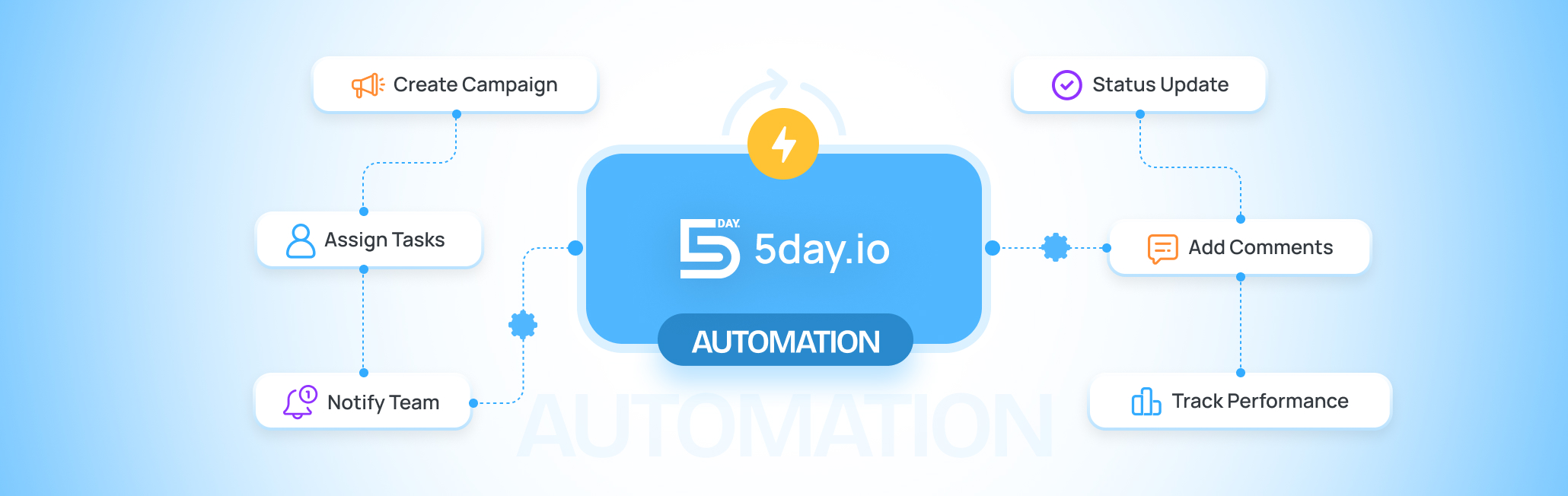
Whichever platform you land on, it stops at the marketing side. It won’t tell you if the campaign’s actually been approved, or who dropped the ball on a deadline last week. That’s the part 5day.io covers instead, a marketing team project management tool built to track exactly that. Set a draft to ping whoever’s approving it once it’s ready, let that approval move straight to design, and if something sits too long untouched, it escalates on its own, no manager digging through Slack to figure out why.
How to Get Started With Marketing Automation
There’s no checklist worth following here. Pick one workflow, build it well enough that it actually saves time, then move to the next one once this one’s earned its place.
Here’s the step-by-step approach:
- First, before touching any tool, nail down three things: who the audience segment really is, one repeatable task that’s genuinely worth automating (redistribution tasks are a common first pick), and a specific person who’s agreed to own the workflow once it’s live
- Resist automating your whole funnel at once. Find the one task eating the most manual time and start there, nothing else
- Before opening any software, write the logic down in plain English: “When X happens, if Y is true, do Z.” Nine times out of ten, an automation that misfires traces back to a rule nobody bothered to make this exact
- Then pick a tool that fits how the team already operates rather than the other way around. Already living inside a CRM? A platform like HubSpot that’s built into one makes sense. Just automating email? Something lighter gets the job done without the extra complexity
These same marketing automation tactics work whether you’re using an enterprise platform or something much simpler. And once the marketing platform is chosen, you still need marketing ops software to run the actual work behind it, who’s building what, and by when.
Marketing Automation Best Practices for Agencies and B2B Teams
Marketing automation for agencies is a different job than running it for one in-house brand, especially once you’re managing eight client accounts instead of one. Every extra client adds another approval chain, and a marketing automation strategy built around one brand’s process usually falls apart the second it’s stretched across five different ones.
A few things worth getting right:
- Build workflows per client, not one shared workflow for everyone, Client A’s approver isn’t Client B’s
- Automate the approval routing, not the publish decision, a human should still say yes on anything client-facing
- Score B2B leads on intent, one pricing page visit often beats ten blog reads
- Loop sales in before changing any scoring rule that feeds their queue
- Write down why a workflow exists, so the next account manager isn’t guessing
Most of this comes down to one thing: automation should speed up the handoff between people, not replace the person making the call. That’s really what solid b2b marketing automation best practices looks like in agency work.
Also Read: Top Marketing Agency Tools in the US to Scale Your Stack (2026). A rundown of the tools agencies are stacking together this year.
Common Marketing Automation Mistakes (And How to Avoid Them)
Most automation problems aren’t technical. They come from rules that were vague, copied, or never revisited once they went live.
The mistakes that show up most often:
- Automating before mapping the process: Turning on a tool before writing down the actual steps means you’re automating guesswork, not a real workflow
- Writing vague trigger conditions: “Notify the team when something’s urgent” won’t fire, because the software doesn’t know what urgent means. Be specific about the exact trigger and condition
- Copying a template without adjusting it: A lead-scoring rule built for e-commerce doesn’t fit a six-month B2B sales cycle
- Setting it and forgetting it: A workflow built a year ago and never checked since is often quietly sending the wrong message to the wrong list
- Skipping the small test run: Rolling a new automation out to your full list before testing it on 50 contacts turns a small bug into a big one
- No one owns the workflow: If nobody’s responsible for reviewing it, no one notices when it breaks
Most of these problems don’t need new software to fix. Somebody built the workflow when the team was smaller and the funnel worked differently, and now, eighteen months later, it’s still running exactly as written, doing something nobody would actually approve of if they looked at it today. Almost nobody looks. Put a recurring reminder on the calendar, check in on what’s actually live every few months, and that habit alone will catch more problems than any new platform would. more.
Start automating: your next move
Every guide like this tells you to automate more. Here’s the part most skip: the teams getting the most out of marketing automation aren’t the ones with the most workflows running. They’re the ones willing to turn workflows off.
Whatever workflows survive that review still need someone to own them, sign off on changes, and notice when something needs a second look, which is exactly what 5day.io is there for.
Try 5day.io free and give your team a place to manage the work behind the automation.
Frequently Asked Questions
What is marketing automation?
Marketing automation is software that runs marketing tasks on its own, once you've set the rules, so email sequences, lead scoring, CRM updates, and reporting happen without someone triggering each step by hand. That's what marketing automation is used for: replacing repetitive work so marketers can focus on strategy.
What's the difference between marketing automation and email marketing?
Email marketing is one channel. Marketing automation is the system running behind it, triggered by behavior instead of a schedule, and it also covers CRM updates, lead scoring, and reporting. Email marketing sends a newsletter to everyone on Tuesday. Automation sends a personalized sequence based on what one lead did.
What are the best marketing automation tools?
HubSpot for agencies needing CRM-connected, multi-channel automation. ActiveCampaign for email-first teams. Klaviyo for e-commerce. Zapier for connecting tools you already use. The right pick depends on your CRM, budget, and channel mix more than any ranking.
How much does marketing automation cost?
Entry-level platforms run $13 to $29 a month, mid-tier like HubSpot Starter runs $50 to $200, and enterprise tools start around $895. First-time setup adds $1,500 to $8,000 if outsourced. Most small teams land at $2,000 to $12,000 in year one, easily justified if it saves even a few hours a week.
What are examples of marketing automation workflows?
A welcome sequence triggered by a form fill. A nurture sequence triggered by a content download. A sales handoff triggered by a lead score. A re-engagement email after 90 days of inactivity. A client report that compiles and sends itself every month. These are the marketing automation examples worth building first.
When should a business start using marketing automation?
Once there's a real buyer journey, a working way to capture leads, at least 200 to 500 engaged contacts, and some existing content to send. Skip it if the list is under 100 people or there's no content ready. The rule of thumb for any marketing automation plan: automate something you've already proven works manually, don't automate a guess.
What's the difference between marketing automation and a CRM?
A CRM stores your contact and deal data. Marketing automation acts on that data, sending campaigns and running workflows automatically. One holds the information, the other uses it. Automation without a CRM behind it just gets generic.
Can marketing automation replace marketers?
No. It handles the repetitive, rule-based work, emails, scoring, scheduling, so marketers can spend time on strategy and creative decisions instead. It can't do judgment calls or handle anything genuinely new. Treat it as set-and-forget, though, and it quietly stops working.