
When was the last time you knew, with confidence, what everyone on your marketing team was working on? If you had to pause and think, you’re not alone and that hesitation is exactly where deadlines start slipping.
Marketing team workload management is the difference between a team that runs on clarity and one that runs on guesswork. Campaigns pile up, content requests shift last minute, and priorities change overnight. Without a system, your best people burn out while others sit idle.
This guide breaks down workload management for marketing teams: what it means, why it matters, and how to build a system that keeps your team balanced and productive.
What is Marketing Team Workload Management
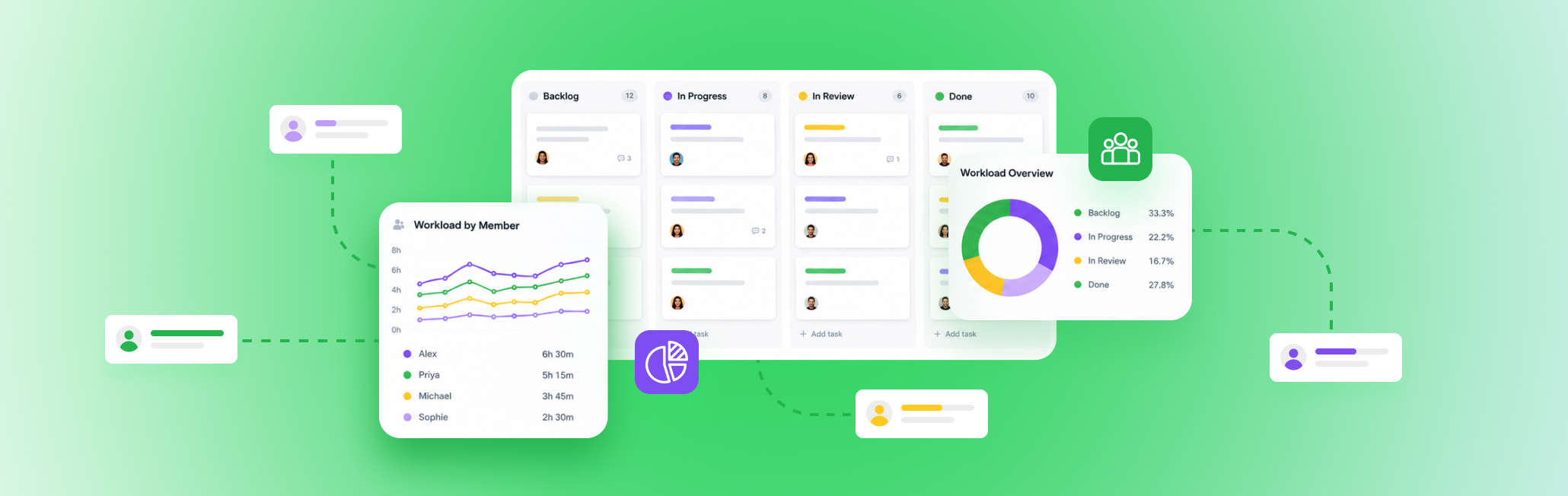
Workload management is how you make sure work goes to people who actually have room for it. In practice, it means tracking what everyone’s carrying and rebalancing when someone’s plate gets too full. For a marketing team, that could be as simple as knowing your designer is booked solid before promising a client new creative by Friday.
Team workload management is about matching the right work to the right person, at the right time, without anyone getting buried or left idle.
Many people confuse this with related terms. Here’s how they’re different.
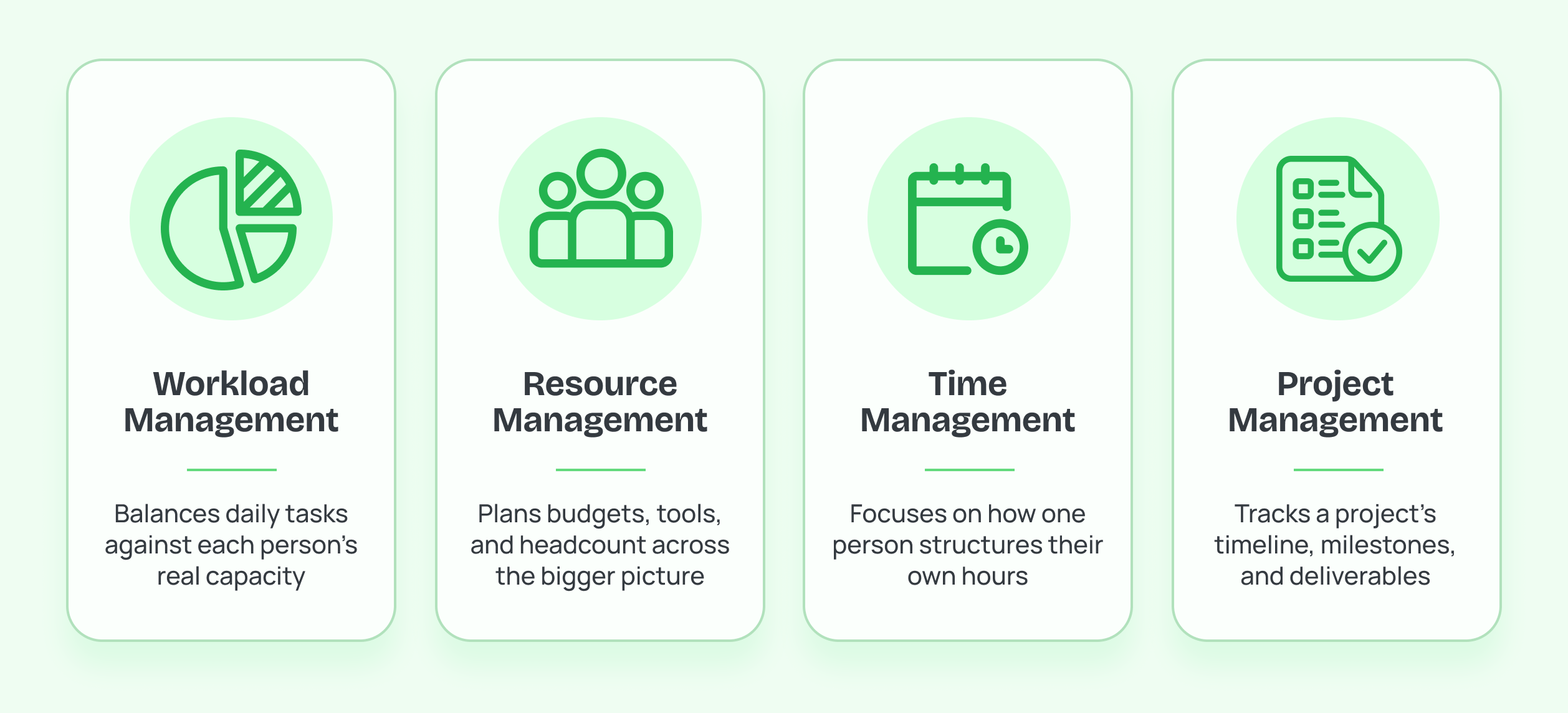
Workload Management vs. Resource Management
Resource management for marketing teams looks at the bigger picture. You look at budgets, tools, headcount, and other assets your team needs. Workload management zooms into the daily task level, who’s doing what and how much of it.
Workload Management vs. Time Management
Time management is personal. It’s how one person structures their own hours. Employee workload management is a team-level view, it looks at how work is distributed across everyone, not just how one person spends their day.
Workload Management vs. Project Management
Project management tracks a project from start to finish: timelines, milestones, deliverables. Workload management asks a different question, does the person assigned to this task actually have room for it right now?
Most marketing teams already track projects, but few actually track workload. By understanding that gap, you can eliminate missed deadlines, and uneven output and also mitigate burnout.
Signs Your Marketing Team’s Workload Is Unbalanced
An unbalanced workload rarely announces itself. It shows up in small cracks first, then in missed deadlines and burned-out team members.
The most common crack: the same two or three people get pulled into every campaign while others wait for assignments. That’s a team workload management gap. Work is being assigned based on visibility instead of capacity.
Missed deadlines follow a similar pattern. Campaign plans look realistic on paper, yet dates keep slipping because the people responsible are already juggling multiple high-priority initiatives. According to the Project Management Institute (PMI), only half of projects meet a modern definition of success, while 13% fail outright and 37% only partially deliver their intended results. Execution breaks down when teams struggle with complexity and coordination.
Quality is usually the next thing to suffer. Missed brand guidelines and publishing errors often get read as poor performance when they’re really signs of a stretched team.
Then there’s the quietest signal of all: your best people slowly burning out. High performers attract more work because they’re reliable, and over time that imbalance turns into stress, disengagement, and eventually attrition if employee workload management isn’t addressed. McKinsey reports that one in five employees experiences burnout, making workload planning an organizational challenge rather than an individual one.
Finally, watch how your managers assign work. If they have to check multiple spreadsheets, scroll through Slack, or ask around before handing out a task, you have a visibility problem. An effective workload management system should make team capacity instantly visible. PMI’s latest Pulse of the Profession found that teams that manage complexity effectively are five times more likely to deliver successful projects.
Major Challenges Marketing Teams Face with Workload
Marketing teams face a specific kind of chaos that other departments don’t always deal with. Understanding these challenges is the first step toward fixing them.
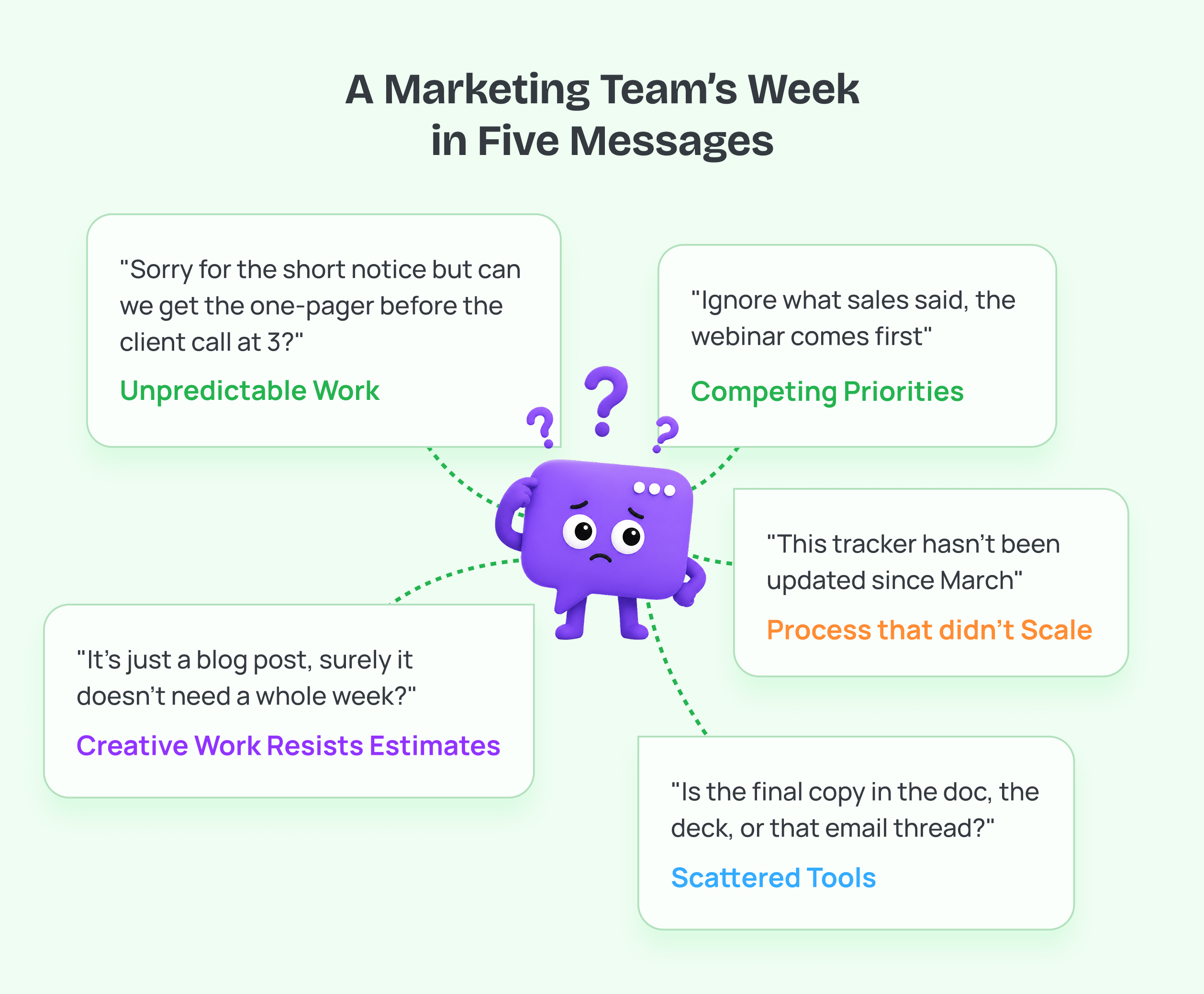 Work doesn’t arrive in a predictable flow
Sales needs a one-pager by tomorrow. Leadership wants a campaign brief by Friday. A client asks for last-minute creative changes. Marketing work is reactive by nature, which makes workload planning harder than in departments with more predictable cycles.
Multiple stakeholders, multiple priorities
A single marketer often reports to a campaign lead, a brand manager, and a client, all with different urgent asks. Without a shared view of capacity, everyone assumes their request is the priority.
Creative work resists easy estimation
Writing a blog post might take two hours or two days, depending on research depth and revisions. This makes marketing team capacity planning trickier than estimating, say, a fixed administrative task.
Tools are scattered across the team
Content calendars in one tool, tasks in another, approvals over email or chat. According to McKinsey’s research on collaboration tools, employees can lose several hours a week simply switching between disconnected platforms and searching for information. That’s time not spent on actual marketing work.
Growth outpaces process
A five-person team can track tasks in a spreadsheet. A fifteen-person team can’t. Many marketing teams manage your workload the same way they did at half their size, until the system quietly breaks down.
How to Assess Your Team’s Real Capacity, Step by Step
Before you can fix an unbalanced workload, you need an honest picture of who has room and who doesn’t. Here’s how to get there.
Step 1: List every active task
Small recurring tasks (weekly reports, minor edits, internal reviews) eat up time just as much as big campaigns. Missing these gives you a false read on capacity.
Step 2: Assign a realistic time estimate to each task
Instead of only tracking due dates, estimate the effort required for each task using hours, story points, or a simple Small–Medium–Large framework. This makes it easier to compare work across projects and identify overload before it happens. Ask your team how long tasks actually take. Creative work, in particular, often takes longer than the calendar suggests.
Step 3: Map tasks against actual working hours
A 40-hour week rarely means 40 hours of task time. Meetings, reviews, and admin work eat into that. Account for this before assigning new work.
Step 4: Look for patterns, not just totals
One person might have five tasks and be maxed out, while another has ten smaller ones and still has room. Total task count matters less than total time required.
Step 5: Reserve capacity for unexpected work
Marketing rarely goes exactly to plan. If you assign every team member’s time down to the last hour, there’s no room left to absorb the urgent work mid-week. Build in a buffer, ideally 15-20% of each person’s week, so unplanned requests don’t derail everything else already in progress. Teams that skip this step end up firefighting instead of following their plan.
Step 6: Revisit capacity regularly
Workload management strategies fail when capacity is assessed once and never revisited. Priorities shift weekly in marketing. Your capacity view should shift with it.
How to Prioritize and Distribute Work Across Your Marketing Team
Once you know your team’s real capacity, the next step is deciding what gets worked on first and who does it. This is where most workload management strategies either work or fall apart.
How to Prioritize Workload
Not every task deserves equal urgency, even when everyone asking says theirs is urgent. A simple way to sort tasks:
- Deadline-driven work – Campaigns or deliverables tied to a fixed external date
- High-impact work – Tasks tied directly to revenue or key business goals
- Maintenance work – Recurring tasks that keep things running but aren’t time-sensitive
- Nice-to-have work – Ideas and improvements with no immediate deadline
When capacity is tight, work through this list in order. Nice-to-have tasks wait; deadline-driven work doesn’t.
Match tasks to skills, not just availability
Giving a task to whoever’s “free” often backfires if it’s not their strength. For example, assigning a complex landing page to a social media manager might reduce one person’s workload but slow the project overall. Instead, distribute work based on expertise while ensuring specialists don’t become permanent bottlenecks.
Spread work evenly across the week
Avoid stacking all deadlines on Friday. Spreading due dates across the week gives your team breathing room and avoids the Thursday-night scramble.
Communicate the “why” behind priorities
When people understand why one task jumped the queue, they’re less likely to feel like the process is random. This builds trust in how you manage your workload as a team, not just as individuals.
Harvard Business Review’s research on team performance has found that unclear prioritization is one of the biggest drivers of workplace stress and disengagement. Marketing teams that make prioritization visible tend to see fewer last-minute fire drills.
What to Do When Someone Is Over Capacity?
Even with good planning, someone will eventually be overloaded. What matters is catching it early and having a clear response.
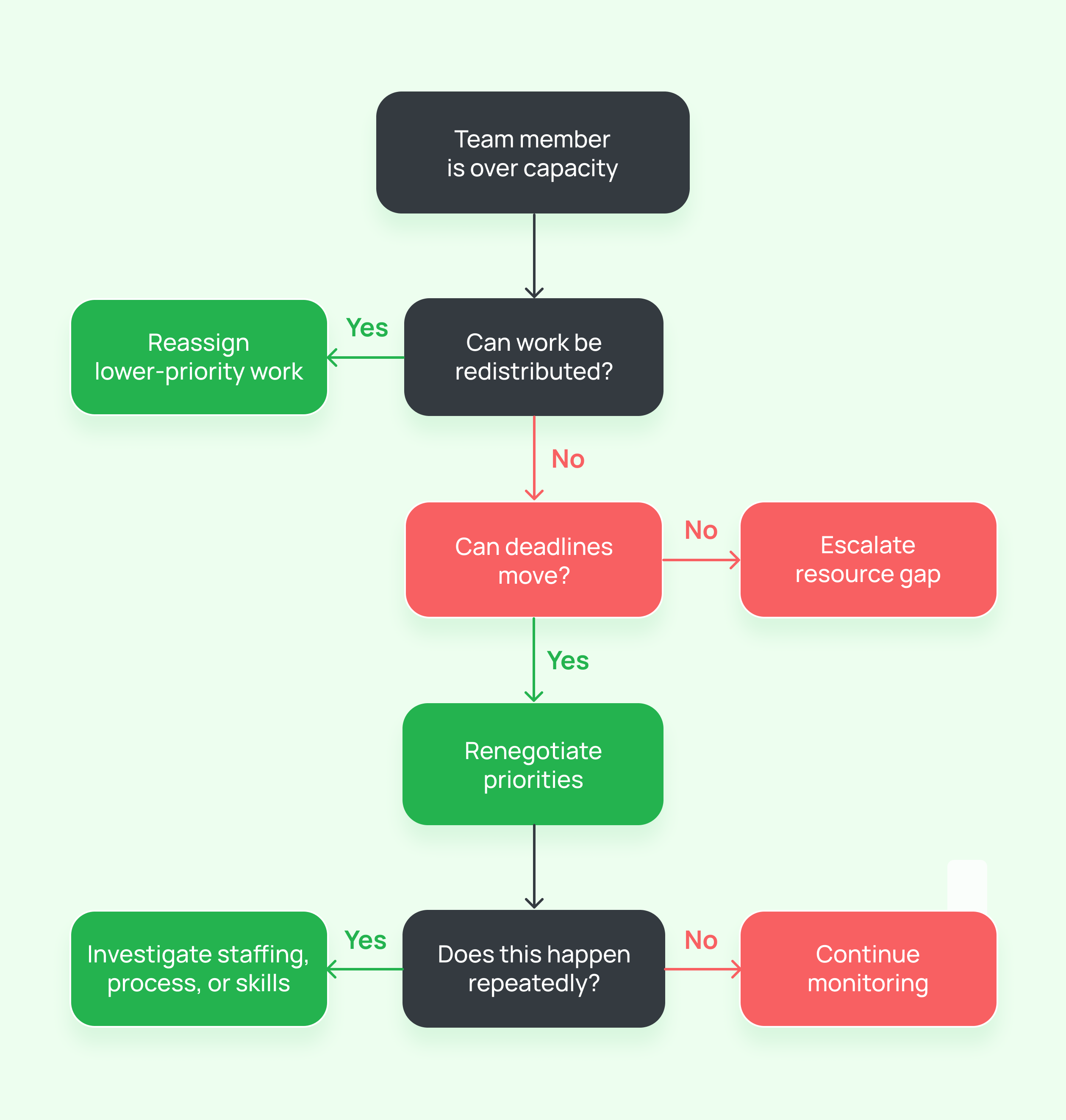
- Spot it before they say it out loud: Many employees won’t flag that they’re overwhelmed until it’s already affecting their work. Watch for signs like slipping deadlines, shorter responses, or a sudden drop in output quality. Employee workload management works best when it’s proactive, not reactive.
- Redistribute, don’t just add hours: The instinct is often to ask the person to “push through.” A better approach is to look at their task list and move lower-priority items to someone with more room, or push soft deadlines where possible.
- Renegotiate deadlines when redistribution isn’t enough: Sometimes there’s genuinely no one else to hand work to. In that case, have an honest conversation with stakeholders about which deadline can move. It’s a better outcome than late, rushed work from a burned-out team member.
- Look at the pattern: If the same person is consistently over capacity, that’s rarely a one-off scheduling issue. It usually points to a deeper gap, like being understaffed for the workload, or one person’s skills getting stretched across too many task types.
According to Gallup, employees who frequently experience burnout are 2.6 times more likely to be actively seeking a new job and 63% more likely to take a sick day, demonstrating how unmanaged workloads affect both productivity and retention.
The takeaway: Overcapacity is easier to fix early. Redistribute work, renegotiate deadlines when needed, and pay attention to repeat patterns, not just one bad week.
How to Select the Right Workflow Management Software
Good intentions around workload management fall apart without a system to back them up.
Selecting the right work management software requires understanding which capabilities matter most for enterprise teams. These features form the foundation of sustainable workload management and long-term success.
Essential capabilities for enterprise workload management include:
- Real-time capacity visibility: See current workloads across your whole team instantly, so overload gets caught before it turns into burnout
- Skill-based assignment: Tag team members by skill, so work goes to the person with the right expertise, not just whoever’s free
- Automated workload balancing: Get alerts or redistribution suggestions the moment someone crosses their capacity threshold
- Integration capabilities: Connect with your project management, HR, and communication tools instead of adding another disconnected system
- Customizable reporting: Pull insights that make sense for whoever’s looking, whether that’s a team lead or a leadership review
- Flexible views: Switch between Kanban, Gantt, and Calendar views depending on whether you’re tracking daily status, campaign dependencies, or deadline spread
Capacity Planning Checklist by Marketing Role
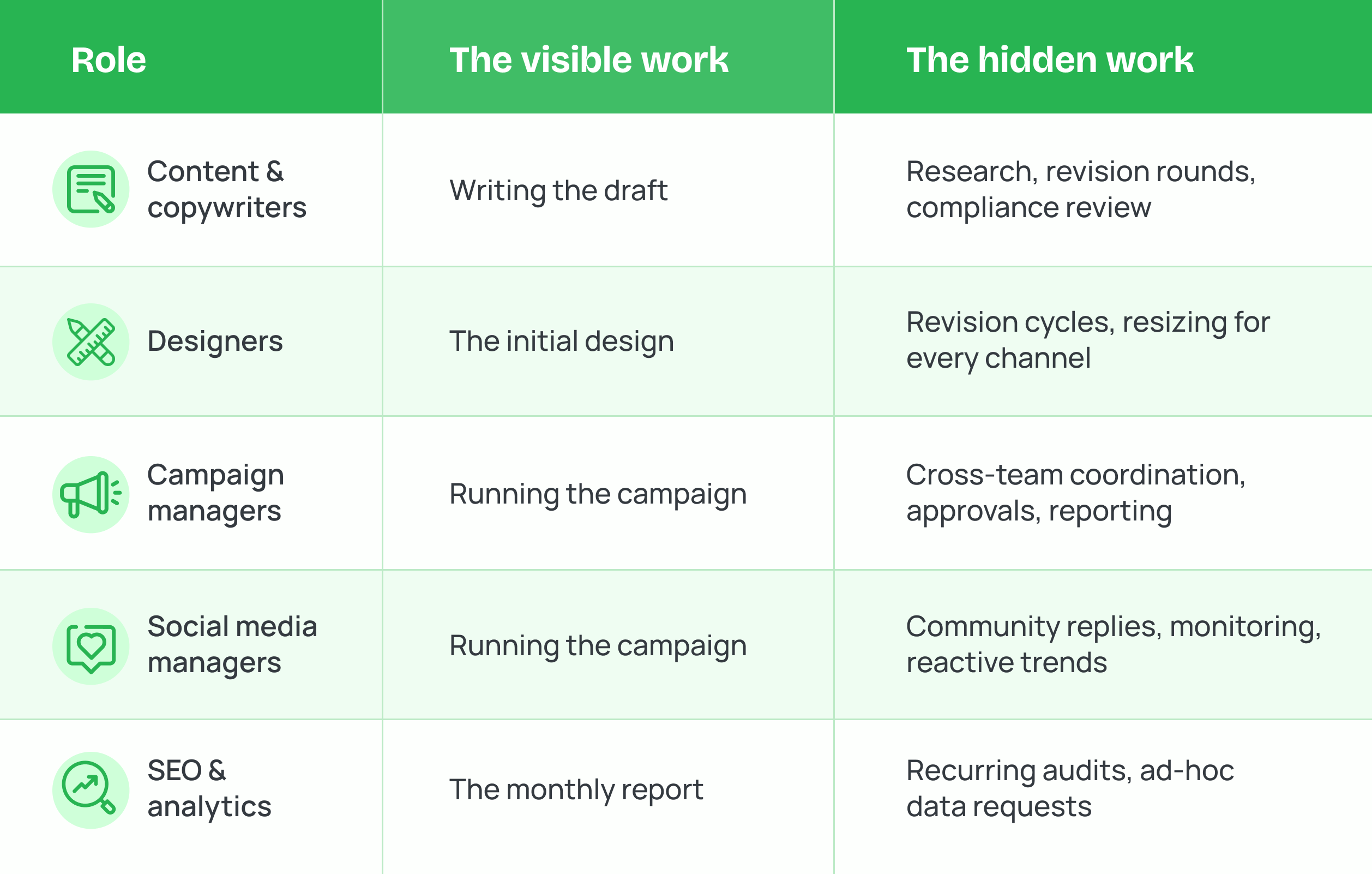
Different roles on a marketing team hit capacity limits in different ways. A generic checklist misses this. Here’s a detailed, role-by-role checklist to guide your marketing team capacity planning.
Content and Copywriters
- Track time by task type: research, drafting, and revisions each take different amounts of time and should be estimated separately
- Account for revision rounds upfront, not just the first draft, since stakeholder edits often add hours that go unaccounted for
- Separate short-form content (social copy, emails) from long-form content (blogs, whitepapers) when estimating time
- Leave a buffer for legal or compliance review on regulated content, since this timeline is rarely in the writer’s control
- Track SEO research and keyword mapping time separately from writing time
Designers
- Estimate time for revision cycles separately from initial design time, since most design work goes through multiple rounds
- Separate quick-turn requests (social graphics, banner ads) from long-form projects (ebooks, decks, campaign kits)
- Track time spent on asset resizing and repurposing for different channels, which often gets missed in initial estimates
- Leave room for last-minute creative requests tied to sales or client asks
Campaign Managers
- Account for coordination time across teams
- Build in time for reporting and post-campaign analysis, which often gets squeezed out when a new campaign starts
- Track parallel, overlapping campaigns separately, since running two campaigns at once isn’t double the work, it’s often more
- Estimate stakeholder update and approval cycles as their own task, not as a side effect of “managing the campaign”
- Leave buffer time for vendor or agency coordination delays outside the team’s direct control
Social Media Managers
- Separate planned content creation from real-time community management and response time
- Account for reactive, unscheduled work like newsjacking or trend-based posts, which can’t be planned in advance
- Track time spent monitoring brand mentions and engagement, which often runs in the background of other tasks
- Estimate content repurposing time separately for each platform, since one asset rarely fits all channels as-is
- Leave room for crisis or reputation management response time, even if it rarely happens
SEO and Analytics Specialists
- Track research and reporting cycles separately from hands-on execution work
- Account for recurring audits and monitoring tasks, which are easy to underestimate since they repeat quietly in the background
- Leave room for ad-hoc data requests from other teams, since these interrupt planned work without warning
- Estimate time for tool and dashboard maintenance separately from analysis time
- Track time spent translating data into recommendations, not just pulling the numbers
Marketing team workload management ultimately comes down to one thing: knowing where your team’s time is actually going, instead of assuming everyone has room for one more task.
Teams that get this right don’t necessarily work harder. They just stop relying on memory, guesswork, or whoever’s most visible in the moment. Capacity becomes something you can see, not something you find out about after a deadline slips.
That visibility is exactly what 5day.io brings to your workspace, workload, priorities, and capacity, all in one place, so nothing depends on chasing updates or hoping the plan holds.
How 5day.io Helps with Marketing Team Workload Management
Most of what makes workload management hard is the daily friction, not knowing where a task stands, chasing someone for a handoff, realizing on Thursday that three deadlines landed on the same day.
5day.io, takes that friction out. Work lives in one shared workspace, but each person sees it the way they like. Campaign managers follow their timelines in Gantt. Content leads drag drafts across a Board. And one look at the calendar tells you Friday is overloaded.
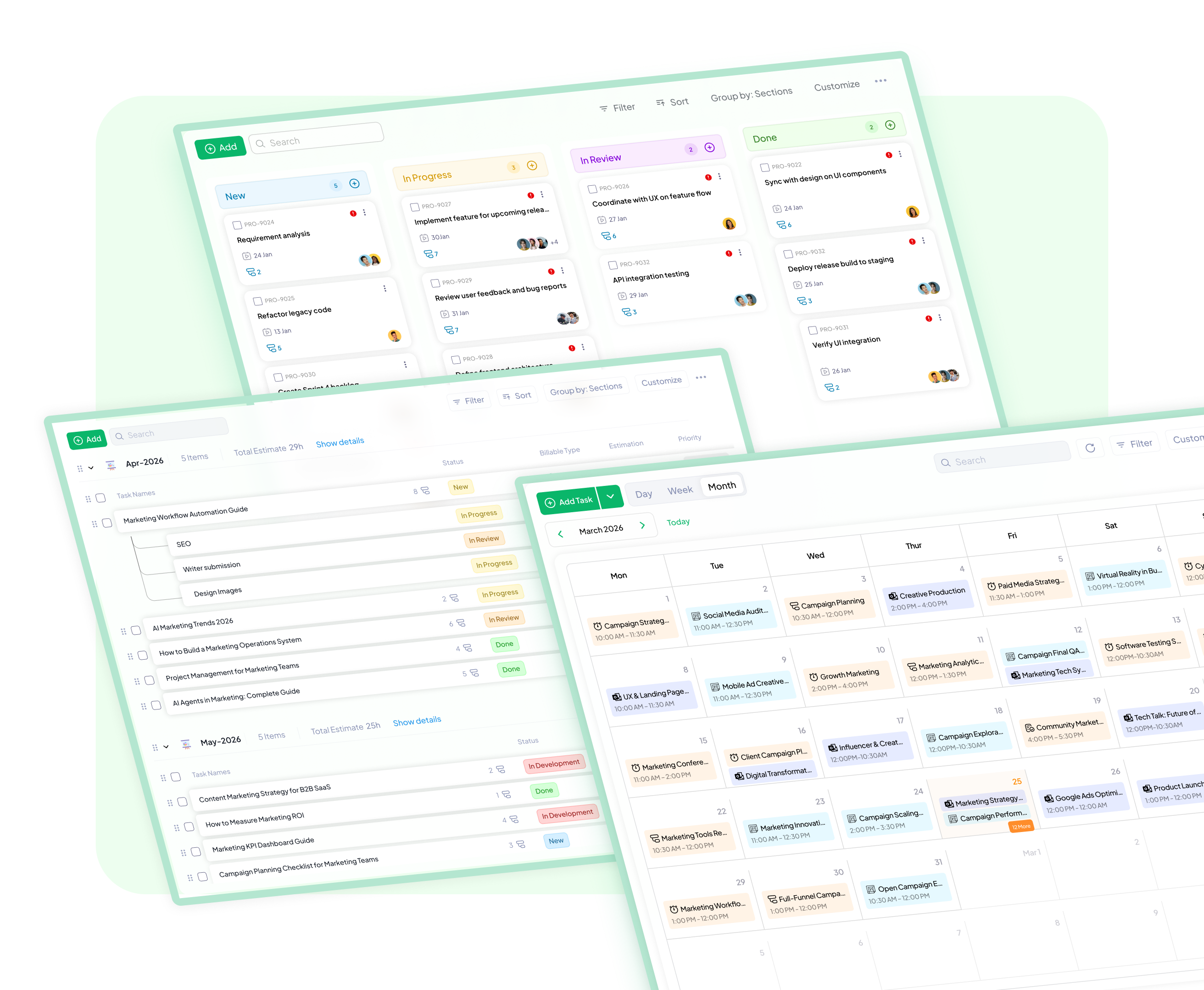
For managers, customizable dashboards pull it all together. Build a view that shows what you actually need to see, active campaigns, overdue tasks, how work is spread across the team, instead of piecing it together from three tools every Monday morning.
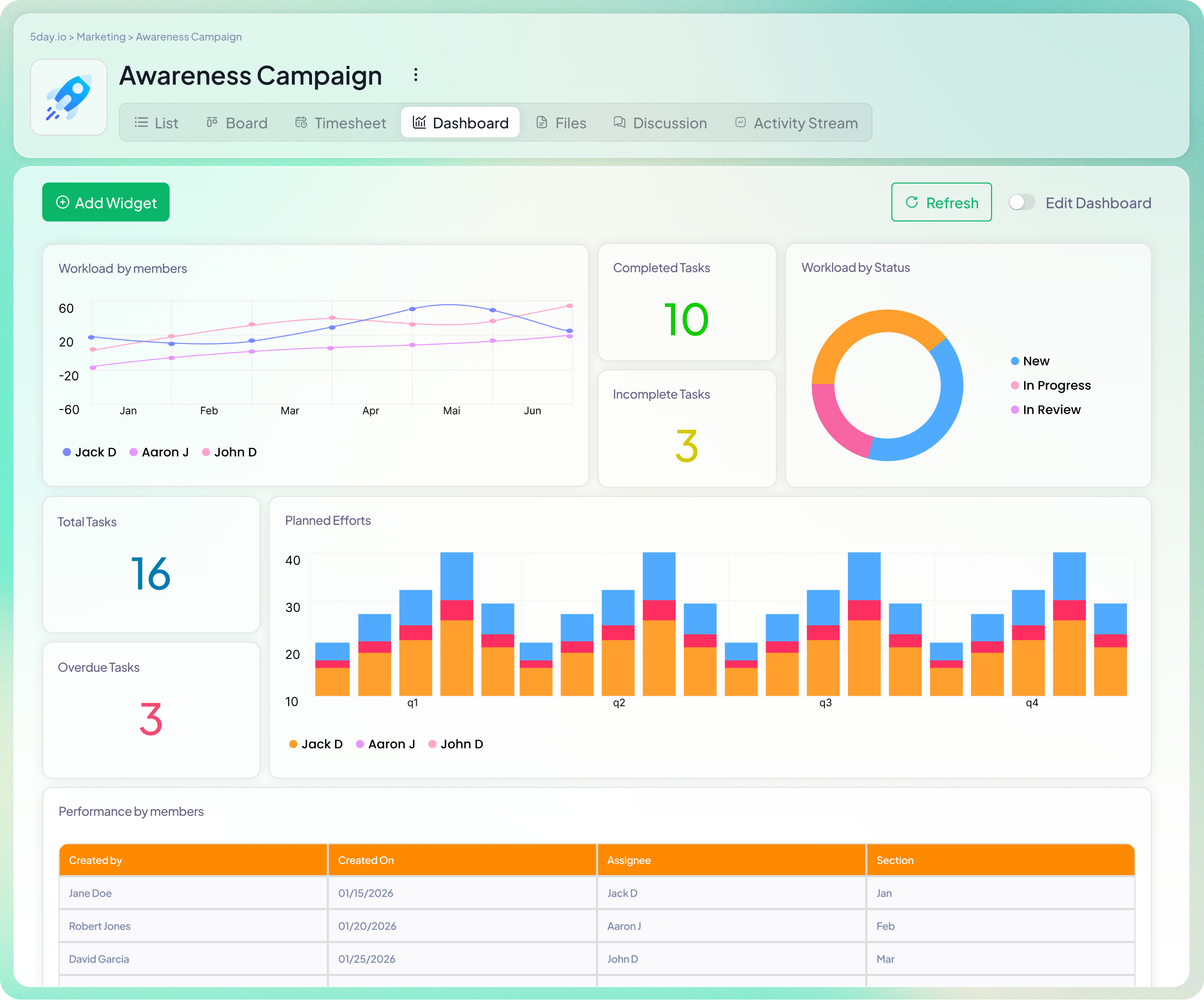
And because time tracking is built into tasks, you gradually build something most marketing teams never have: an honest record of how long work actually takes. That’s what a marketing team project management software should really give you — not just tracked tasks, but planning that gets easier every quarter.