
A marketing budget tracker is not just a spreadsheet for recording costs. It is the working system that shows what you planned to spend, what you actually spent, and what that spend produced.
A marketing budget is a financial plan for marketing activities, and it should help teams track expenses and calculate ROI. According to reports, marketing budgets in 2025 stayed flat at 7.7% of company revenue, which makes tighter tracking really important.
A lot of teams still track spending like bookkeepers instead of operators. They record invoices and ad costs, but they do not connect those numbers to leads or revenue.
That is the gap a good marketing spend tracker should close. If it cannot help you decide where to cut and where to hold, while ensuring where to increase spend, it is only an expense log.
Let’s break down the simplest and most effective way of how to manage spend across every channel with an easy budget tracker.
What Is a Marketing Budget Tracker?

A marketing budget tracker is the execution layer of your budget.
A budget plan explains what the team expects to spend. A tracker shows what has happened so far. Also, it shows where the money went and what results came out of that spend.
This difference matters because marketing budgets do not stay fixed. A team may start the month with a clear plan for paid search and paid social. The same plan may also cover SEO work and email campaigns. Events and tools may sit in the budget too. The real numbers can shift quickly after campaigns go live.
One ad campaign may be faster than expected. One channel may generate leads at a lower cost. Another may use the budget without producing enough pipelines.
A good m Marketing budget planner makes these changes visible before the end of the month. It helps the team see the gap between planned budget and actual spend, then connect that spend to various outcomes like conversions or ROMI.
A tracker works best when spend and outcomes stay in the same view, so weekly changes are easy to act on. That is the core idea behind data-driven project management for marketing teams.
Budget Tracker vs Budget Plan
The budget plan is forward-looking. It sets the target. It answers questions like:
- How much can we spend this month?
- Which channels will get the budget?
- What campaigns are approved?
- What tools, freelancers, or agency costs are included?
The tracker is operational. It shows reality. It answers questions like:
- How much have we already spent?
- Which channel is over budget?
- Which campaign is below target?
- Which activity needs more budget?
- Which spend should be paused or reviewed?
For example, your tracker may show that paid search has used $3,800 of a $5,000 budget and brought only 12 qualified leads.
That tells the team something useful. It does not only show how much it is spent. It shows pace, performance, and risk.
That is why a marketing budget tracker should not be treated like a simple expense tracking spreadsheet. It should work like a decision tool.
Why Tracking Spend Without Outcomes Is Just Bookkeeping
Many teams track costs carefully but stop too early. They record invoices, platform spend, tool subscriptions, and freelancer payments. That helps with accounting, but it does not help much with marketing decisions.
If your sheet stops at spend, you still cannot answer the questions leadership or clients care about:
- Which channel is overspending?
- Which campaign is under-delivering?
- Which channel deserves more budget next month?
- Which campaign should be paused?
- Which activity produces leads to a healthy cost?
- Which spend is supporting revenue?
This is the main reason teams get budget tracking wrong. They track the money leaving the business, but not the value coming back.
If the tracker cannot connect spending to leads and revenue, the review turns into explaining costs instead of improving performance. Building marketing reports fits this exact shift toward outcome-led reporting.
Why Teams Should Review the Tracker Weekly
Waiting until month-end is one of the easiest ways to lose control of spending. By then the money is already spent and the team can only explain what happened.
A weekly review gives the team more room to act before results slip too far. It helps catch overspend early and spot weak campaigns. It also gives the team time to move the budget while there is still a chance to improve results.
A weekly budget review becomes easier when the team runs it like a short operations routine with clear actions. Read operations management strategies to know more about it.
A simple weekly check can include:
- Budget planned vs actual spends
- Variance by channel
- Leads or conversions generated
- CPL or CPA changes
- Campaigns that need action
- Budget that can be moved
- Notes for the next reporting cycle
This does not need to take long. Even 20 minutes each week can make the tracker much more useful than a month-end expense log.
Overspending is not only a budget issue but also, a risk issue that can compound across the month. Project risk management is a useful lens for treating overspend signals early, not after month-end.
How to Structure a Marketing Budget Tracker: The 8-Column Framework
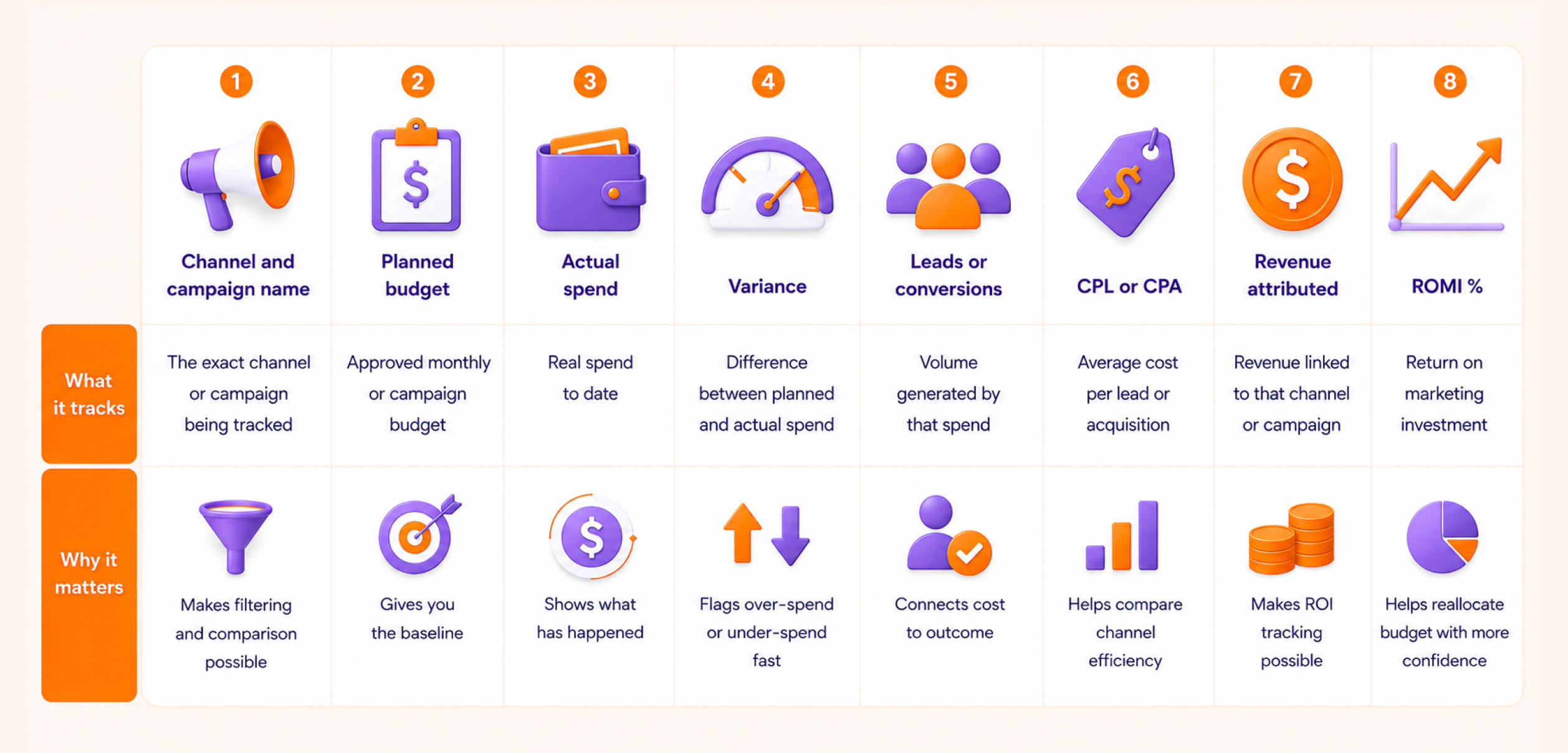
A marketing budget tracker should be easy enough to update every week and detailed enough to support real budget decisions. Too many columns can make the team stop using it. Too few columns can turn it into a basic expense tracking spreadsheet.
The best starting point is an 8-column framework because it gives the team one clean view of planned spend and actual spend. It also shows performance and returns in the same place. This makes it useful for small teams and agencies. It also helps marketing leaders understand where the money is going and what it is producing.
Column | What it tracks | Why it matters |
Channel and campaign name | The exact channel or campaign being tracked | Makes filtering and comparison possible |
Planned budget | Approved monthly or campaign budget | Gives you the baseline |
Actual spend | Real spend to date | Shows what has happened |
Variance | Difference between planned and actual spend | Flags over-spend or under-spend fast |
Leads or conversions | Volume generated by that spend | Connects cost to outcome |
CPL or CPA | Average cost per lead or acquisition | Helps compare channel efficiency |
Revenue attributed | Revenue linked to that channel or campaign | Makes ROI tracking possible |
ROMI % | Return on marketing investment | Helps reallocate budget with more confidence |
Channel and campaign name
This column should be specific. Do not use broad labels like “ads” or “content” because they make reporting unclear later.
Use names that are easy to filter and compare. For example:
- Google Ads | Brand Search | May
- Meta Ads | Lead Gen Campaign | Q2
- LinkedIn Ads | Webinar Promotion
- SEO | Blog Production
- Email | Product Launch Sequence
This level of detail helps when you need to check which campaign used the most budget or which channel created the best results. It also helps agencies manage client budgets because each campaign has a clear identity.
Planned budget
The planned budget is the approved amount before the campaign starts. This is your control number.
For example, if the team approves $4,000 for paid search in May, that amount goes into the planned budget column. Every later update is compared to this number.
This column is important because it stops the tracker from becoming a simple cost log. Without a planned budget, you cannot clearly see over-spend, under-spend, or pacing issues.
A simple rule is to enter the planned budget at the start of each month or campaign. Do not change it every few days unless the budget is officially revised. If the plan changes, add a note so the team knows why.
Actual spend
Actual spending shows how much money has already been used in a marketing expense tracker. This should include all direct campaign costs.
For paid campaigns, this may include ad spend. For SEO or content, it may include:
- Freelance writing
- Design, tools
- Agency support.
For events, it may include
- Booth cost
- Travel
- Design
- Sponsorship
- Promotion
Many teams make the mistake of tracking only media spend. That gives an incomplete picture. If a campaign used $2,000 in ads and $1,000 in creative production, the real cost is $3,000.
Update actual spend weekly. This helps the team catch problems before month-end.
Variance
Variance shows the gap between planned budget and actual spending.
The basic formula is:
Variance = Planned Budget – Actual Spend
A positive number means the budget is still available. A negative number means the campaign has gone over budget.
For example:
Planned Budget | Actual Spend | Variance | Meaning |
$5,000 | $3,500 | $1,500 | Budget still available |
$5,000 | $5,200 | -$200 | Campaign is over budget |
$5,000 | $5,000 | $0 | Budget fully used |
Variance is useful because it gives quick warning signs.
Leads or conversions
This column connects spend to output. It tells you what the budget is produced.
The metric can change based on the channel. For example:
- Paid search may track leads or demo requests
- Ecommerce ads may track purchases
- Email may track sign-ups or sales
- Content may track organic leads
- Events may track meetings booked
- Webinars may track registrations and qualified attendees
This column is important because the spend alone does not tell the full story. The goal is to track the outcome that matters most for that channel.
CPL or CPA
CPL means cost per lead. CPA means cost per acquisition or action.
Use CPL when the goal is lead generation. Use CPA when the goal is a purchase, sign-up, booking, or another completed action.
The basic formulas are:
CPL = Actual Spend / Leads
CPA = Actual Spend / Conversions
For example, if a LinkedIn campaign spends $2,000 and generates 40 leads, the CPL is $50.
This column helps you compare channels more fairly. One channel may have higher total spending but lower cost per result. Another may seem affordable but generate results at a very high cost.
CPL and CPA also help with next month’s planning. If one channel keeps producing qualified leads at a healthy cost, it may deserve a more budget. If another keeps getting expensive with poor quality, it may need a strategy to change.
Revenue attributed
Revenue attributed shows how much revenue can be linked to a channel or campaign.
This column is easy for ecommerce and direct-response campaigns because sales may happen quickly. It can be harder for B2B and SEO besides events and long sales cycles. Still, the tracker should include a revenue field because it pushes the team to connect with business value.
Revenue attribution can include:
- Direct sales
- Closed deals
- Pipeline influenced
- Subscription revenue
- Repeat purchase revenue
- Revenue linked to campaign leads
If exact revenue is not available yet, use a temporary status like “pending,” “pipeline influenced,” or “not closed yet.” This is better than ignoring revenue completely.
ROMI %
ROMI means return on marketing investment. It helps you understand how much return the marketing spend created.
Use this formula:
ROMI = ((Revenue Attributed – Marketing Cost) / Marketing Cost) × 100
For example, if a campaign cost $5,000 and generated $15,000 in attributed revenue:
ROMI = (($15,000 – $5,000) / $5,000) × 100 = 200%
That means the campaign returned 200% over its cost.
The cost should include more than ad spend where possible. Add creative costs, agency fees, tool costs, freelancers, and internal labour if your team tracks it. This gives a more honest view of performance.
After following the steps above, you can set up a perfect budget tracker and the quesion “how to track your expenses” will no longer bother your team. However, if you face any difficulties while managing multiple clients or projects, we recommend using a marketing agency project management tool.
Marketing budget allocation: how much to spend on each channel
There is no perfect universal ratio, but there are useful planning anchors. Gartner’s 2025 survey says large-company marketing budgets averaged 7.7% of company revenue.
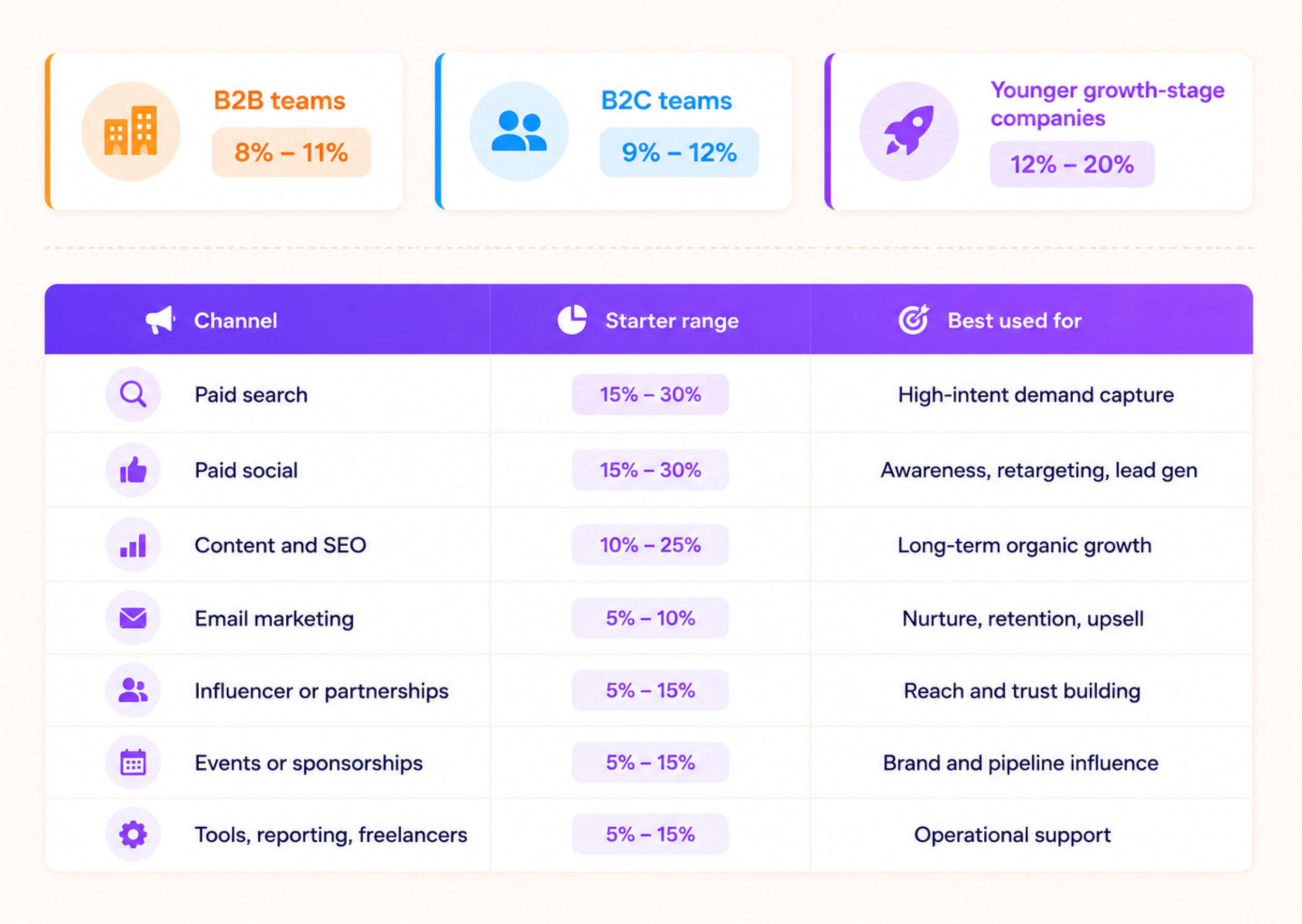
HubSpot’s 2026 budget guide says B2B companies typically allocate around 8% to 11% of revenue to marketing, while B2C companies often land around 9% to 12%.
Practical revenue benchmarks
- B2B teams: around 8% to 11% of revenue is a common planning range
- B2C teams: around 9% to 12% is a common working range
- Younger growth-stage companies: often 12% to 20% if growth is the priority
These are planning ranges, not laws. Your actual number should reflect goals, industry, sales cycle, and growth stage.
Starter allocation by channel
Use this as a practical starting mix, not a fixed benchmark.
Channel | Starter range | Best used for |
Paid search | 15% to 30% | High-intent demand capture |
Paid social | 15% to 30% | Awareness, retargeting, lead gen |
Content and SEO | 10% to 25% | Long-term organic growth |
Email marketing | 5% to 10% | Nurture, retention, upsell |
Influencer or partnerships | 5% to 15% | Reach and trust building |
Events or sponsorships | 5% to 15% | Brand and pipeline influence |
Tools, reporting, freelancers | 5% to 15% | Operational support |
Channel-By-Channel Marketing Budget Tracking Guide
Each marketing channel needs a different tracking lens because each one spends money and produces results in a different way to manage monthly budget. Paid search can show conversions quickly. SEO may take longer. Events may influence the pipeline instead of creating instant sales. A good marketing budget tracker respects these differences instead of forcing every channel into one reporting style.
The team uses it to track the right cost and connect that cost to the right outcome. This helps the team decide where to increase budget and where to reduce spend. It also shows which campaigns need to pause or go through review.
Paid search
Paid search usually needs close budget control because spend can move quickly. Track planned spend, actual spend, CPC, conversion rate, CPA, leads, and revenue.
Do not only check how much was spent. Check how efficiently the campaign turned that spend into results. A campaign may stay inside budget but still perform poorly if the CPA is too high or lead quality is weak.
For paid search, your tracker should help answer:
- Which campaigns are spending the fastest?
- Which keywords are driving useful leads?
- Is CPA rising or falling?
- Are conversions turning into pipelines or sales?
- Should the budget move to better-performing ad groups?
Weekly checks matter because ad budgets can change during the month. When a campaign spends too fast by week two, the team still has time to adjust bids. The team can also pause weak keywords or move budget to stronger campaigns.
Paid social
The team should track paid social by platform instead of using one combined paid social line. Meta can behave very differently from LinkedIn. TikTok and X can show different patterns too. One platform may bring cheaper leads with poor quality. Another platform may cost more and still bring better-fit prospects.
Track each platform by spend and campaign. Also track the audience and be creative. Then review metrics such as CPM and CTR. Add CPL and CPA. Include assisted conversions and revenue where possible.
This helps the team see what is really working. If Meta is bringing low-cost leads and LinkedIn is bringing fewer but better-quality leads, both may have value. But the tracker should show the difference clearly.
For paid social, watch these signals:
- Rising CPM with no improvement in lead quality
- High CTR but low conversion rate
- Low CPL but poor sales follow-up quality
- One creative using most of the budget
- Retargeting campaigns producing better results than cold campaigns
Paid social tracking becomes more useful when creative performance is included. Sometimes the channel is not a problem. The offer, creative, or audience may need revision.
Content and SEO
Content and SEO are harder to track because results are usually slower. That is why many teams stop tracking too early. But SEO still needs budget discipline because content production, SEO tools, technical work, writers, editors, and agencies all have real costs.
Track content production cost, SEO tool cost, freelancer or agency cost, published pages, keyword movement, organic traffic, organic leads, assisted conversions, and revenue influenced.
The tracker should not judge SEO only on short-term revenue. It should show progress across stages. A new article may first improve rankings, then bring traffic, then create leads later.
For content and SEO, track:
- Cost per published content asset
- Organic traffic growth
- Leads generated through organic pages
- Revenue influenced by organic visits
- High-cost content that is not ranking
- Old pages that need updates instead of new spend
This makes SEO easier to defend in budget meetings. The team can show not only what was published, but what that content is starting to produce.
Email marketing
Email is usually easier to track because the path is more direct. The team can often see sends and opens inside the email platform or CRM. It can also review clicks and conversions along with revenue.
Track platform cost and campaign production time first. Then review the list size and send volume. Add click rate and conversion rate. The team should also track unsubscribes and revenue per campaign. Revenue per subscriber can be added when the data is available.
Email tracking should not focus only on open rates. Open rates can be useful, but clicks, conversions, and revenue tell a better story.
For email, your tracker should help answer:
- Which campaigns produced clicks or sales?
- Which segments performed better?
- Which email types helped nurture leads?
- Did the campaign support retention or upsell?
- Is the email tool cost justified by results?
A newsletter may not create direct sales every week. It may still drive repeat visits and demo bookings. It can also support product education. Add notes in the tracker, so the team does not miss this value.
Influencer and partnership marketing
The team should set clear expectations before influencer and partnership campaigns begin. Direct attribution can be weaker because people may see the content first and convert later through another channel.
Track these costs and results:
- Creator fee
- Product cost
- Production cost
- Reach
- Engagement
- Referral traffic
- Discount code usage
- Affiliate sales
- Leads
- Assisted conversions
Use unique links and UTM tags wherever possible. Coupon codes and landing pages can also improve tracking. These steps will not make tracking perfect, but they will give the team a much clearer view.
For influencer and partnership campaigns, check:
- Which partner drove real traffic?
- Which creator generated engagement but no action?
- Which audience matched the brand best?
- Did the campaign support awareness or direct sales?
- Is the partnership worth repeating?
The main mistake is treating reach as the only result. Reach matters, but the tracker should also show traffic, leads, code usage, and sales where possible.
Events and sponsorships
Events and sponsorships often work as pipeline-influence channels rather than strict direct-response channels. They may not create instant revenue. They can still support relationships and meetings. They can also build brand trust and support sales conversations.
Track the event budget and sponsorship cost first. Then review travel costs and booth setup costs. The team should also track meetings booked and leads scanned. Add qualified opportunities and follow-up status. Influenced pipeline and closed revenue should be checked later.
Post-event tracking matters the most. Many teams record the event cost but fail to track what happened after the event. That makes the spend look weaker than it may be.
For events, track these follow-up stages:
- Leads collected
- Meetings booked
- Sales calls completed
- Opportunities created
- Pipeline influenced
- Deals closed
- Notes for next event planning
This helps the team decide if the event should be repeated, reduced, or replaced with another channel.
Quick channel tracking view
A marketing budget tracker becomes more useful when each channel has the right success measure. Paid campaigns need cost efficiency. SEO needs progress and influences value. Email needs conversion and retention signals, while events need pipeline follow-up. Once each channel is tracked in the right way, budget decisions become much easier.
Channel | Main Costs to Track | Main Outcomes to Track | Best Decision It Supports |
Paid search | Ad spend, agency cost, landing page cost | Leads, CPA, revenue | Increase or reduce campaign spend |
Paid social | Platform spend, creative cost, creator support | CPL, CTR, assisted conversions | Shift budget by platform or audience |
Content and SEO | Writers, editors, tools, agency cost | Organic leads, traffic, influenced revenue | Continue, update, or pause content spend |
Email marketing | Email tool, copy, design, production time | Clicks, conversions, revenue | Improve nurture and retention campaigns |
Influencer and partnerships | Creator fee, product cost, referral setup | Reach, code usage, traffic, sales | Repeat or stop partner campaigns |
Events and sponsorships | Sponsorship, travel, booth, promotion | Meetings, pipeline, follow-up results | Decide if event spend is worth repeating |
Free Marketing Budget Tracker Template: What to Use and How to Set It Up
Approvals as a workflow stage
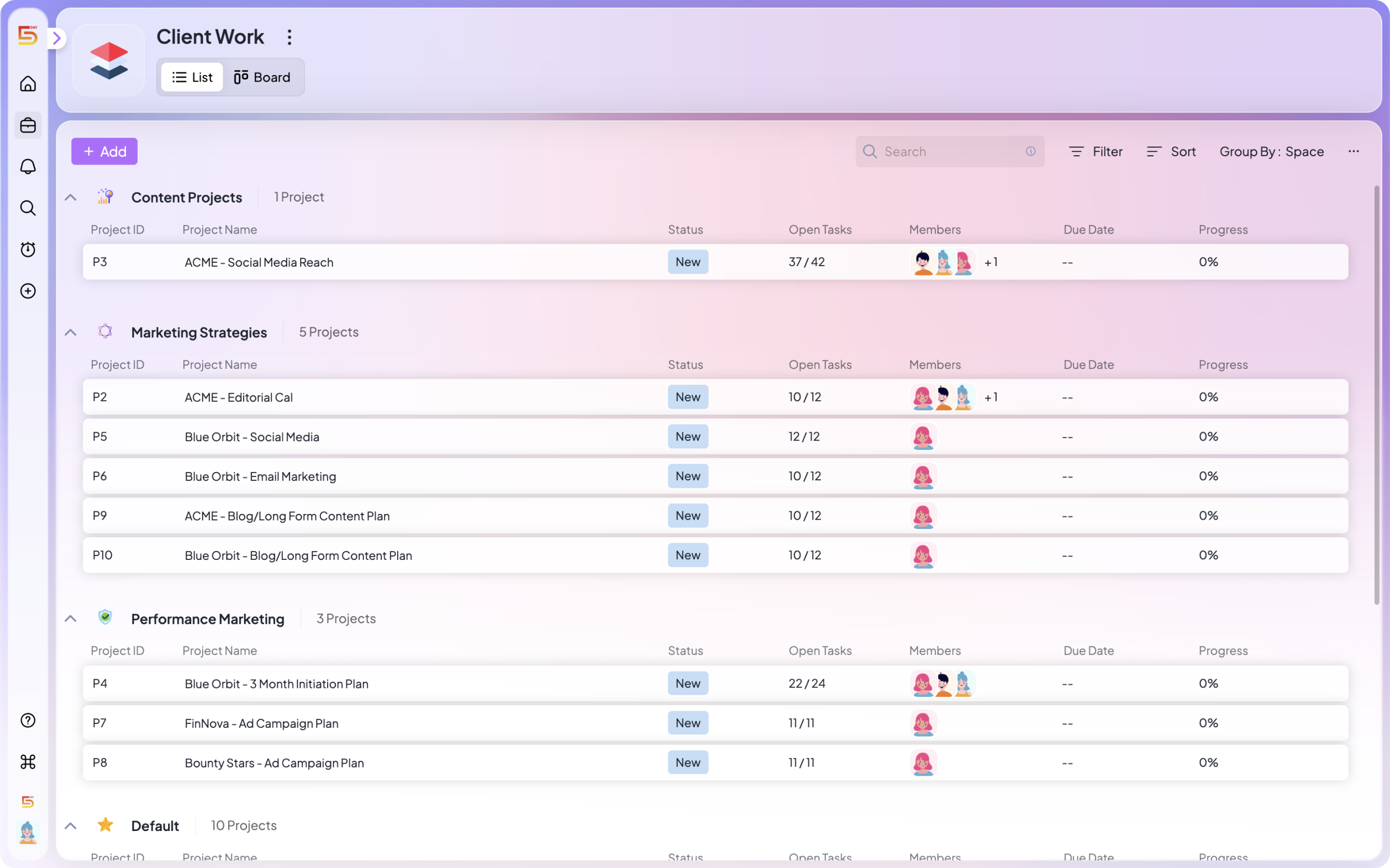
Most agencies have a version of a review process. What they usually don’t have is a review stage that’s embedded in the actual workflow one that creates clarity and urgency without someone having to manually create both.
In 5day.io, review stages live inside the project. You configure approval stages with named reviewers and deadlines. When work reaches that stage, the reviewer is notified automatically. Feedback is captured in context, attached to the specific task and file being reviewed.
The question ‘what are we waiting on for Client X?’ becomes a two-second check of the project view, not a trawl through email threads. And approval bottlenecks become visible before they become crises, because the system shows when a review has been sitting longer than expected.
Templates that standardize delivery across every account
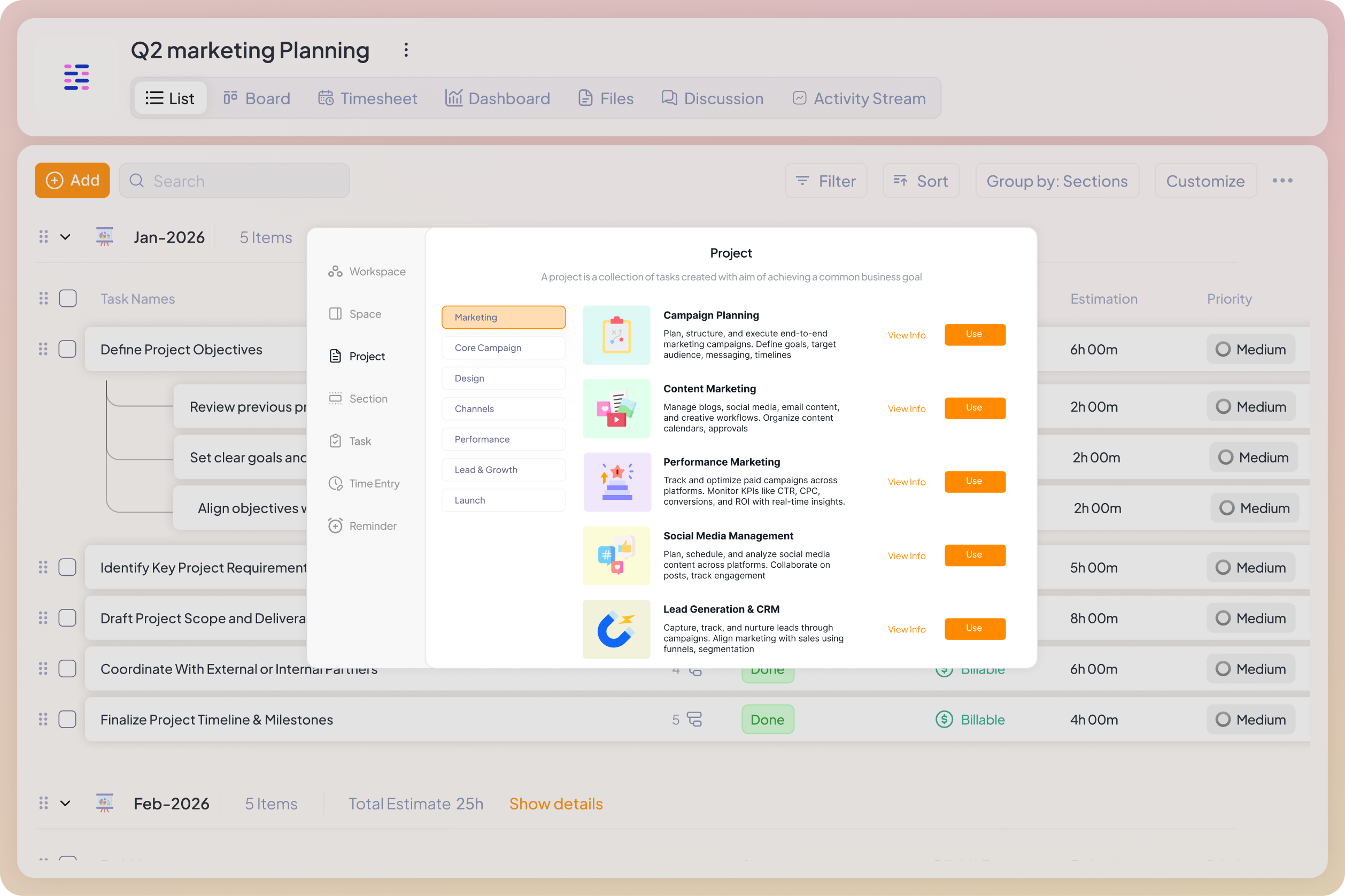
The single highest-leverage thing most agencies can do is stop rebuilding their project structure from scratch for every client. Every time a new account onboards and someone creates a fresh project from memory, there’s a chance the stages are slightly different, the task types don’t match, and the new team member assigned to it has to figure out how it’s supposed to work.
5day.io lets you build project templates that capture your entire delivery structure, the stages, task types, ownership logic, and workflow sequence that you know works. When a new client comes on board, you apply the template. The architecture is already there.
Additionally, if you do not want to set up a structure from scratch, you can also find more than 75+ marketing templates that you can tweak based on your team’s work style and apply immediately.
For agencies running similar campaign types across multiple clients like content programs, paid media, SEO retainers and more, this is where the operational leverage compounds. The same proven structure, applied consistently, builds a delivery engine that gets more reliable over time rather than more chaotic.
It also dramatically reduces how long it takes to bring on a new team member. They don’t need to be taught how each client project is set up as the structure is the same across every account. They can navigate a new client project on day one because it looks and works like all the others.
What you get | What it solves |
Project templates | Build once, apply to every new client — stages, tasks, ownership, and workflow all included |
Consistent status logic | Statuses mean the same thing across all client projects, so cross-client reporting doesn’t require manual translation |
Faster onboarding | New team members can navigate any client project immediately because the structure is standardized |
Client visibility that reduces status calls
Most agency-client communication is reactive: the client asks, the agency answers. The client emails asking where things stand, the project manager spends 20 minutes assembling an accurate response, and the whole exchange is repeated the following week.
5day.io supports role-based client access that lets clients see their project’s progress without seeing the internal operations behind it. Clients get a view of what’s in progress, what’s waiting on their review, and what’s complete on demand, without needing to ask.
This changes the dynamic in a specific way. When clients have real-time access to their project’s current state, reactive status updates drop significantly. Clients ask fewer ‘where are we?’ questions because they can already see. And the agency’s time shifts from answering status queries to delivery.
Where to start if you’re setting this up now
If your current setup is a combination of spreadsheets, Slack, and a PM tool, the migration feels bigger than it is. But the biggest shift will be deciding if the structure is worth investing in before the next client crisis, not after.
Step 1: Build your standard project template
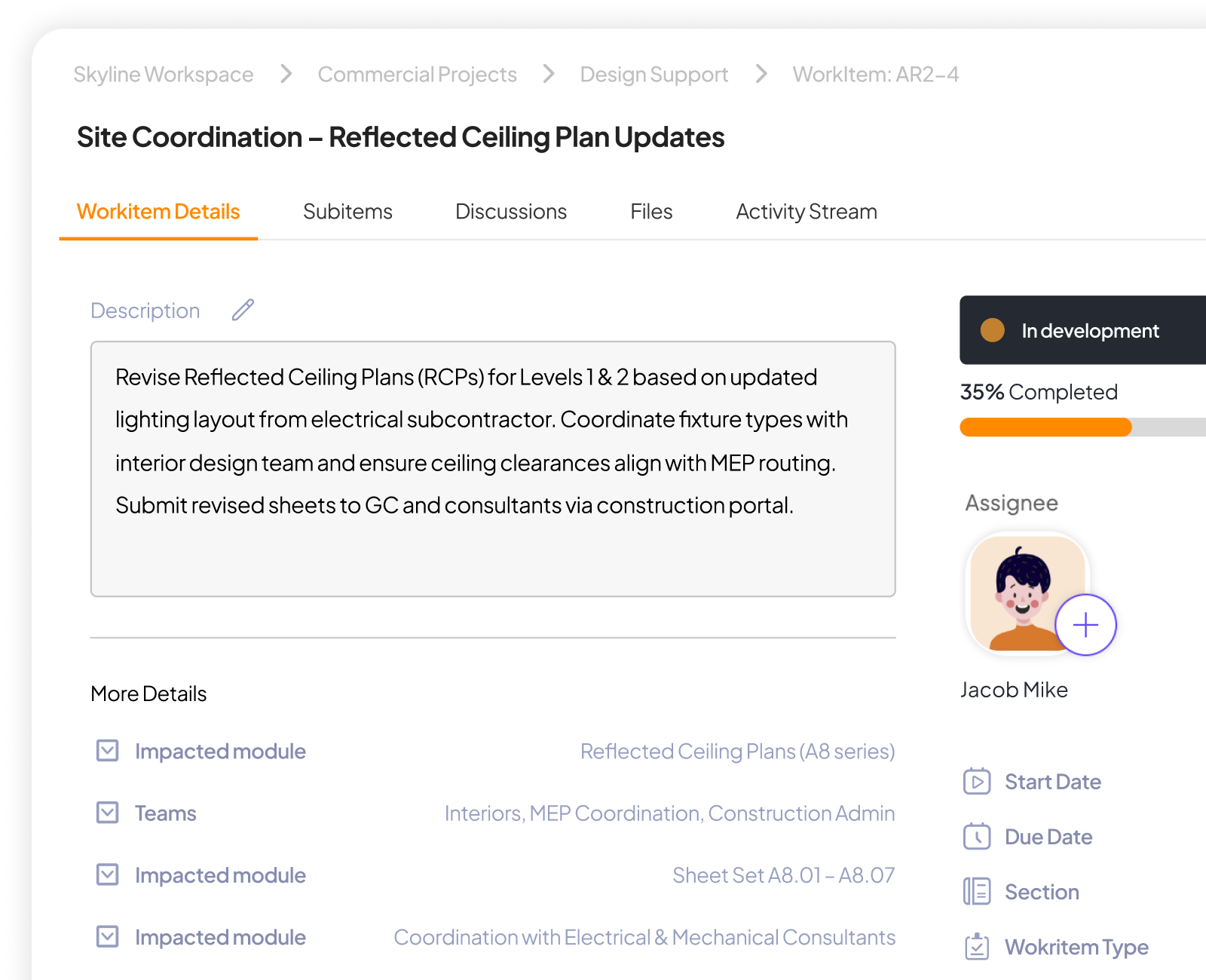
Before anything else, map out how your best-run recent projects moved. Not how they should move in theory, how the smooth ones moved. What stages did work go through? Who was involved at each stage?
For most marketing agencies, a working template covers: brief and intake, internal strategy, creation, internal review, client review and approval, revisions (if needed), and final delivery. Build this once in 5day.io or use the template. Use it for every client from that point forward.
Step 2: Define what ‘owner’ means at your agency
Before you can assign ownership correctly, you need a shared definition. One owner per task,. It should always be the person accountable for the outcome, not just a contributor. Write it down. One sentence is enough. Post it somewhere the team sees it.
In 5day.io, every task has an explicit assignee. When work moves between stages, ownership transfers explicitly. There’s no ambiguity, and the My Work view makes the accountability visible to everyone.
Step 3: Build approvals into the project, not around it
Every deliverable that goes to a client for review should have three things embedded before it leaves: a link to the specific asset and version, a deadline, and a named reviewer. In 5day.io, approval stages handle all three. You’ll have to configure it once and it works the same way across every account.
Step 4: Give clients a project window, not a status update
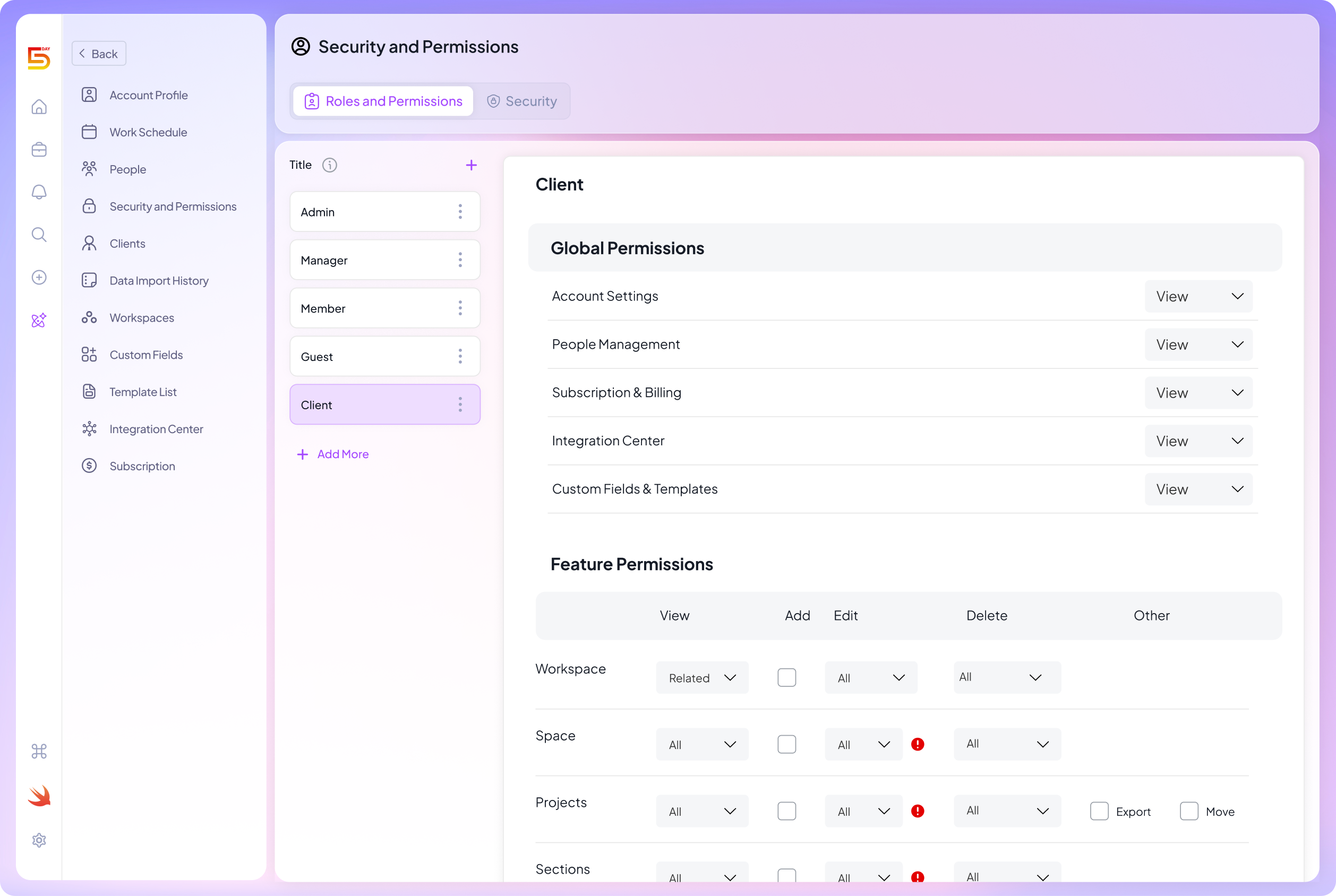
Set up client-facing access in 5day.io for your accounts. Clients see what’s in progress and what’s awaiting their input. You stop composing status emails for questions they can answer themselves.
The real cost of running on informal systems
Every month an agency manages multiple clients on informal systems is a month of invisible costs: the project manager rebuilding a status report on Friday afternoon, the client relationship quietly eroding because updates arrived slightly wrong, the team always reactive because nobody can see priority across accounts.
These costs don’t appear in any report. They show up in staff turnover, client churn, and a ceiling on how many clients you can realistically take on before delivery quality starts slipping.
The agencies that scale confidently are built on operational infrastructure that holds the work without requiring heroic individual effort to keep it together.
Build that infrastructure with 5day.io
See how 5day.io works for agencies managing multiple clients.

5day.io now has a free marketing budget template built for marketing teams and agencies. The template includes an executive summary with auto-calculated KPIs, a monthly spend tracker, a channel performance view with ROI and CPL benchmarks, a campaign budget log, and a setup guide.
5day.io says the workbook is ready to use in under ten minutes and is designed to support channel-level tracking plus campaign-level priority management.
What is included
According to the template page, the workbook includes five tabs:
- executive summary
- monthly spend tracker
- channel performance view
- campaign budget log
- how-to-use guide
It also includes pre-built formulas, pace-status flags, variance tracking, and editable channel rows.
How to use it well
Start by entering your annual budget, year start date, revenue targets, and channel budgets. Then update actuals weekly, not monthly. That one habit makes the tracker more useful because overspend shows up earlier.
Marketing Budget Tracking for Agencies
Agencies have one extra layer of complexity: client budget tracking is not the same as internal marketing budgeting.
Separate media spend from agency fees
Put media spend, production cost, software, and agency fees in separate lines. If they are blended, your reporting becomes harder to explain and easier to dispute.
Use a master tracker for multi-client work
A simple approach is:
- One workbook per client
- One master sheet for leadership view
- One summary by channel and one by account
Keep internal and client-facing reports different
Clients usually need:
- Budget vs actual
- Core performance metrics
- Next-step recommendations
Internal teams may also need:
- Margin context
- Labor cost
- Utilization
- Overspend risk
This is also where a project management software for marketing teams setup can help. Budgets do not live in isolation. Campaign work, approvals, tasks, and timelines all shape spend.
Common Marketing Budget Tracking Mistakes and How to Avoid It?
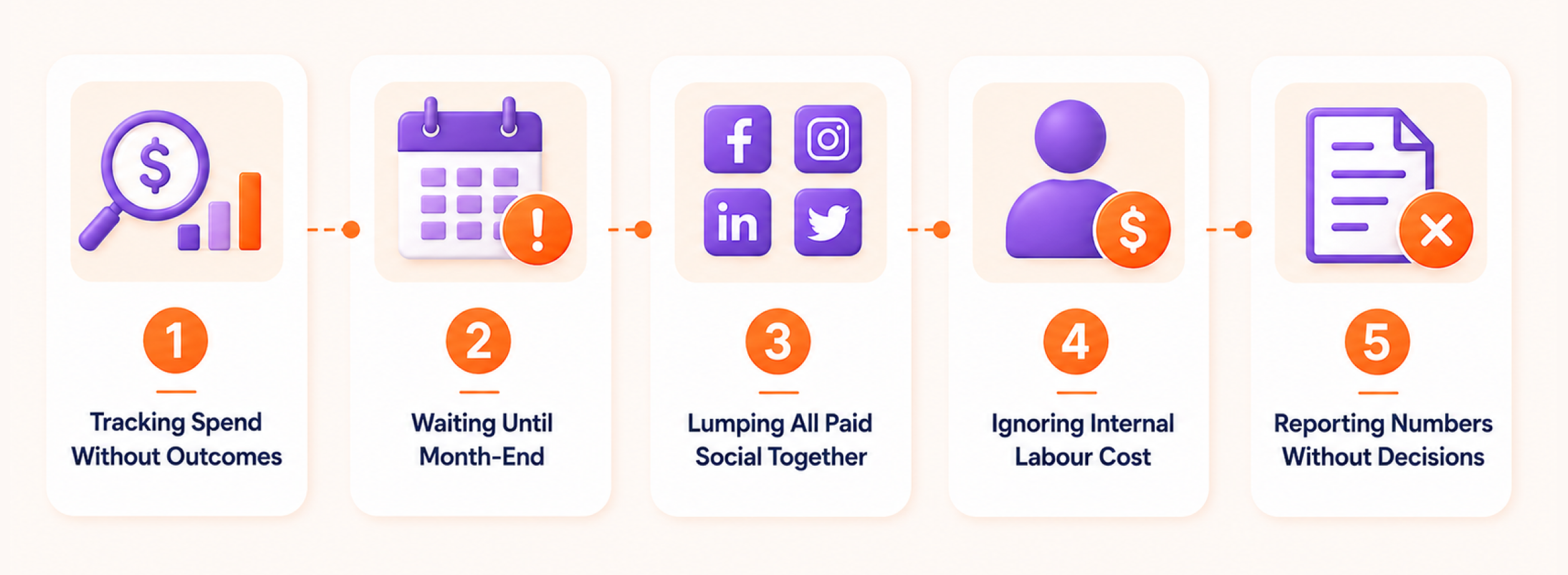
Even a useful marketing budget tracker can become weak if the team only updates numbers without using them for decisions. The team should not track the budget just to make the sheet look complete. The real goal is to understand what to stop and what to fix. It should also show which campaigns deserve more budget.
These are the most common mistakes that make budget tracking less useful.
Tracking spend without outcomes
This is the biggest mistake. Many trackers show planned budget, actual spend, and remaining budget, but they do not show what the spend produced.
If there is no conversion, CPL, CPA, revenue, or pipeline field, the tracker is too weak. It can tell you that money was spent, but it cannot tell you if the spend was useful.
For example, two campaigns may both spend $2,000. One may generate 80 qualified leads. The other may generate 12 weak leads. Without outcome columns, both campaigns look the same in the tracker, even though one clearly performed better.
A better tracker should always connect cost to performance. At minimum, add leads, conversions, CPL or CPA, and revenue where possible.
Waiting until month-end
Month-end reporting is useful. However, it is often too late for active budget control. By the time the report is ready, the spending has already happened.
This is risky for paid channels as budgets quickly. If a campaign is spending too fast in week one or two, the team needs to know about it early to adjust it.
Therefore, a weekly check is safer. It will help your team spot over-spend and weak conversion rates. Also, it will flag unused budget while there is still time to act.
A simple weekly review can answer:
- Are we spending faster than planned?
- Is any channel under-spending?
- Is CPL moving up?
- Are conversions good enough?
- Should any budget be paused or moved?
This does not need to be a long meeting. Even a 20-minute weekly budget review can prevent bigger month-end problems.
Lumping all paid social together
A single “paid social” row hides too much detail. Meta, LinkedIn, TikTok, and X can perform very differently. One platform may generate low-cost leads. Another may bring fewer leads but better sales quality.
If all platforms sit under one combined line, the team cannot see which one is actually working.
Track each paid social platform separately. For larger campaigns, break it down even more by the audience, creative, or campaign type.
For example:
- Meta Ads | Retargeting
- Meta Ads | Cold Audience
- LinkedIn Ads | Webinar Campaign
- TikTok Ads | Awareness Campaign
This makes budget decisions clearer. The team can increase spend on the platform that is working and reduce spend where results are weak.
Ignoring internal labour cost
Many teams only track ad spend, tool costs, and agency invoices. That makes the budget look cleaner, but it does not show the full cost of marketing work.
Internal labor matters, too. If a campaign needs 20 hours of writing, design, coordination, and reporting, that time has a cost. Without it, ROMI can look stronger than it really is.
This does not mean every small task needs exact costing. But for bigger campaigns, product launches, events, content projects, and agency work, labor costs should be estimated where possible.
For example, a content campaign may look cheap if only writing costs are tracked. But if strategy, editing, design, publishing, and reporting take many internal hours, the real cost is higher.
A more honest tracker should include internal effort when it affects budget decisions. Agencies also need effort visibility, not only media costs, because time can quietly become the biggest spend line. Time tracking guide for agencies is a good read to cover this part of the cost story.
Reporting numbers without decisions
A tracker should not only say what happened. It should help decide what happens next.
If the report shows spend, leads, CPL, and revenue but no action, the team is still missing the point. Every budget review should lead to a clear next step.
That next step could be:
- Keep the campaign running
- Increase budget
- Reduce budget
- Pause the campaign
- Test a new creative
- Improve the landing page
- Move budget to another channel
- Review lead quality with sales
This makes the tracker useful for real marketing management. It stops being a record of past spend and becomes a tool for better planning. If you face problems while dealing with clients from various industries and want to streamline your workflow, we highly recommend using project management software.
Final Advice
A strong marketing budget tracker should do more than record expenses. It should show planned vs actual spend, connect spend to outcomes, calculate CPL or CPA, and make ROMI visible enough to support real budget decisions.
Gartner’s flat 7.7% revenue benchmark and HubSpot’s 2026 budget guidance both point to the same reality: marketing teams are under pressure to show better returns with tighter scrutiny.
The easiest upgrade is not adding complexity. It is adding structure and budgeting strategies. Start with eight columns, update weekly, track channel performance separately, and use a template built for real marketing work. That is how a budget tracker starts improving decisions instead of only recording spend.
A spreadsheet tracker is fine at the start, but it starts bending when updates and decision notes must stay consistent. 5day.io vs spreadsheets for marketing team is a guide that will help you resolve a lot of questions.