Even with the strongest strategy and the most talented people, it’s almost impossible to deliver consistent results on top of broken processes.
Most ops teams don’t notice the damage right away. A delayed approval here, a missed handoff there. But over time, those small gaps show up as missed deadlines, stretched teams, and falling operational efficiency.
That’s the problem process optimization solves.
In this guide, you’ll learn what process optimization is, the signs your team needs process optimization, where to start with process optimization, and the methods, tools, and process optimization examples that work for operations and marketing ops teams.
Let’s start with the basics.
What Is Process Optimization?
Process optimization means looking hard at how a piece of work gets done (not how the SOP says it gets done), spotting where time, money, or effort leaks out, and changing the process so it stops leaking.
Think of it like tuning a car’s engine. The car already runs, but tuning makes it faster, more fuel-efficient, and less likely to break down on the highway.
In practice, process optimization usually means:
- Removing steps that add no value, such as duplicate approvals and manual data entry
- Fixing handoffs where work gets stuck between people or teams
- Standardizing repeatable work so everyone follows the same playbook
- Measuring results so improvements stick
Business process optimization zooms out. Instead of fixing one workflow, it asks how workflows affect each other across teams. A slow creative approval doesn’t just annoy the design team. It pushes back the campaign launch, which delays the sales follow-up, which shows up in next quarter’s pipeline. BPO is about finding those knock-on effects and fixing the process where it does the most damage.
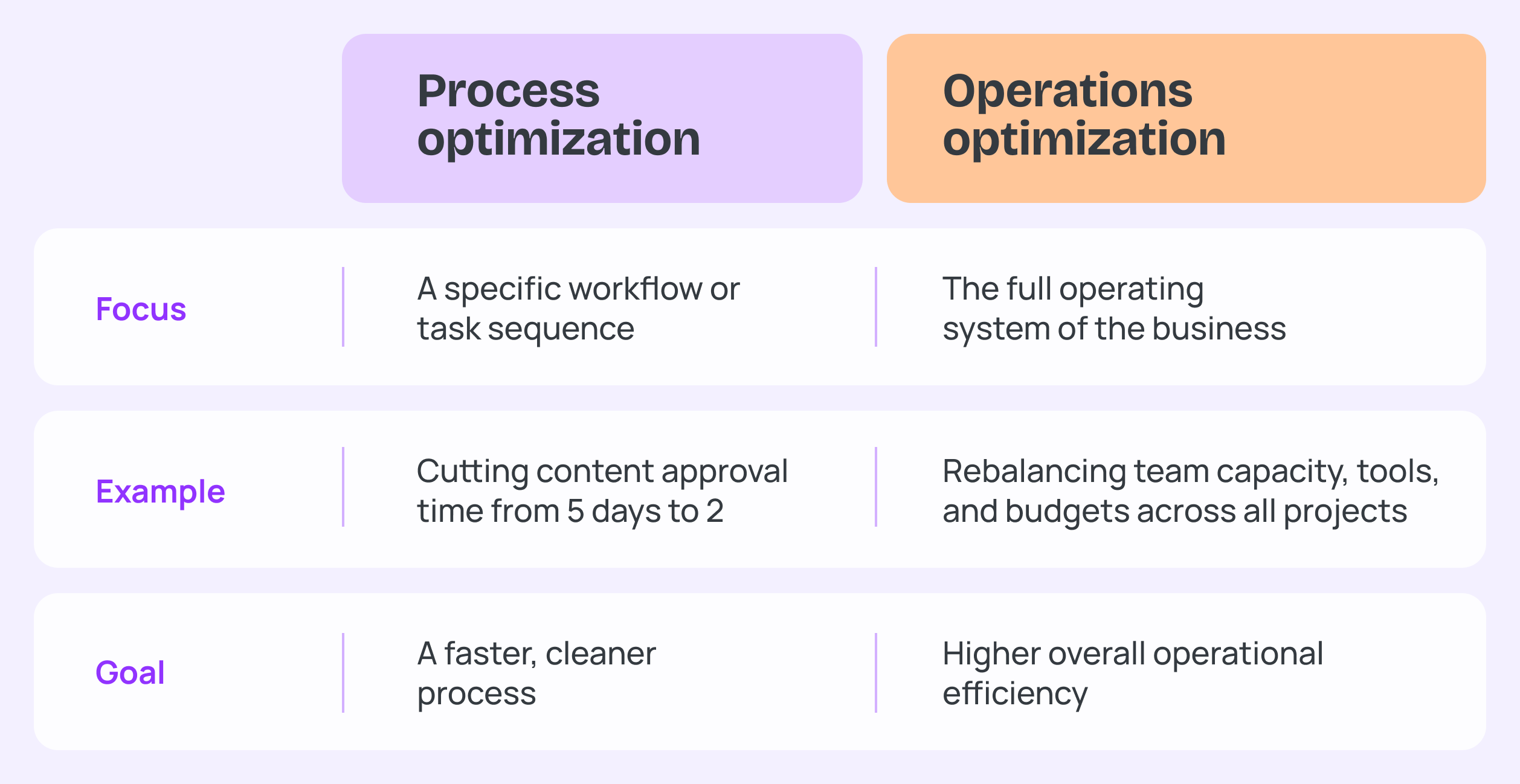
You’ll also hear the terms operational optimization and operations optimization. They overlap, but the focus differs:
Why Process Optimization Matters for Operational Efficiency
Most teams aren’t short on talent or effort. They’re losing time to the chaos around the work.
According to Microsoft’s 2025 Work Trend Index, employees are interrupted every two minutes during core work hours, 275 times a day, by meetings, emails, and notifications. It’s no surprise that nearly half of employees (48%) say their work feels chaotic and fragmented.
For operations teams, that’s not a people problem. It’s a process problem. And it’s exactly what process optimization is designed to fix.
Here’s what teams gain when they invest in business process optimization:
- Faster delivery: Fewer handoffs and approvals mean projects move from kickoff to launch without stalling
- Lower costs: Removing duplicate and manual work frees up hours (and budget) for high-value tasks
- Fewer errors: Standardized workflows reduce rework, missed steps, and “I thought you were handling that” moments
- Better visibility: When processes are mapped and measured, leaders can spot problems before they become emergencies
- Fewer interruptions: Clear workflows replace the constant quick question pings with self-serve status and ownership
The result is higher operational efficiency: your team gets more done with the same people, tools, and budget.
TIP: Before changing anything, ask your team one question: “What’s the most frustrating part of your week?” The answers usually point straight to your first optimization opportunity.
Signs Your Team Needs Process Optimization
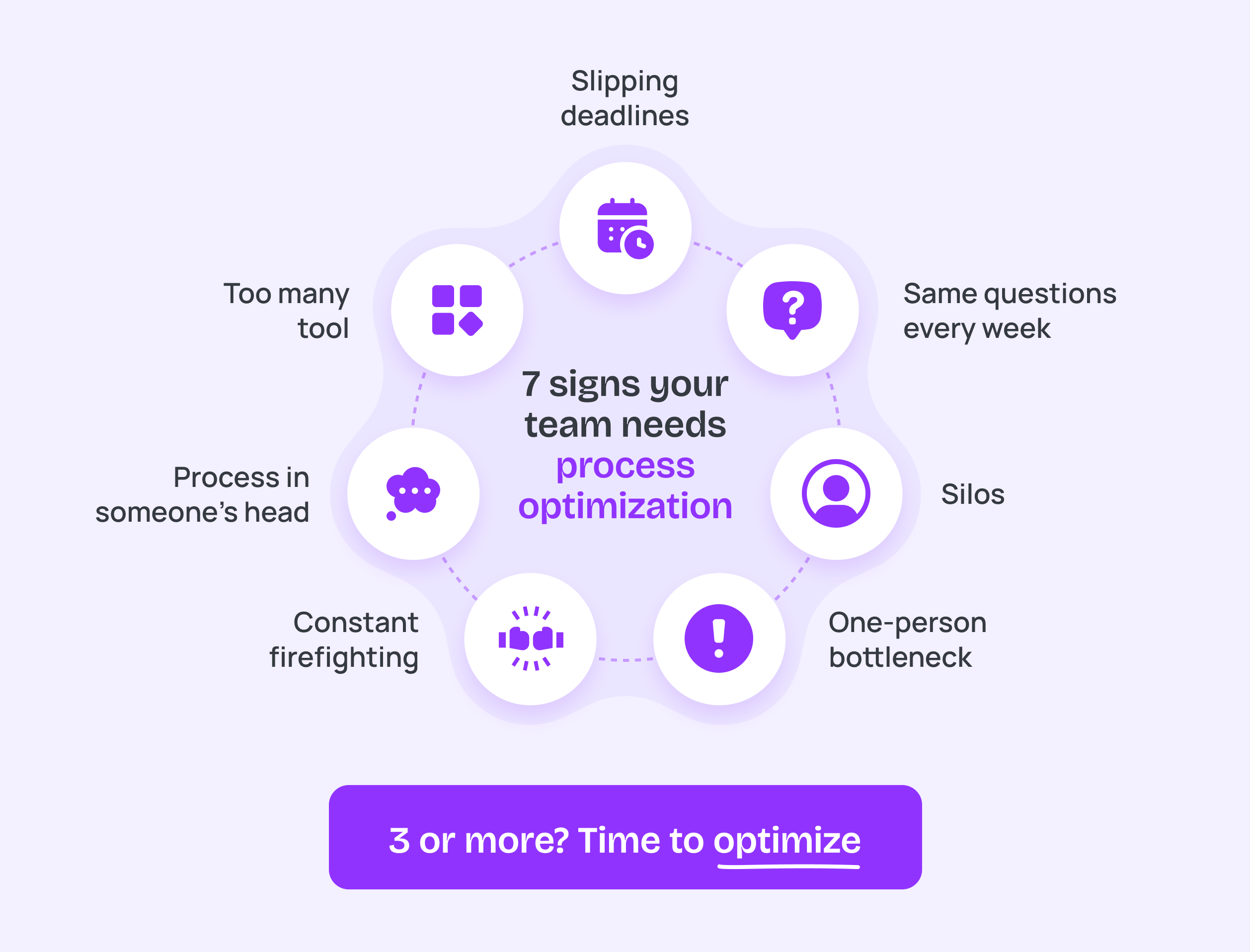
Broken processes don’t announce themselves. They show up as small frustrations that slowly become routine cycles. Watch for these signs your team needs process optimization:
- Deadlines slip, but no one knows exactly why: Work looks on track until suddenly it isn’t, because delays are hiding in handoffs and approvals
- The same questions keep coming up: “Where’s the latest version?” “Who’s approving this?” “What’s the status?” If your team asks these every week, the process isn’t doing its job
- Teams work in silos: Sales, marketing, and delivery each run their own workflows, so information gets lost between them and work gets duplicated
- Work piles up at one person or step: If everything waits on one manager’s sign-off or one specialist’s review, you have a bottleneck. To reduce bottlenecks in operations, you first have to see where they form
- Your team is always firefighting: When urgent requests constantly derail planned work, there’s no system for capturing and prioritizing incoming requests
- Processes live in people’s heads: If a task stalls whenever one person is on leave, the process was never documented
- Tools multiply, but efficiency doesn’t: New apps get added to fix problems, yet the team spends more time switching between them than getting work done
If three or more of these sound familiar, it’s time to step back and look at how work really flows through your team.
TIP: Track every “Where is this?” or “Who owns this?” message for one week. The tasks that trigger them most are your strongest optimization candidates.
Where to Start with Process Optimization
The biggest mistake teams make is trying to fix everything at once. You end up with a dozen half-finished improvements and a team that’s tired of hearing the word process.
So where to start with process optimization? Start small, with one process that’s clearly hurting and easy to measure.
How Do I Know Which Process to Optimize First?
Score each candidate process on three questions:
Question | What to look for |
How often does it run? | Daily or weekly processes give you faster wins than quarterly ones |
How much pain does it cause? | Delays, rework, complaints, or missed deadlines |
How easy is it to change? | Fewer teams and tools involved means a quicker fix |
The process that scores high on all three is your starting point. In our experience with marketing and ops teams, it’s almost always one of three things: content approvals, client onboarding, or that weekly report nobody enjoys building.
Operations Teams Process Optimization: Where Should Teams Start?
For workflow optimization for operations teams, our advice is simple. Go with the one people complain about in standups. Sketch how it really runs (not how the SOP says), then fix just the worst delay. Leave the rest for later. Seriously.
TIP: Give your first project 30 days, no more. Long enough to see a difference, short enough that people don’t lose interest. And you’ll have something real to show leadership.
How to Optimize Business Processes: 6 Steps
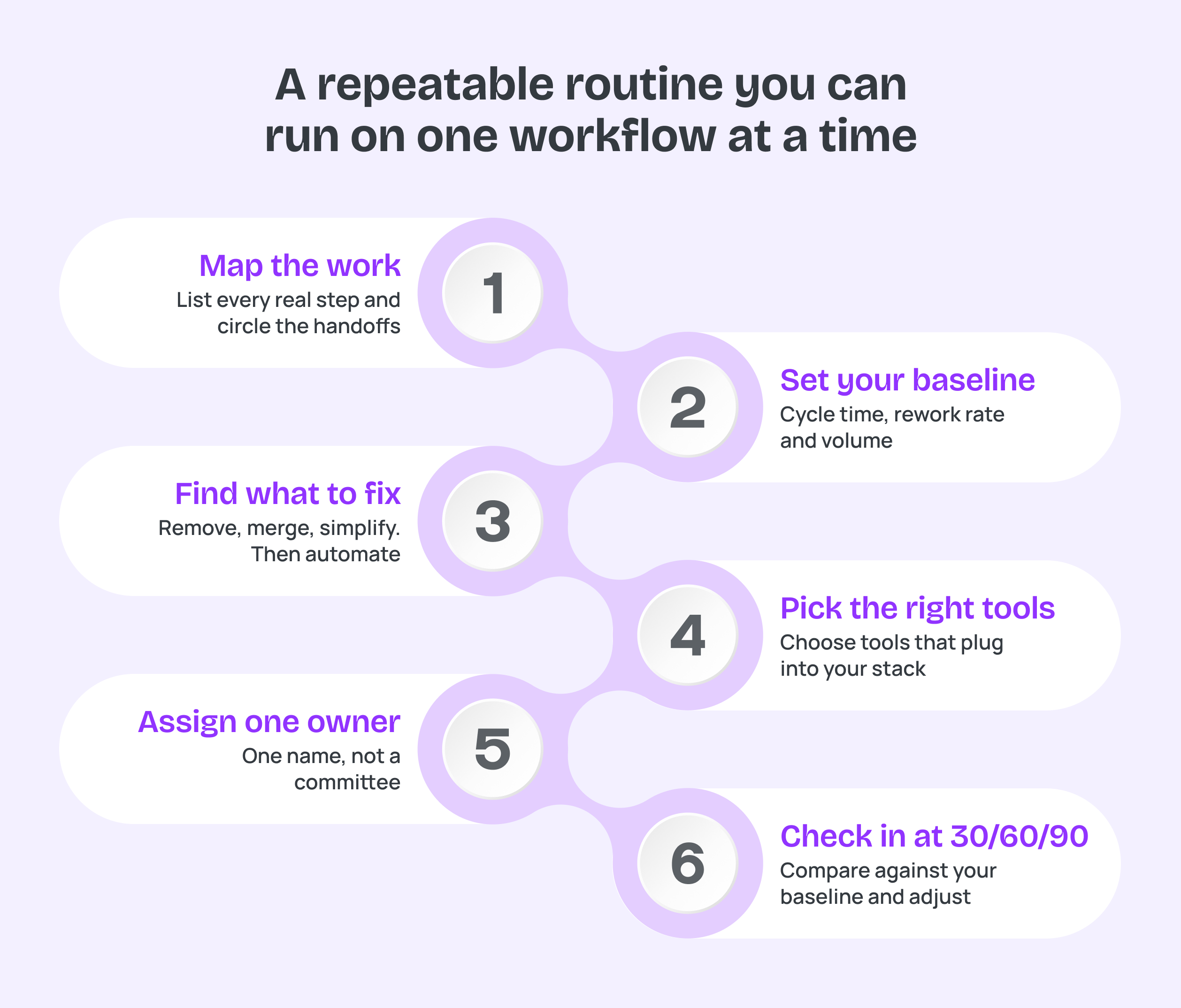
Knowing how to optimize business processes isn’t about big transformation projects. It’s a repeatable routine you can run on one workflow at a time.
Step 1: Map How the Work Moves Today
Grab a whiteboard (or a doc) and list every step, the messy real version included. Then circle the handoffs, where a task leaves one person’s hands and lands in someone else’s. Nine times out of ten, that’s where things sit and wait.
For each handoff, jot down three things: what kicks it off, what’s being passed over, and what tends to break.
Step 2: Set Your Baseline
Before changing anything, measure where you are. Three numbers are enough:
- Cycle time: how long the process takes from start to finish
- Rework rate: how often work gets sent back
- Volume: how many times it runs per week or month
Get everyone involved to agree on these numbers. They become your proof that the changes worked.
Step 3: Find What to Fix
Go through the map and look for steps you can remove, merge, or simplify. Only then think about automation. A step is worth automating if it:
- Happens often
- Follows clear rules, with little judgment needed
- Holds up other people’s work when it’s delayed
TIP: We’ve seen teams automate a broken approval chain and end up with broken approvals that just arrive quicker. Clean it up first, then automate.
Step 4: Pick tools your team will use
Before you sign up for anything, check whether it plugs into what you already run, like your CRM, Slack, and shared drive. A feature-rich platform that doesn’t integrate will create new handoffs.
Step 5: Give it one owner
Every optimized process needs one named owner. Not a committee. It’s their job to keep the doc current, field the “how does this work again?” questions, and raise a flag the moment things start drifting.
Step 6: Check In After a Month (and Then Again)
Pull up the baseline numbers from Step 2 and see what’s moved. The first month usually surfaces a few small hiccups, and that’s normal. By the second or third month you’ll know whether the change is holding up during busy weeks, or whether it needs another tweak.
There’s no finish line for operations process improvement, honestly. Once one workflow runs without anyone babysitting it, pick the next and optimize processes there using the same steps.
Process Optimization Methods and Techniques
Process optimization methods have fancy names, but you don’t need a Six Sigma belt to use them. Most teams we talk to borrow a bit from each. These six come up most often:
Method | What it does | Best for |
Lean | Cuts waste, meaning any step that doesn’t add value for the customer | Removing unnecessary approvals, waiting time, and duplicate work |
Six Sigma (DMAIC) | Define, Measure, Analyze, Improve, Control: a data-led way to reduce errors | Processes with frequent mistakes or rework |
Kaizen | Small, continuous improvements suggested by the people doing the work | Teams that want steady progress without big overhauls |
PDCA (Plan-Do-Check-Act) | Test a change on a small scale before rolling it out | Trying new workflows with low risk |
Value stream mapping | A visual map of every step, showing where time is spent versus wasted | Spotting bottlenecks and handoff delays |
Process mining | Uses system data to show how a process runs | Larger teams with lots of tool and activity data |
So, Which One Should You Pick?
Honestly, keep it simple. Map the process out first (value stream mapping is great for this) so you can see where time disappears. Then use a bit of Lean thinking to strip out the waste, and test your fix small with PDCA before rolling it out to everyone. Six Sigma and process mining are worth it later, once you have more data and bigger processes.
Don’t worry about picking the “right” one. The process optimization techniques that work are the ones your team doesn’t abandon after two weeks. Try one or two on a single workflow, see what sticks, and shape your optimization strategies around that.
AI for Process Optimization
A couple of years ago, AI was something teams experimented with. Now it’s everywhere. According to McKinsey’s State of AI survey, almost nine in ten organizations use it regularly in at least one part of the business.
Here’s the catch, though. The same research found that nearly three-quarters of high-performing companies have fundamentally redesigned their workflows around AI, compared with only about a quarter of everyone else.
The lesson is simple: AI works best on a process that’s already clean.
Here’s where AI for process optimization is already helping ops and marketing ops teams.
- Summarizing and routing requests: AI reads incoming briefs or tickets, sorts them, and sends them to the right person
- Drafting first versions: Status updates, meeting notes, and reports are generated automatically, then checked by a human
- Spotting bottlenecks: AI flags tasks that are overdue or stuck in review longer than usual
- Forecasting workload: Past project data helps predict when a team is about to be overloaded
Our advice? Pick one boring, repetitive task from your process map. Let AI handle it for a few weeks, and keep a person checking anything that needs judgment.
TIP: Here’s a quick test. If you’d struggle to explain a step to a new hire, AI will struggle with it too. Write it down properly first.
Process Optimization Examples
Process optimization examples are easier to learn from than theory, so here are four we see all the time with ops and marketing teams.
Content Approvals
Before: Drafts went back and forth over email between the writer, editor, brand lead, and client. Nobody knew which version was final, and approvals took 5 to 7 days.
Fix: One named reviewer per stage, a deadline for each, and all comments in a single thread.
Result: Approvals now wrap up in roughly two days, and the “which version?” messages have mostly stopped.
Client Onboarding
Before: Every kickoff depended on who ran it. One client got asked for brand assets on day one. Another waited until day ten.
Fix: Build one onboarding checklist. Tasks, owners, and due dates get created automatically when a client signs.
Result: Kickoffs move faster, and every client gets the same experience, no matter which account manager they’re assigned.
Free Template: Customer Onboarding Template. The same checklist idea, ready to copy. Adjust it to your agency and use it for every new client.
Get a Customer Onboarding Template for completely free!
Campaign Requests
Before: Requests arrived through Slack, email, and hallway chats. Urgent asks jumped the queue, and planned work kept slipping.
Fix: Every request now goes through one intake brief, and priorities get sorted once a week.
Result: Monday mornings got a lot calmer. This is a classic case of process optimization for marketing operations teams. It sounds almost too basic, but it works.
Free Template: Marketing Campaign Brief Template. Goals, audience, deliverables, and deadline, all agreed before anyone starts working.
Get Marketing Campaign Brief Template for free!
Weekly Reporting
Before: Every Friday, one analyst copied numbers from five tools into a slide deck. Half a day, gone, every week.
Fix: One standard report format where the key numbers calculate themselves, plus a three-line written summary.
Result: Hours saved every week, and leadership gets the numbers on Monday morning instead of Friday night.
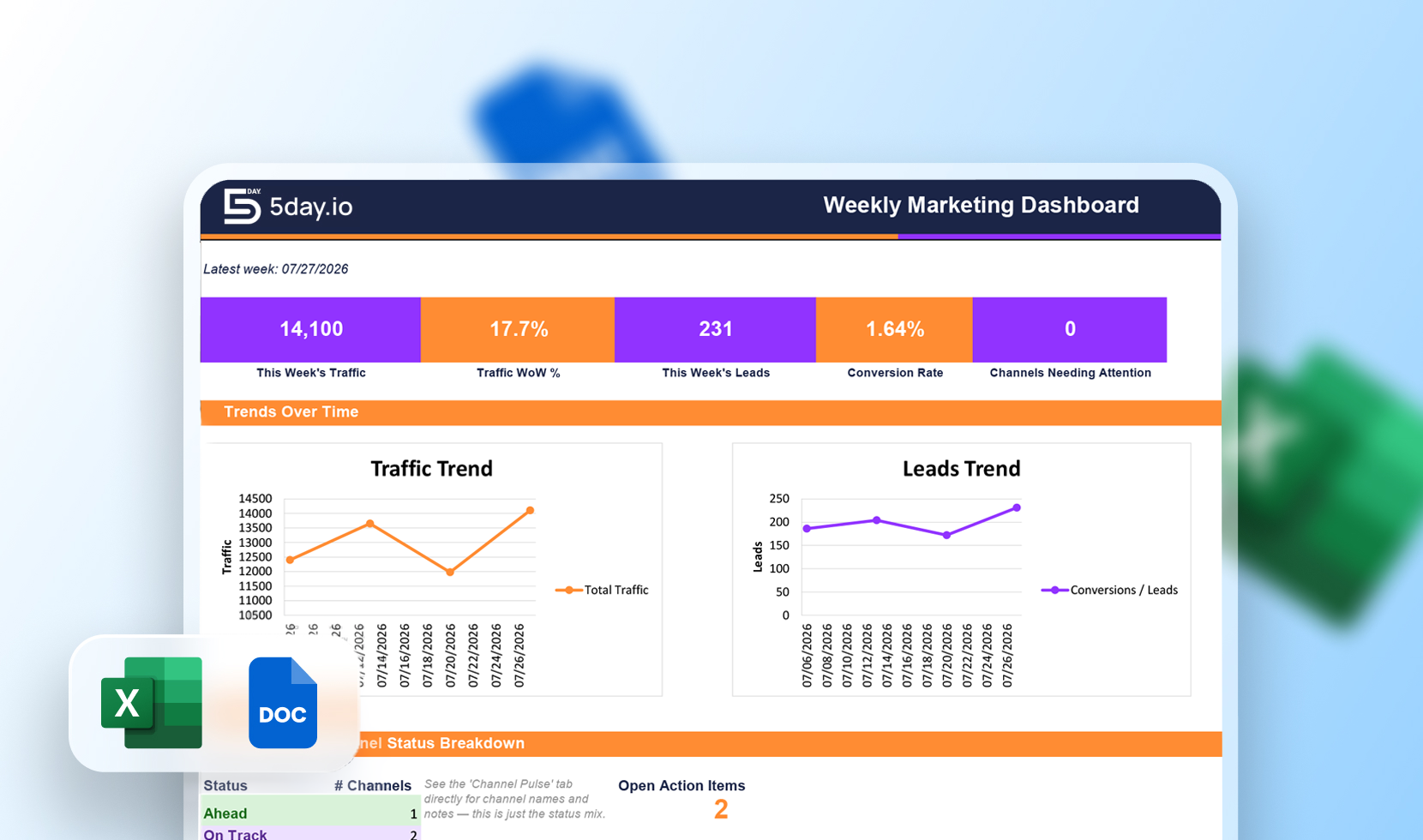
Free Template: Weekly Marketing Report Template. Plug in your weekly traffic, engagement, and lead numbers. The week-over-week changes work themselves out.
Get a Weekly Marketing Report Template for completely free!
All four of these business process optimization examples follow the same pattern: one owner, one place for the work, and fewer handoffs. That’s also the foundation of good marketing team project management.
Process Optimization Tools
Here’s an unpopular opinion: most teams don’t need more software. They need fewer tools that talk to each other. The right process optimization tools give everyone one place to see what’s happening, so you’re not piecing it together from five tabs and a Slack search.
What you need depends on what’s broken. Roughly, tools fall into four buckets:
Tool type | What it helps with | Good for |
Process mapping | Drawing out how work really flows | Spotting handoffs and waiting time |
Project and work management | Tasks, owners, deadlines, approvals in one place | Day-to-day execution |
Automation | Moving data and triggering next steps without manual work | Repetitive, rule-based tasks |
Reporting and dashboards | Tracking cycle time, workload, and progress | Proving the changes worked |
For marketing teams, the project management bucket usually matters most. That’s where approvals stall and requests pile up. If you run client work, it’s worth comparing the options in our roundup of the best project management software for marketing agencies before committing to anything.
In-house teams with a bigger stack often need something more specialized. Dedicated marketing ops software brings campaign planning, handoffs, approvals, and leadership reporting into one view. That’s the gap we built 5day.io to fill, and it’s what a lot of ops leads end up looking for once spreadsheets stop keeping up.
Process Optimization Checklist for Operations Managers
Bookmark this one. It’s the short version of everything above, for when you’re sitting down to fix something. Use this process optimization checklist for operations managers every time you take on a new workflow.
Before you change anything
- ☐ Pick one process. Just one.
- ☐ Ask the people who run it what annoys them most
- ☐ Map every step and circle the handoffs
- ☐ Write down your starting numbers: cycle time, rework, volume
- ☐ Get the team to agree those numbers are right
While you’re fixing it
- ☐ Cut steps nobody can justify anymore
- ☐ Put one name next to each stage, not “the team”
- ☐ Move feedback and files into one shared place
- ☐ Automate only what’s frequent, rule-based, and blocking someone else
- ☐ Test the new version on a small batch before rolling it out
After it’s live
- ☐ Document the new process somewhere people will find it
- ☐ Assign one owner to keep it current
- ☐ Check your numbers again after a month, then again at three months
- ☐ Ask the team if it feels better, because the numbers don’t always tell you
TIP: Print it, stick it on the wall, and tick things off for real. Sounds old-school, but it keeps the project from quietly stalling halfway.
Broken processes don’t fix themselves. They just get quieter, until the deadline slips.
The good news? You don’t need a big transformation project to change that. Pick one workflow this week, find the slowest handoff, and fix it. Then do it again. That’s all process optimization really is: small, steady fixes that add up.
Ready to stop chasing updates? 5day.io brings your marketing team’s requests, approvals, handoffs, and reporting into one place, so the process runs itself and you get back to the work that matters.