

A social media content calendar is no longer just a planning sheet. In 2026, it has to support search behavior on social, AI-assisted creation, faster review cycles, and tighter coordination across channels.
HubSpot’s 2025 Social Trends Report says 84% of marketers expect consumers to search for brands on social media this year, and 25% of consumers said they bought products directly on social media in the past three months.
Similarly, HubSpot’s 2026 State of Marketing Report also says 80% of marketers use AI for content creation and 75% use it for media production. That changes what a useful calendar needs to do.
A good calendar also helps teams stay responsive after the post goes live. Keep in mind, a huge percentage of social media users expect brands to respond to social media within 24 hours.
So a modern social media calendar cannot stop publishing dates and captions. It needs ownership, approval flow, asset status, and space for post-publish notes. That is the practical shift many older templates still miss.
What Is a Social Media Content Calendar
A social media content calendar is a planning system that shows what you are posting, where it will go, when it will go live, who owns it, and what stage it is in. It is a planner for businesses to map content and publication time.
A social media calendar template can be looked upon as a tool to plan, schedule, and track posts across channels in one place. 5day.io’s free social media content calendar template frames it as a single source of truth for what is going out, on which channel, when, and who owns it.
That definition matters because a social content calendar is not the same as a broad content strategy doc. A strategy sets direction. A calendar turns that direction into a working schedule. It is closer to execution than planning theory. That is why the best templates now include campaign tags, copy fields, publish dates, approval status, and platform-specific details instead of only a title and date column.
Why Every Marketing Team Needs A Social Media Calendar In 2026
Marketing teams need a stronger calendar now because social media is doing more jobs than it used to. It is a:
- discovery channel,
- a search behavior channel,
- a service channel,
- a product education channel,
- and often a direct conversion channel too.
Social is now a primary brand discovery tool, and users expect quick responses and more personalized support. When the channel does this much work, ad hoc planning starts breaking quickly.
The format mix has changed, too. Short-form video keeps getting more important, but it does not replace every other format. Instagram users are most likely to engage with short videos, while LinkedIn still performs well with text and static-image posts.
YouTube’s official creator guidance makes it clear that the platform now supports both Shorts and longer videos as part of one channel strategy. A calendar has to reflect those differences instead of treating every network the same.
For small and mid-sized teams, a calendar also protects focus. It helps you batch work, spot approval delays early, reuse ideas across channels, and keep campaign timing visible. That is one reason 5day.io positions templates as practical planning systems and not just spreadsheets to fill out once.
What Should Be Included in a Social Media Content Calendar
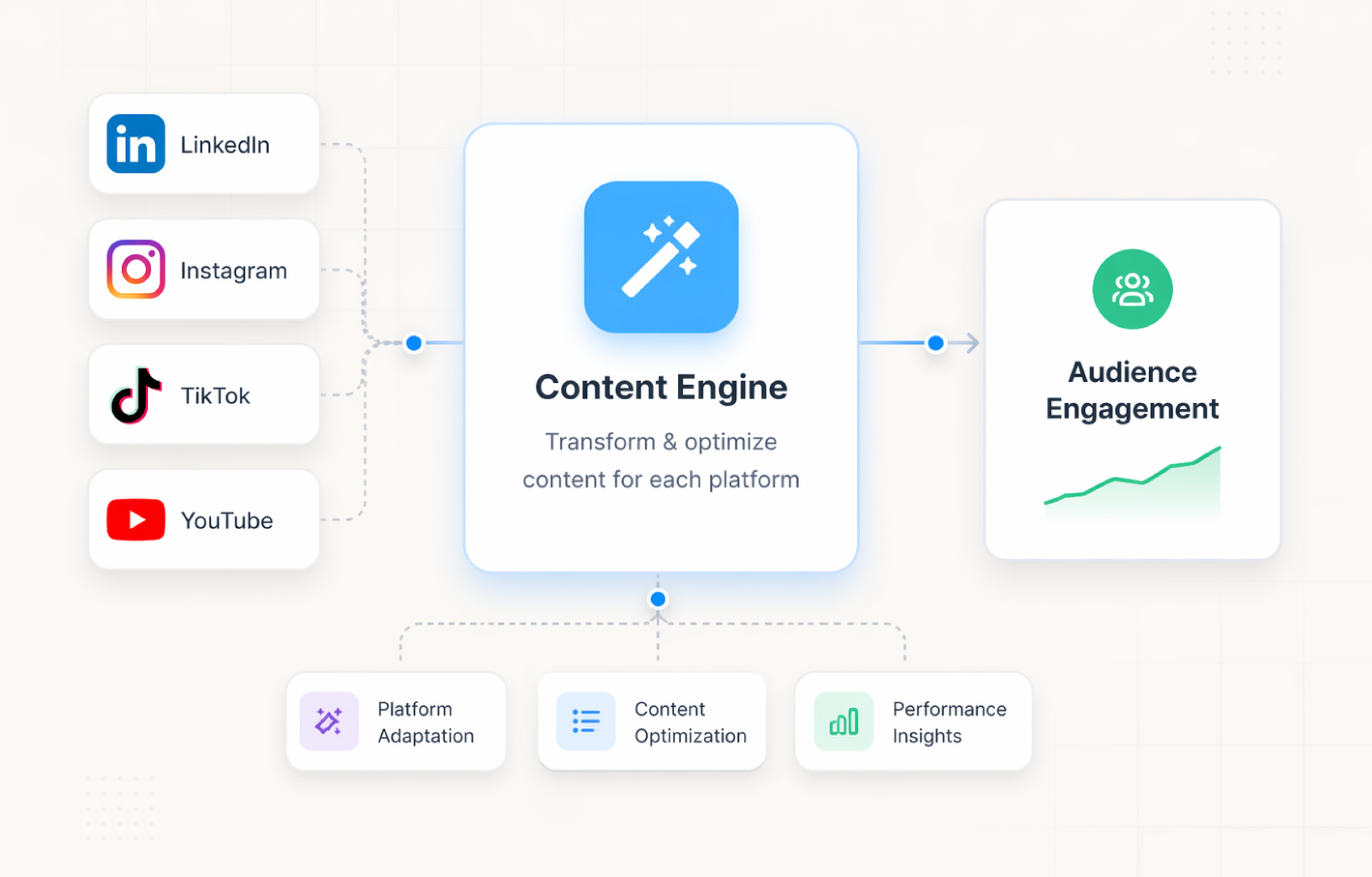
Many older templates are too light for current team workflows. A typical one should highlight basics like content type, title, link, snippet, image link, and publish date. Some add rescheduling and custom tags inside a workflow.
5day.io’s free social media content planner adds campaign tags, copy fields, approval status, and publish dates in one view. Put together, that points to a more useful modern structure.
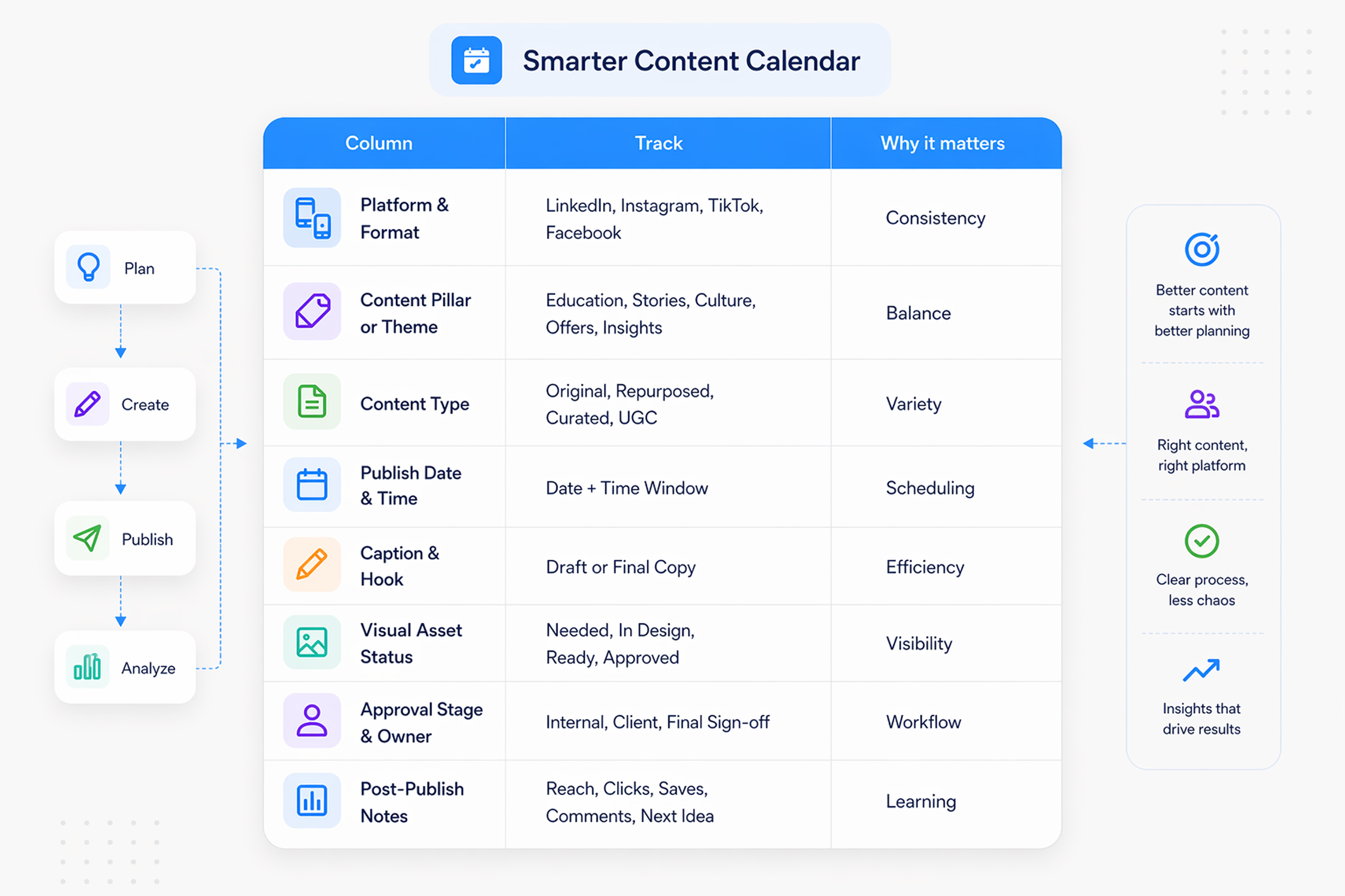
The following marketing gap analysis template for your social media scheduling should include these eight fields:
Column | What it should track | Why it matters |
Platform and format | LinkedIn carousel, Instagram Reel, TikTok video, Facebook text post | Stops teams using one-size-fits-all content |
Content pillar or theme | Product education, customer story, culture, offer, industry insight | Keeps content balanced across themes |
Content type | Original, repurposed, curated, UGC | Helps teams manage effort and variety |
Publish date and time | Exact date plus preferred posting window | Makes scheduling clearer |
Caption draft and hook | First-pass copy or final copy | Cuts back-and-forth later |
Visual asset status | Needed, in design, ready, approved | Keeps creative work visible |
Approval stage and owner | Internal review, client review, final sign-off | Makes the social media approval workflow real |
Post-publish notes | Reach, clicks, saves, comments, next idea | Turns the calendar into a learning loop |
That structure is one of the biggest improvements suggested in your planning sheet too. It closes the gap between strategy and daily execution, which is what most teams really need.
How To Build Your Social Media Content Calendar from Scratch
A good social media content calendar should do more than line up postdates. It should help your team decide:
- what to publish,
- why it matters,
- who owns each step,
- when approvals happen,
- and what to learn after each post goes live.
That matters even more now because social is doing more jobs than before.
The cleanest way to build your content calendar is in layers. Start with the strategy layer. Then move into cadence, workflow, approvals, and review. If you skip that order, the calendar usually turns into a date sheet with no real decision-making behind it.
1. Start with the job your calendar needs to do
Before you open a spreadsheet or template, decide what the calendar is meant to be solved.
A lot of teams build a calendar too early. They create dates, rows, and color codes before they answer the bigger question: what problem is this calendar fixing? For some teams, the issue is inconsistent. For others, it is missing approvals, weak campaign coordination, or too much last-minute posting.
A strong calendar usually supports five outcomes:
- consistent publishing
- clearer ownership
- smoother approvals
- better campaign alignment
- easier reporting later
If you are a small in-house team, your calendar may mainly need to organize content and keep everyone on schedule. If you are an agency, it also needs to handle multiple brands, multiple approvers, and client-safe visibility.
5day.io’s free social media content calendar template leans into that by calling out campaign tags, copy fields, approval status, and publishing dates in one working view, instead of a basic date-and-caption sheet.
Get the Social Media Content Calendar Template for completely free
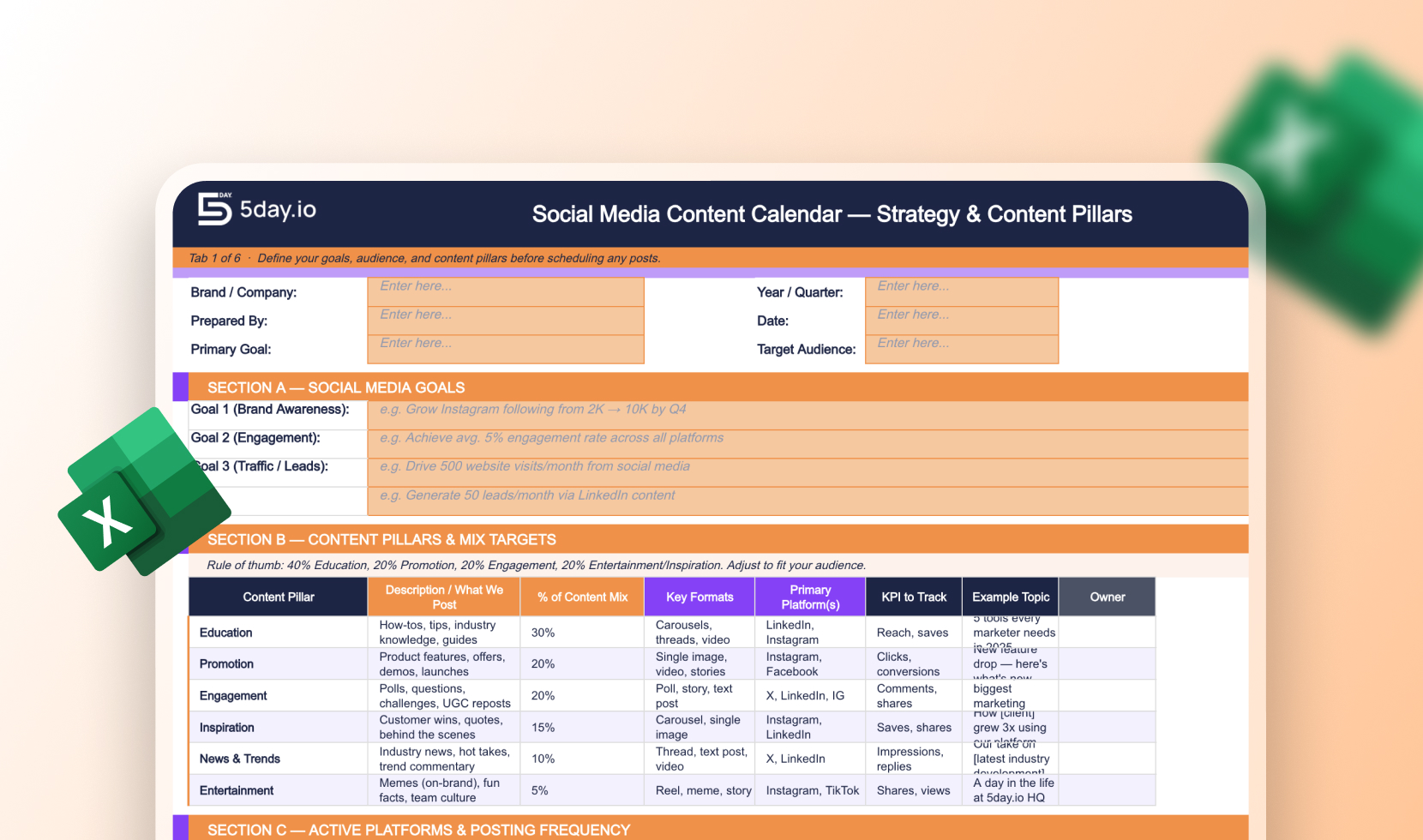
2. Set a realistic planning window
Do not try to lock the entire quarter at once unless your workflow is very stable. A four-week working calendar is usually a better fit for modern social teams.
A social calendar becomes easier when the team follows the same content rhythm each week. Content calendar management tools and techniques can help structure that rhythm in a simple way.
That gives you enough visibility to batch work, connect posts to campaigns, and manage approvals without making the schedule too rigid. It also leaves space for real-world changes like trend moments, product updates, new feedback, or service issues that need fast response.
Our social media calendar template is built around ongoing collaboration, tracking, and fast rescheduling, which is a good signal that modern calendars should stay flexible, not frozen.
A simple planning rhythm works well:
Time horizon | What to decide |
Quarterly | Big campaigns, launches, seasonal moments, major content themes |
Monthly | Working calendar, content mix, platform cadence, asset needs |
Weekly | Final copy, approvals, scheduling, quick changes, post-performance notes |
This structure keeps strategy stable while giving the team room to adjust the working plan.
3. Define a small set of content pillars
Start with no more than five content pillars. Most teams do better with a tighter system because it is easier to repeat and review, besides being easier to improve later.
For a B2B team, those pillars might be product education, customer proof, team expertise, industry opinion, and campaign content. For an ecommerce brand, they might be product use, customer stories, new arrivals, education, and community. For agencies, each client can keep the same broad structure while the specific messages change.
This step matters because a calendar without pillars turns into random publishing. One week are all product posts. Next week is all about trends. Then the team runs out of ideas and starts posting only when someone remembers them. Pillars stop that drift.
A quick way to build pillars is to ask:
- What does the audience need to learn?
- What does the brand need to be known for?
- What proof helps people trust the message?
- What campaign or commercial moments need support?
Once you decide on the pillars, tag every planned post inside the calendar. That makes balancing the month much easier.
4. Give each platform a clear role
One of the biggest calendar mistakes is treating every network like the same channel with a different size crop. That usually creates lazy cross-posting and flat performance. Instead, decide what each platform is meant to do in your system.
A simple structure can look like this:
Platform | Main job in the calendar |
Thought leadership, product education, B2B trust | |
Visual storytelling, short-form education, brand personality | |
TikTok | Reach, creative testing, trend-led awareness |
Community, updates, customer interaction | |
Evergreen discovery, search-friendly content | |
YouTube | Long-form education, demos, Shorts, repeatable series |
This does not mean every brand needs every platform. It means the platforms you use should each have a reason to exist. Once that role is clear, your calendar for social media posts becomes easier to fill because the team knows why each post belongs to a given network.
5. Decide the cadence your team can sustain
A social calendar should be ambitious, but still realistic. Posting seven times a week looks good in a planning meeting. It looks worse when the team misses deadlines by week two.
Start with a sustainable baseline. You can always scale later. It is better to publish steadily for eight weeks than to publish aggressively for ten days and then disappear.
Think in terms of minimum effective cadence:
- what volume fits your team capacity
- what volume fits the platform
- what volume still leaves time for replies, editing, reporting, and approvals
This is also where you need to respect content effort. A LinkedIn text post is not equal to a short-form video. A carousel is not equal to a quick reshare. Your calendar should reflect production effort, not just post count.
A good practical model is:
- anchor content that takes more effort
- lighter supporting content
- campaign or promotional slots
- a small number of reactive slots
That mix helps teams avoid building a month that looks fine in rows but is impossible to produce in real life.
6. Build the calendar fields before you fill the month
Most teams start with ideas. A better approach is to start with structure.
Before you enter post ideas, define the columns your calendar needs. 5day.io’s template points toward a more useful working setup than old-school sheets because they include more titles and dates. 5day.io’s template specifically highlights campaign tags, copy fields, approval status, and publish dates.
A strong working calendar should include:
Field | Why it matters |
Publish date | Gives the schedule shape |
Platform | Prevents one-size-fits-all posting |
Content pillar | Keeps the mix balanced |
Campaign tag | Connects posts to bigger marketing goals |
Post topic or angle | Makes the purpose clear |
Draft copy status | Shows how close the post is too ready |
Asset status | Prevents design bottlenecks |
Owner | Removes confusion on responsibility |
Approval stage | Makes review visible |
Final link or CTA | Keeps traffic goals aligned |
Post-publish note | Helps the team learn and improve |
This is the difference between a calendar that helps execution and a calendar that only stores ideas. You can use a simple marketing project management platform to get free templates and tailored support if you feel creating a content calendar is becoming complex for you.
7. Plan campaigns and recurring content together
Your calendar should not be filled with one post at a time. It should be filled with layers.
Start by placing campaign moments first. Product launches, webinars, event promos, offers, major announcements, and partnerships should go on the calendar before regular weekly content. Then add recurring content around them.
This matters because campaign posts usually need more approval, more assets, and more coordination with other teams. If you build the month only with day-to-day content, campaigns often get squeezed in late and create chaos.
Campaign posts need more coordination than routine posts, so they should lead the plan. Our detailed guide about social media campaign management for marketers breaks down how to keep campaigns clean and visible.
A strong fill order looks like this:
- campaign and launch moments
- recurring weekly series
- product or service education
- customer or proof content
- trend or reactive space
That approach keeps the month organized and stops important commercial work from getting lost under routine posting.
8. Build production workflow into the calendar
A lot of teams think the calendar ends when the topic is chosen. It does not. The production path needs to be visible, too.
For every planned post, think beyond the idea. Ask:
- who writes the first draft
- who creates the asset
- who checks brand fit
- who schedules it
- who reviews performance
If that path stays outside the calendar, work slips into chat threads and side messages. Then the team starts asking the same questions every week.
A simple production flow might look like this:
Workflow stage | Owner | What happens |
Briefing | Social lead | Topic, goal, platform, CTA are defined |
Drafting | Copywriter or social manager | Caption and hook are written |
Design or editing | Designer, editor, or creator | Visual asset is created |
Internal review | Team lead or brand lead | Message, timing, and quality are checked |
Final scheduling | Social owner | Post is queued with final asset and caption |
Review | Social owner or strategist | Performance note is added after publishing |
This kind of structure becomes even more important when content volume grows.
9. Build the approval path into the calendar
This is where many teams get sloppy. They plan to post well, but approval still happens in email threads, WhatsApp messages, or scattered chat comments.
That breaks visibility fast.
5day.io’s marketing agency pages emphasize controlled client access and reusable project templates. That is a strong sign that modern social workflows need approval built into the system, not handled as an afterthought.
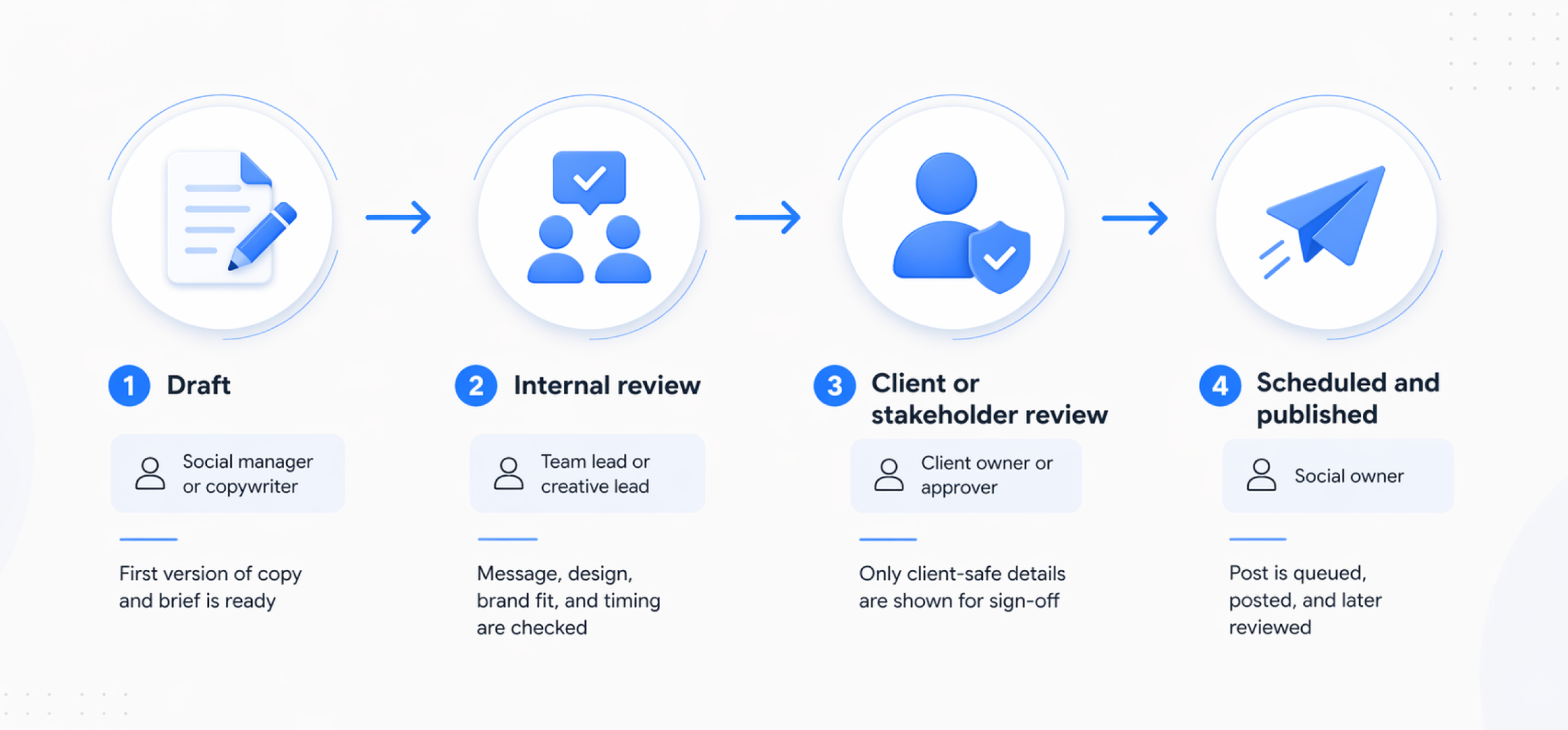
A simple agency-friendly path looks like this:
Stage | Owner | What happens |
Draft | Social manager or copywriter | First version of copy and brief is ready |
Internal review | Team lead or creative lead | Message, design, brand fit, and timing are checked |
Client or stakeholder review | Client owner or approver | Only client-safe details are shown for sign-off |
Scheduled and published | Social owner | Post is queued, posted, and later reviewed |
The key point is this: approval status should live in the calendar row itself. If someone opens the calendar, they should know instantly if a post is blocked, approved, scheduled, or live.
10. Leave room for reactive content and customer care
A calendar should not fill every slot.
Keep around 15% to 20% of the month flexible for reactive moments, trend-led posts, product updates, service issues, or community responses. This is especially important for agencies and fast-moving brands.
There is another reason for this, too. Social is not only a publishing channel anymore. It is also a service and response channel. A huge number of users expect brands to respond within 24 hours, and its social customer care guidance stresses collaboration across marketing and service teams. That means your calendar cannot assume the team’s only job is posting. You need time left for comments, DMs, escalation, and real conversation.
A practical way to handle this is:
- lock 80% to 85% of the month
- leave the rest open
- mark high-risk service periods around launches or campaigns
- assign comment and inbox ownership around key posts
That creates a breathing room without losing planning discipline.
11. Create separate views for internal teams and clients
This matters most for agencies, but it also helps in-house teams with several stakeholders.
Your internal team needs the full view: notes, production status, dependencies, blocked items, and draft-stage details. Clients and senior stakeholders usually do not need all of that. They need a cleaner view with the topic, timing, visual direction, and approval status.
Approvals get smoother when clients see only what matters and can sign off fast. Improving client collaboration for marketing agencies is a lot beneficial with this calendar approval setup.
5day.io’s template guidance says agencies can add a client or brand column and filter it, which is a practical way to support multi-client planning without rebuilding the whole system.
The following model keeps the system organized and reduces messy review cycles:
- one master calendar for the delivery team
- one filtered view per client or brand
- one client-safe approval view when needed
12. Add a weekly review loop so the calendar keeps getting smarter
A strong social media content calendar is not finished on publishing day.
Every week, review what performed well and what did not. You do not need a huge report inside the calendar. One short note per important post is enough.
The calendar stays useful when it also tracks owners and next steps after publication. Read more about how to manage your content calendar to know how teams can keep that loop alive.
Look at signals like:
- saves
- clicks
- replies
- shares
- watch time
- profile visits
- conversion behavior if available
Our broader content calendar guidance and reporting templates emphasize visibility and organized follow-through, which is exactly what this review loop supports.
A simple post-review note can answer:
- What worked?
- What underperformed?
- What should we repeat, test, or stop?
Once that note lives in the calendar, your next month gets better without needing a separate memory exercise. If you want to keep the workflow smooth, use a marketing team project management platform to manage tasks efficiently, and set simple automation to keep the team aligned.
13. Turn the calendar into an execution system
At some point, a spreadsheet alone starts to strain. That usually happens when approvals grow; clients multiply, or the team needs clearer ownership and faster handoffs.
That is where a connected workflow helps. 5day.io’s free social media content calendar template is a strong starting point for planning, and its broader marketing setup is built to connect templates, ownership, approvals, and campaign execution in one place. If your team has already outgrown loose planning, that shift matters.
A useful way to think about it is:
- the template helps you plan the month
- the workflow system helps you run the month
That is the difference between a calendar people fill in and a calendar people actually use.
A simple final check before your month starts
Before you approve the month, ask these questions:
- Does every platform have a clear role?
- Is the content mixed balanced across pillars?
- Are campaign posts placed before routine posts?
- Does every post have an owner?
- Is the approval path visible inside the calendar?
- Did you leave space for reactive content?
- Is there a review loop after publishing?
If the answer is yes across all seven, your calendar is probably strong enough to handle real work, not just planning theory.
Platform-By-Platform Posting Strategy For 2026
There is no single perfect frequency for every brand. Use the table below as a practical starting point for small and mid-sized teams, not as a rigid rulebook.
Platform | Practical starting cadence | Best formats to plan | Best timing window to test first | Planning note |
2 to 5 posts a week | Text posts, carousels, short native video | Tuesday to Thursday, 11 a.m. to 5 p.m. | Best for B2B insight, product education, employer brand | |
5 to 7 planned pieces a week, then scale | Reels, carousels, Stories | Tuesday and Wednesday afternoons | Use short video, but keep carousels in the mix | |
TikTok | 3 to 7 posts a week for most lean teams | Short-form video | Tuesday to Thursday, 2 p.m. to 6 p.m. | TikTok officially encourages more volume, but sustainability matters |
3 to 5 planned posts a week | Text updates, repurposed video, community posts | Tuesday and Wednesday, 12 p.m. to 8 p.m. | Strong for service, updates, and repurposed content | |
YouTube | Weekly Shorts plus a steady long-form rhythm | Shorts, longer videos, series | Test by audience behavior, not one universal slot | Plan Shorts and longer video as two streams |
Fresh weekly publishing | Static pins, video pins, collages | Tuesday to Thursday, 10 a.m. to 1 p.m. | Best for evergreen search-style content |
A few platform notes matter here. LinkedIn still rewards steady quality more than overposting. Instagram still rewards strong early engagement, and Sprout’s 2026 timing data shows midweek remains the safest place to start.
TikTok remains the highest-volume network in the mix but even Sprout notes that most brands publish far less than TikTok’s official recommendation. Pinterest is now much clearer about weekly fresh content and search-friendly setups.
AI-Powered Social Media Calendar Workflows In 2026

AI is now part of normal social media operations, but it works best as support, not as the system itself. HubSpot’s 2026 State of Marketing says 80% of marketers use AI for content creation and 75% use it for media production.
In 2026, teams using AI are seeing better results in content creation, engagement, and audience growth. That tells us one thing clearly: the question is no longer “should the team use AI?” The better question is “where in the workflow does AI actually save time without hurting quality?”
Use AI at the planning stage, not only at the writing stage
A lot of teams use AI only for captions. That is useful, but it is not where the biggest calendar gains happen. AI is more valuable earlier in the month, when the team is trying to turn campaign goals, product updates, audience pain points, and platform needs into a realistic publishing plan. At this stage, AI can help generate topic clusters, post angles, hook options, series ideas, and rough monthly mixes across content pillars.
A simple example helps here.
Say the team has one webinar, one customer story, one product update, and one industry trend report. AI can help turn that into a month of structured ideas across LinkedIn, Instagram, TikTok, Facebook, and Pinterest. The team still decides what is worth posting, what fits the brand, and what should be cut. AI just reduces blank-page time. That is the best use case for early-stage social media content planning.
Use AI to create variations, not copy everything the same way
This is where AI becomes especially useful for a social media content calendar. One finished asset rarely needs to stay one asset. A webinar can become a LinkedIn carousel, an Instagram Reel script, a TikTok hook list, a Facebook text post, and a Pinterest checklist. AI helps speed up this adaptation work because it can create first-draft variants for different formats and tone needs.
That said, a social team should not let AI flatten platform differences. LinkedIn copy still needs a different structure than Instagram captioning. Pinterest still needs stronger keyword signals and evergreen logic. TikTok still needs a sharper first-line hook. AI should help the team produce better first drafts faster. It should not turn every platform into the same post with a different line break.
Keep AI inside the approval workflow
The biggest mistake teams make with AI is using it outside the real workflow. Someone drafts ideas in one tool, copies them into a sheet, sends another version in chat, then loses track of which draft was approved. That is not an AI problem. It is a workflow problem.
AI works much better when it stays tied to the calendar itself. Our social media calendar template stresses planning, scheduling, tracking, collaboration, and approvals in one place. It features page highlights Write with AI and AI-powered project updates, while its marketing agency pages emphasize controlled client access and reusable workflow structure. That is the right operating model: AI helps create and summarize, while the calendar keeps ownership, approval, and execution visible.
Use AI after publishing too
AI should not disappear once the post goes live. A strong team can also use it after publishing to summarize performance notes, spot repeating themes in high-performing posts, and flag which angles deserve a second version. That makes the calendar a learning system, not just a publishing tracker. AI is helping teams move faster across creation and optimization, not just first-draft production.
How Marketing Agencies Should Structure Calendars for Multiple Clients
This is the part most generic articles barely touch. A social media calendar for agencies needs more structure than a single-brand calendar. You are managing several brand voices, several approval chains, and different publishing cadences at the same time.
Most calendar delays happen when feedback and sign-off rules stay unclear. Read our blog about stakeholder communication management for marketing to reduce slow approvals and mixed comments.
5day.io’s social media template page explicitly says agencies can add a client or brand column and filter by it, while the marketing agency page focuses on controlled client access and faster project initiation.
The cleanest model is to keep one master calendar plus one filtered view or sheet per client.
Calendar view | Best use | Main advantage |
Master calendar | Agency-wide planning and capacity | Helps spot deadline clashes, review bottlenecks, and workload pressure |
Per-client calendar | Client-specific planning and approvals | Keeps brand voice, campaigns, and approval flow clean |
Client-facing view | Approval and visibility | Shows only safe, relevant details without internal notes |
This is also where a marketing industry project management tool is better than a loose spreadsheet once the account load grows. Teams need tags, owners, status tracking, file attachments, internal comments, and client-safe visibility. 5day.io’s marketing pages and content calendar guidance both lean into that exact problem.
Common Social Media Calendar Mistakes and How to Avoid Them
Most social calendars do not fail because the idea is bad. They fail because the system is too thin for real teamwork. The posting plan looks fine at first glance, but once approvals, changes, client feedback, and platform differences show up, the calendar starts leaking context. That is why a modern calendar needs more than dates and captions.
5day.io’s free social media content calendar template points toward the same direction: a working calendar should support planning, tracking, approvals, and follow-through.
Treating every platform the same
This is probably the most common mistake. Teams build one post, then force it across every network. That usually creates flat performance because the role of each platform is different, and the format logic is different too.
Even timing patterns vary by network. Sprout’s current posting guidance shows different engagement windows by platform, which is a good reminder that one-size-fits-all scheduling is weak planning.
Better fix: define one clear job for each platform before you fill out the calendar. That way LinkedIn can carry thought leadership, Instagram can carry visual storytelling, and Pinterest can carry evergreen discovery. Once the role is clear, your post ideas become easier to shape and approve.
Planning too far ahead with no flexibility
A rigid calendar often looks organized, but it breaks the moment a campaign changes; a product update lands late, or a trend becomes worth reacting to. Social needs a planning window, but it also needs a breathing room. That is why 5day.io’s current social calendar template emphasizes ongoing collaboration and fast rescheduling instead of a fixed schedule that nobody touches.
Better fix: keep a monthly working view, but leave some open capacity for reactive content, service updates, and urgent changes. That makes the calendar stronger, not weaker.
Skipping ownership and approval rules
A surprising number of social calendars still show only topics, date, and platforms. That means the team has no fast way to see who writes the draft, who reviews the asset, who signs off, or what is blocked. Once that happens, approval gets pushed into email or chat, and the calendar stops being the source of truth. 5day.io’s marketing agency materials emphasize controlled client access plus reusable project structure for this exact reason.
Better fix: add owner, approval stage, and status to every row. If the team opens the calendar, they should know instantly what is ready, what is waiting for, and who has the next move.
Forgetting post-publish notes
A lot of teams treat the calendar as a pre-publish tool only. That is a waste. If you never record what performed well or why something failed, the same weak post ideas keep coming back next month.
Better fix: add one short post-publish note to important posts. You do not need a full report in the calendar. A short note on clicks, saves, watch time, reply to quality, or comments is enough to improve future planning.
Ignoring community management
A calendar that only tracks publishing is incomplete. Social also includes comments, DMs, and public response expectations. Users expect brands to respond on social media almost the same day. That means teams should know who is watching replies around key posts and service-sensitive announcements.
Better fix: mark high-response posts in the calendar and assign a response owner. This matters even more during campaign launches, customer issues, or high-engagement content series.
Letting the tool stack create more chaos
The final mistake is tool sprawl. Ideas live in one doc, captions in another, assets in a design thread, approvals in email, and status updates in chat. At that point, the team is not really using a social calendar. It is stitching together fragments.
Better fix: keep planning, ownership, approvals, and post status as close together as possible. 5day.io’s templates reduce calendar chaos at the planning level and add workflow and collaboration.
A compact way to think about these mistakes is this:
Mistake | What it causes | Better fix |
Same post logic on every platform | Weak fit and flatter results | Give each platform a clear role |
Calendar packed too far ahead | Low flexibility | Keep a working monthly view |
No owner or approval field | Delays and confusion | Add owner, status, and approval stage |
No post-publish notes | Repeated weak ideas | Record one learning note per key post |
No response ownership | Slower replies and missed signals | Assign community management responsibility |
Too many disconnected tools | Lost context | Keep planning and execution tied together |
How 5day.io Helps Create a Robust Social Media Content Calendar
If your current process lives across sheets and scattered approvals, 5day.io is a practical next step because it gives social teams a cleaner bridge between planning and execution. Its free social media content calendar template supports multi-brand use and can be adapted with a client or brand column. Its broader product pages then extend that into task ownership, collaboration, timesheets, AI-assisted writing, and project-level visibility.
Start with a free template, then move into a real workflow
The template is useful when a team needs a fast-starting point. It helps organize channels, dates, approvals, and copy planning without overcomplicating the first setup. But once post volume grows, teams usually need more than a sheet. They need owners, reminders, task-level status, and client-safe visibility. 5day.io’s content calendar and marketing workflow material leans into exactly that shift, especially for teams trying to connect campaign planning with real execution.
Keep client access cleaner
This matters most to agencies. Clients need visibility, but they do not need every internal production note. 5day.io’s marketing agency and client collaboration pages highlight controlled access and dedicated client portals designed to show progress and milestones without exposing irrelevant internal detail. That makes approvals simpler and helps reduce the endless back-and-forth that usually slows social calendars down.
Reuse good process instead of rebuilding it every month
A strong social operation should not recreate the same campaign setup every time. 5day.io’s client onboarding and marketing team content all highlight reusable templates and repeatable project structures. That is useful for recurring social plans because the team can keep the same core workflow for drafting, design, review, approval, scheduling, and reporting, then adapt the details per client or campaign.
Put AI inside the workflow, not beside it
One of the better parts of 5day.io’s setup is that it does not position AI as a separate content toy. Its features pages surface Write with AI and AI-powered project updates inside the same project environment. For social teams, that means AI-assisted drafts and summaries can stay tied to the work itself instead of getting lost in separate tools or side documents.
Final Advice
A good social media content calendar now needs more than dates and captions. The strongest calendars include approvals, asset status, and performance notes
Use a four-week working window and keep some space open for reactive content. Also, plan each platform with its own role and format mix with a timing pattern
Agencies should keep a master view plus filtered client views. A free social media content calendar template is a strong start, but a connected workflow becomes more important as volume grows.
FAQs
What is a social media content calendar?
A social media content calendar is a planning system that organizes posts across platforms, formats, dates, owners, and approval stages. 5day.io frames it as a central planning view that helps teams schedule posts and stay aligned.
How far in advance should you plan social media content?
A good working default is four weeks ahead. That gives teams enough room to batch work and approvals without locking the calendar too far in advance. Then keep some open space for reactive content and campaign changes.
How do you manage social media calendars for multiple clients?
Use one master calendar for internal planning and one filtered or separate view per client. Keep client-facing views clean and hide internal notes. 5day.io’s template and marketing agency pages both support this kind of multi-client structure.
What is the best social media calendar tool for marketing agencies?
The best tool depends on the stage of your workflow. A free spreadsheet template is fine for lean planning. A marketing-focused work system like 5day.io becomes more useful when you need templates and approvals besides controlled client access and campaign visibility in one place.
Is there a free social media content calendar template I can use right away?
Yes. 5day.io offers a free social media content calendar template built for Excel and agency-style planning. HubSpot also offers a free multi-platform calendar bundle, and Asana offers a free social media calendar template inside its platform.